Manualofuseandmaintenance
EN
83
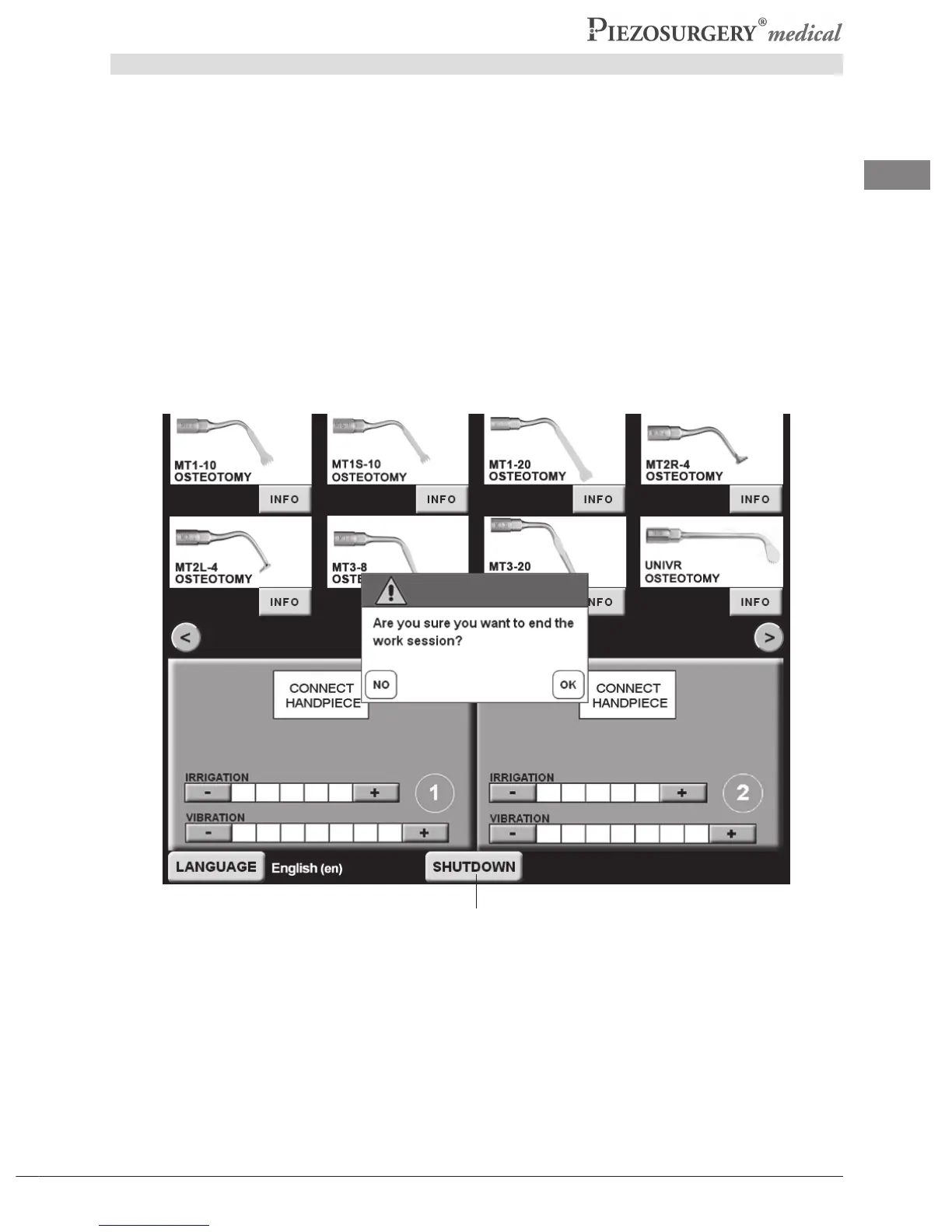
5.4 Switching off the device - “SHUTDOWN”
Toswitchoffthedeviceitisnecessarytoproceedasfollows:
- Pressthe“SHUTDOWN”button(Pic.25-Ref.A).Awindowappearsatthecenterofthescreen
whichaskstheoperatortoconrmthechoiceofshuttingdowntheworksession(Pic.25).
- Pressthe“OK”buttontoswitchoffthedevice.Thedevicewillstartthesystemshutdownprocess.
To return to the previous step, press “NO”. The device will return to the previous shutdown
request.
- Whenthewriting“The device can now be turned off with the switch at the back. It is necessary
to wait 4 seconds before switching the device on again”,appears,turnthepoweroffbymeans
ofthemainswitchonthebackofthedevicebody(Pic.7-Ref.C).Thedevicewillswitchoff.
NOTE:
Torestartthedevice,waitforatleast4secondsaftershutdownbeforeswitchingonagain(paragraph
5.2.6).
Pic.25
A



 To Next Page