8 Logging
37
The following points must be fulfilled for immediate output:
u The date and time have been set correctly.
u The output medium must have been selected and connected.
u Immediate output must be activated in MenuSettings >Logging.
Information regarding the setting of immediate output and the desired output medium is provided in the
chapter Settings, logging [}page44].
Subsequent log output
MenuLog output provides the option of outputting text logs subsequently and independently of the
point of the program end. You can set the output media yourself. The output media are pre-selected as
standard, which are also selected underSettings >Logging as far as automatic immediate output
has been activated.
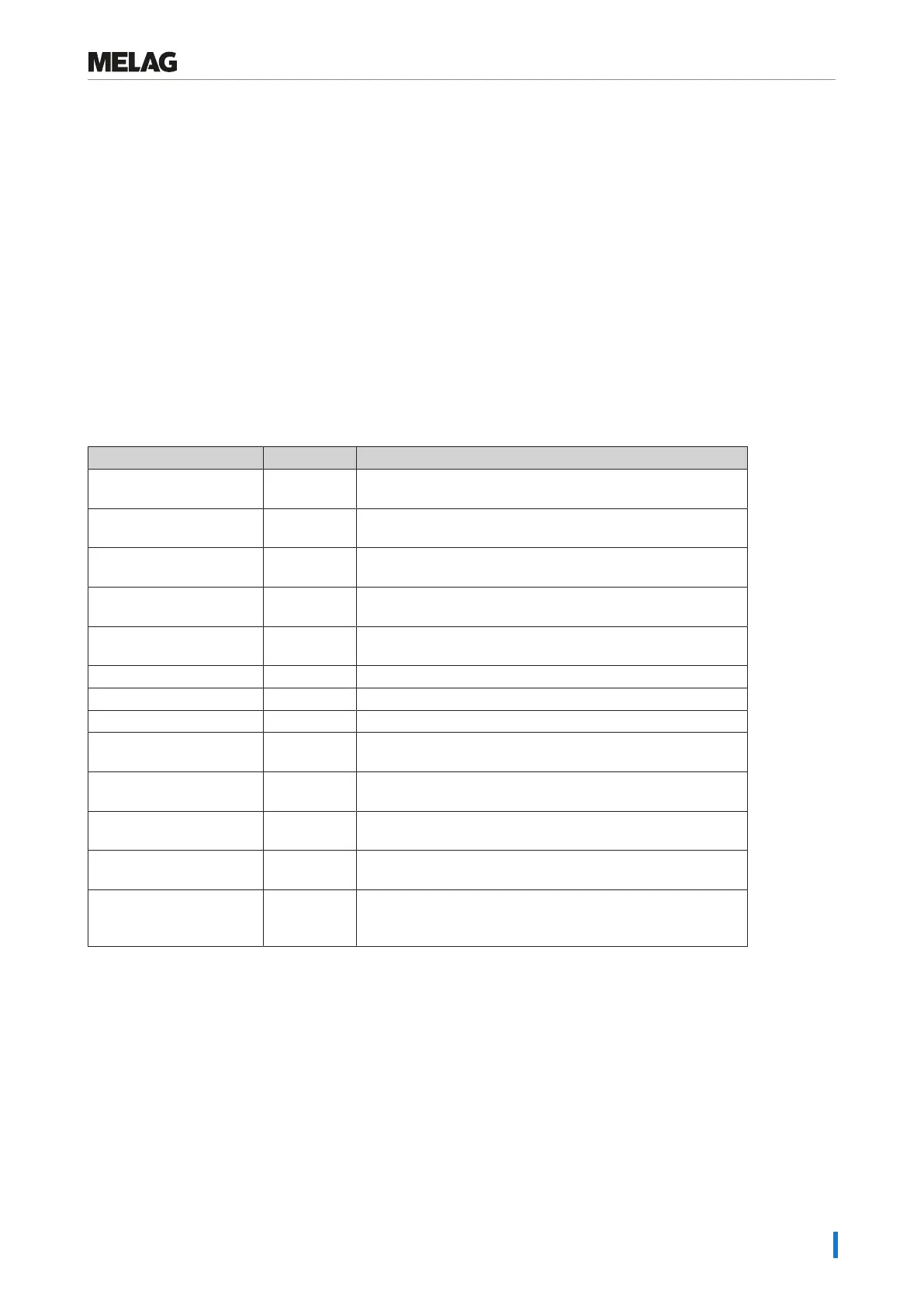
MenuLog output provides various opportunities for log output. MenuLogging list displays all the
program logs present in the memory. You can sort the list according to date, time, program and outcome
by pressing on the column headings. Here is an overview of all possible output media.
Designation File ending Explanation
Last log .PRO The log of the last successful completed program is
outputted.
Logs of the day .PRO The log of the last successful program of the current day is
outputted.
Logs of the week .PRO Logs of all successfully completed programs of the week -
Monday to Sunday - will be outputted
Logs of the month .PRO Logs of all successfully completed programs performed in the
current month will be outputted.
All logs .PRO The logs of all successfully completed programs will be
outputted.
Last fault log .ML The last malfunction log is outputted.
Fault logs of the day .ML The malfunction logs of the current day are outputted.
etc. ...
Legend log file .LEG Contains an explanation of all abbreviations contained in the
log.
Status log .STA A summary of all important settings and system states
(counter, measured values etc.)
Fault in standby .STB This log type is generated following malfunctions during a
time at which no program was active.
System log .LOG A sort of logbook listing all malfunctions and changes to the
system in order of their incidence.
Delete all logs Deletes all logs stored in the internal log memory. Warning:
All logs will be deleted which were not previously outputted to
another output medium.
Outputting a log from the log list
Proceed as follows to output a specific log from the internal memory:











 To Next Page