10 Settings
59
MELAconnect
MELAconnect serves the monitoring of the decontamination process deployed in your MELAG steam steri-
lizer on your mobile end device (e.g. smartphone, tablet).
The following requirements must be fulfilled:
ü
MELAconnect is installed on your mobile end device.
ü
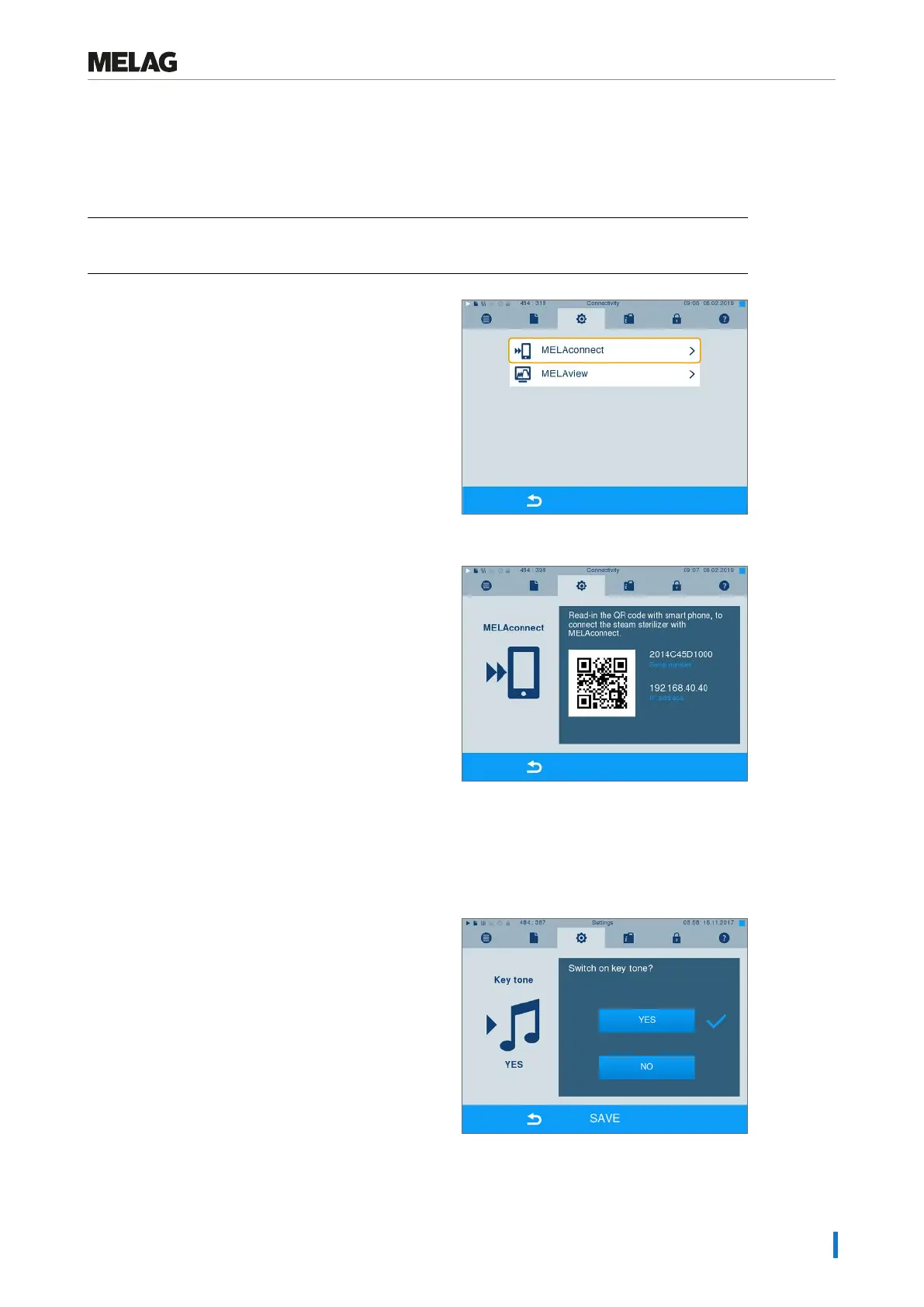
You are in MenuSettings >Connectivity.
1. SelectMELAconnect.
2. Open MELAconnect on your mobile end device.
3. Follow the instructions in MELAconnect and read in
the QR code to connect your device to MELAconnect.
Alternatively, you can enter the IP address of your
device in MELAconnect manually.
Ê With manual entry of the IP address: Owners of multiple steam sterilizers of the identical device type
can differentiate between their devices by viewing serial number on the display to check whether
MELAconnect has been connected to the correct device.
Key tone
1. SelectSettings >Key tone. The display
switches to the settings window.
2. Press YES or NO to determine whether a tone
should be emitted every time a pushbutton is
pressed. This can be deactivated at any time.











 To Next Page