7 Sterilization
31
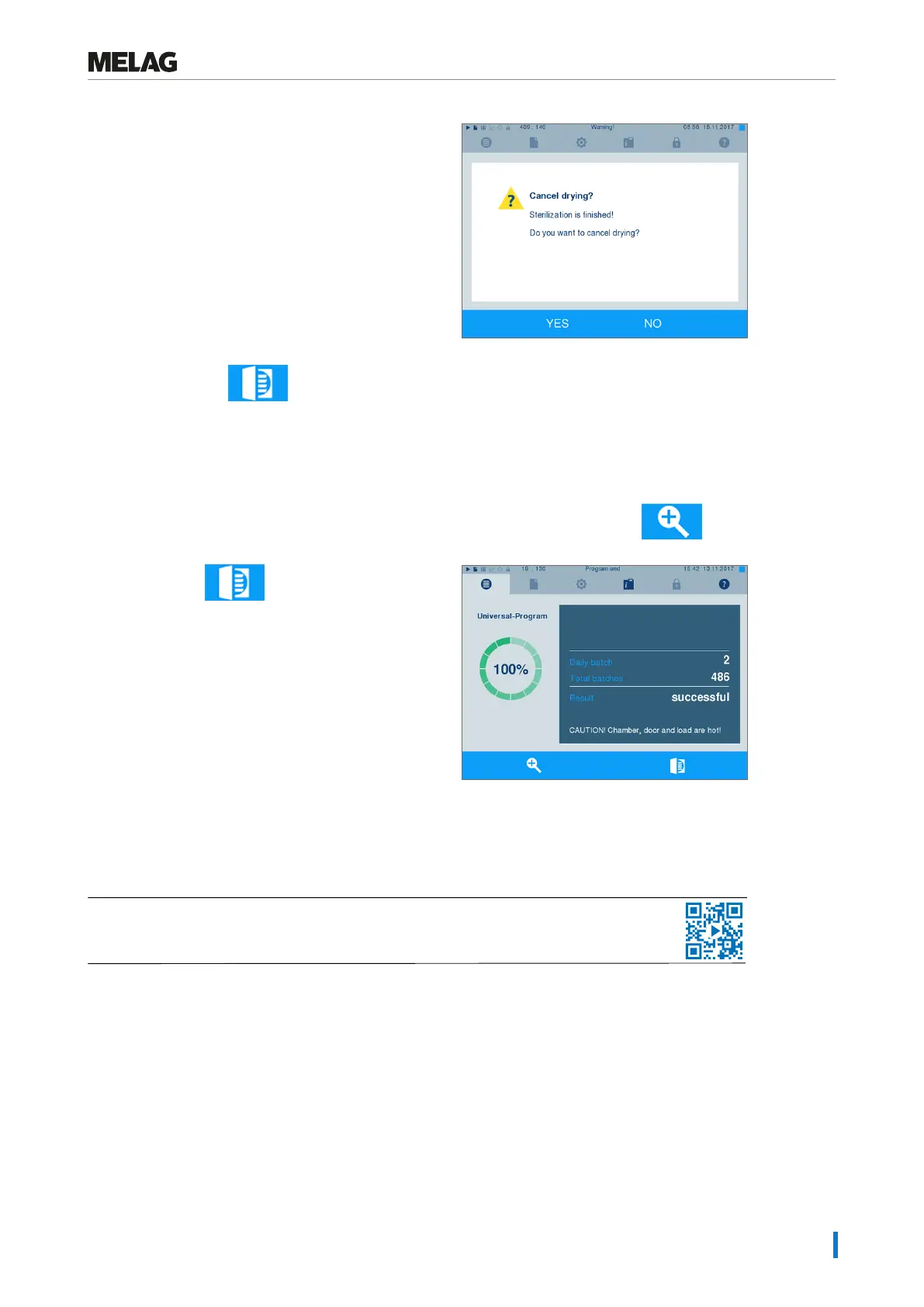
2. Confirm the security query with YES.
3. After a short time, you can open the door by
pressing the door symbol.
Program end
When the program has ended successfully, the corresponding message will be issued on the display. Be-
fore opening the door, you can view further values on the display from the program which has just com-
pleted, e.g. the plateau time or conductivity etc. by pressing the magnifying glass symbol .
}
Press the key to unlock the door.
Working in MenuSettings >Logging if immediate output after program end is activated (= Immediate
output), the log of the completed program will be outputted to the activated output medium after opening
the door.
The approval process
See also "Approving the sterilization batch".
Video tutorial
According to RKI "Hygiene requirements for the treatment of medical products", instrument treatment ends
with the documented approval for storage and application of the sterilized equipment. The approval pro-
cess consists of batch indication and batch approval and must be performed by authorized and expert per-
sonnel. This is ensured by the activated user authentication. To do so, enter the user PIN (see Settings
[}page44]).











 To Next Page