10 Settings
52
Changing the Admin PIN
PLEASE NOTE
If you forget the Admin PIN, consult your stockist/MELAG customer services provider.
The Admin PIN (standard: 1000) can be edited like every other User PIN and should be changed after de-
livery.
User authentication for sterilization
The user authentication can be set to ensure exact logging and verification. User authentication is per-
formed by entry of the user PIN. The following settings are possible:
▪ Query user authentication upon program start
▪ Query user authentication upon program end
▪ Query user authentication upon program start and end
▪ You can skip the query user authentication
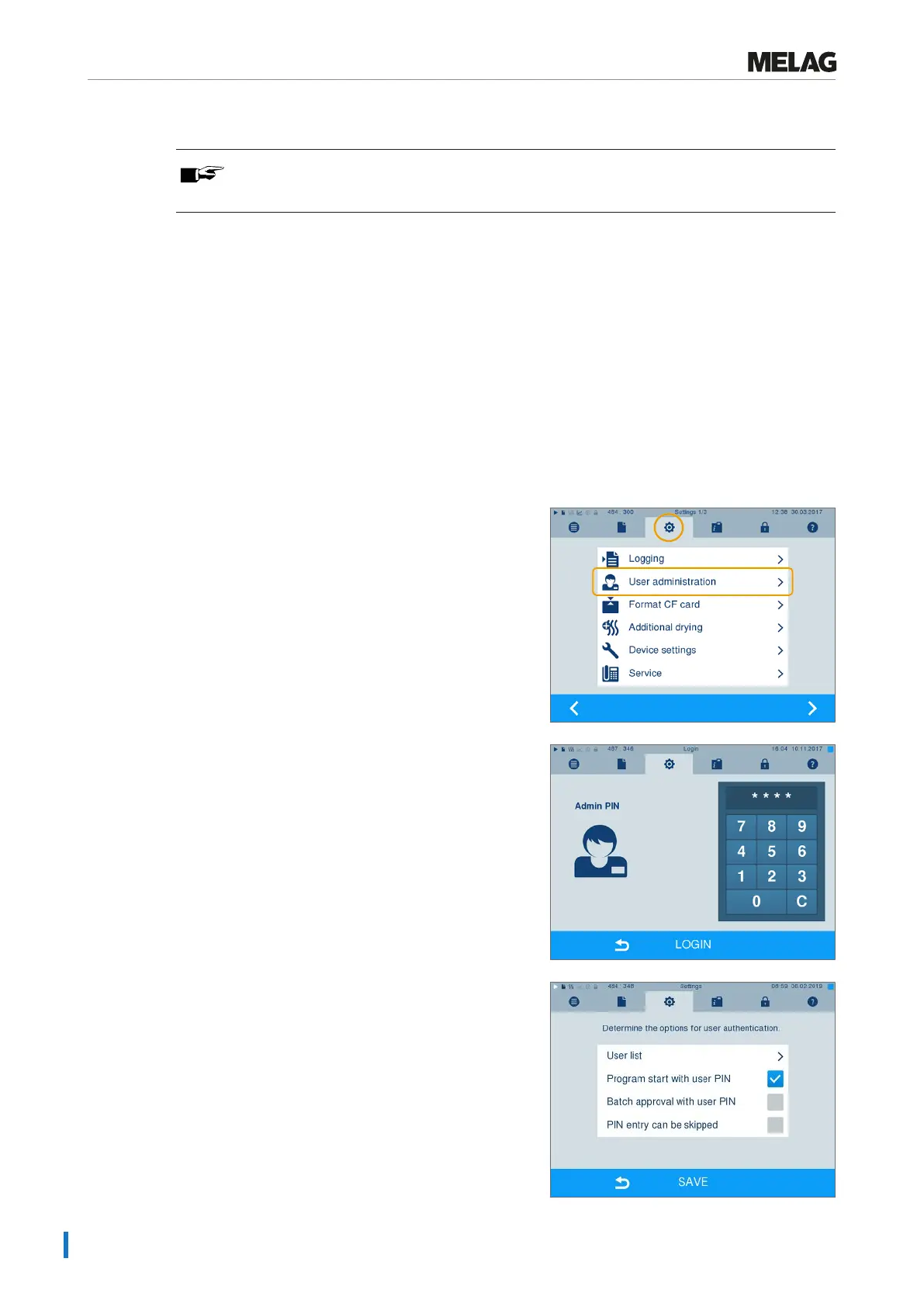
Determining options for the user authentication
1. Select MenuSettings >User
administration.
2. Entry of the Admin PIN is necessary to navigate to
MenuUser administration and perform the
settings there. Enter the Admin PIN (standard 1000)
and confirm with LOGIN. The display switches to
windowUser administration.
3. Set a checkmark next toProgram start with
user PIN, to perform user authentication upon every
program start. The program will start only after entry
of the user PIN.











 To Next Page