13 Malfunctions
79
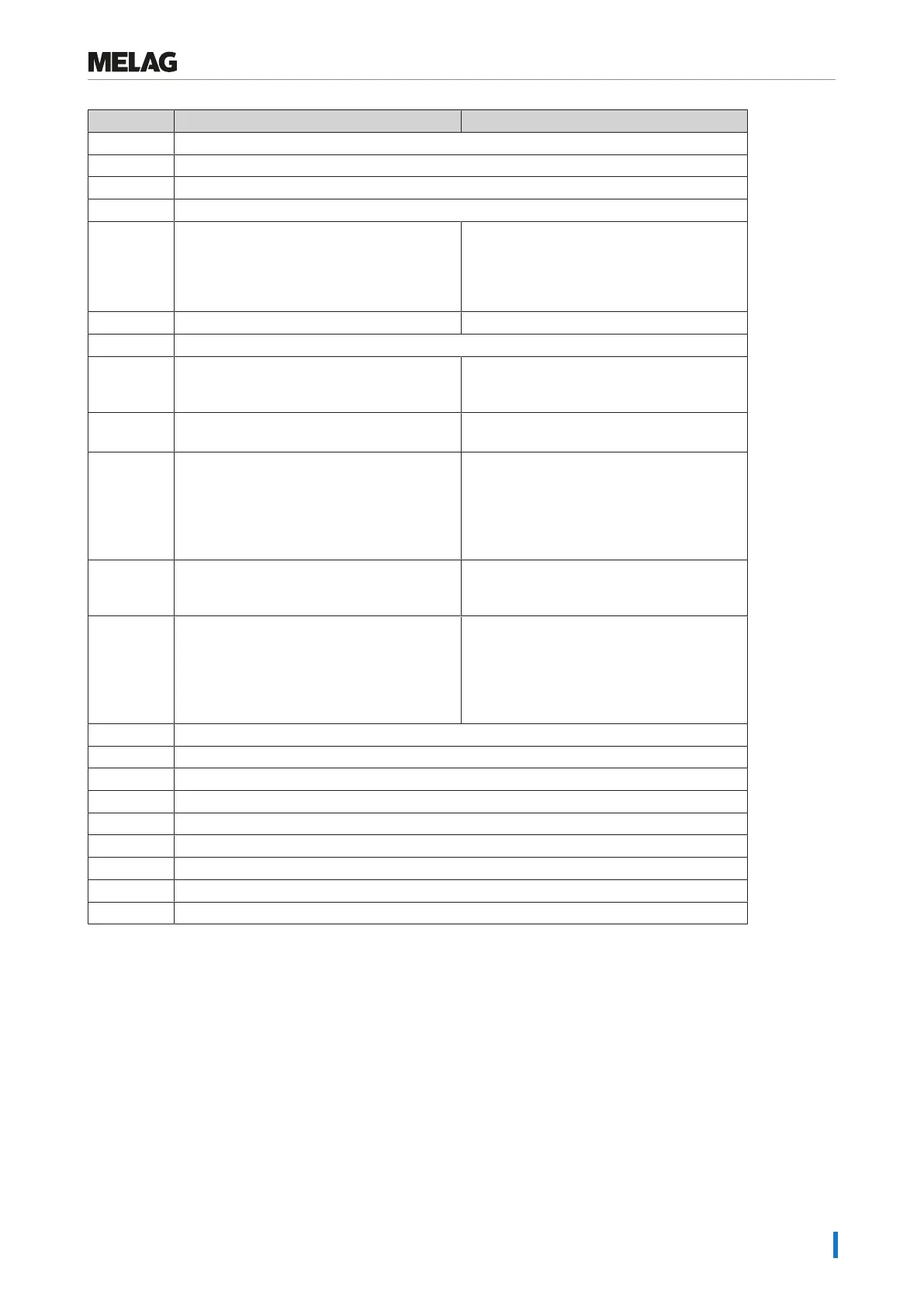
Incident Possible causes What you can do
414 see event 102
416 see event 214
417 see event 397
428 see event 102
434 Overheat on temperature sensor 2 1. Switch off the steam sterilizer and allow it
to cool for 15 min.
2. Start it again. The steam sterilizer is now
ready for operation. Should this repeat,
please contact the service technician.
438 The steam sterilizer must be validated. Arrange for validation of the steam sterilizer.
439 see event 187
452 An attempt was made to perform actions on
the display, although the log printer is still
printing.
Please wait until the label printer has printed
all the labels. Then the desired action can be
performed.
457 The date or time was set incorrectly. Check the date and time settings and correct
if necessary (see Date and time [}page56]).
458 a) The date or time was set incorrectly.
b) The start time pre-selection timer has run
down but the steam sterilizer was switched
off at the time for which the start time was
selected.
a) Check the date and time settings and
correct if necessary (see Date and time
[}page56]).
b) Please note: The steam sterilizer must be
switched on at time for which the start time is
selected.
464 An attempt was made to perform actions on
the display, although the log printer is still
printing.
Please wait until the log printer has finished
printing the log(s). Then the desired action
can be performed.
465 a) The connection to the label printer has
been interrupted.
b) The label printer has not been switched
on.
a) Check whether the power cable is
connected to the socket and the Ethernet
cable of the label printer is correctly
connected with the steam sterilizer.
b) Switch on the label printer The Power LED
must illuminate green.
479 see event 397
486 see event 82
488 see event 457
489 see event 136
490 see event 136
492 see event 136
692 see event 132
693 see event 132
694 see event 132











 To Next Page