Menu Mode
40 D30374 11/2023
■ Gateway (see }8.3.8Gateway)
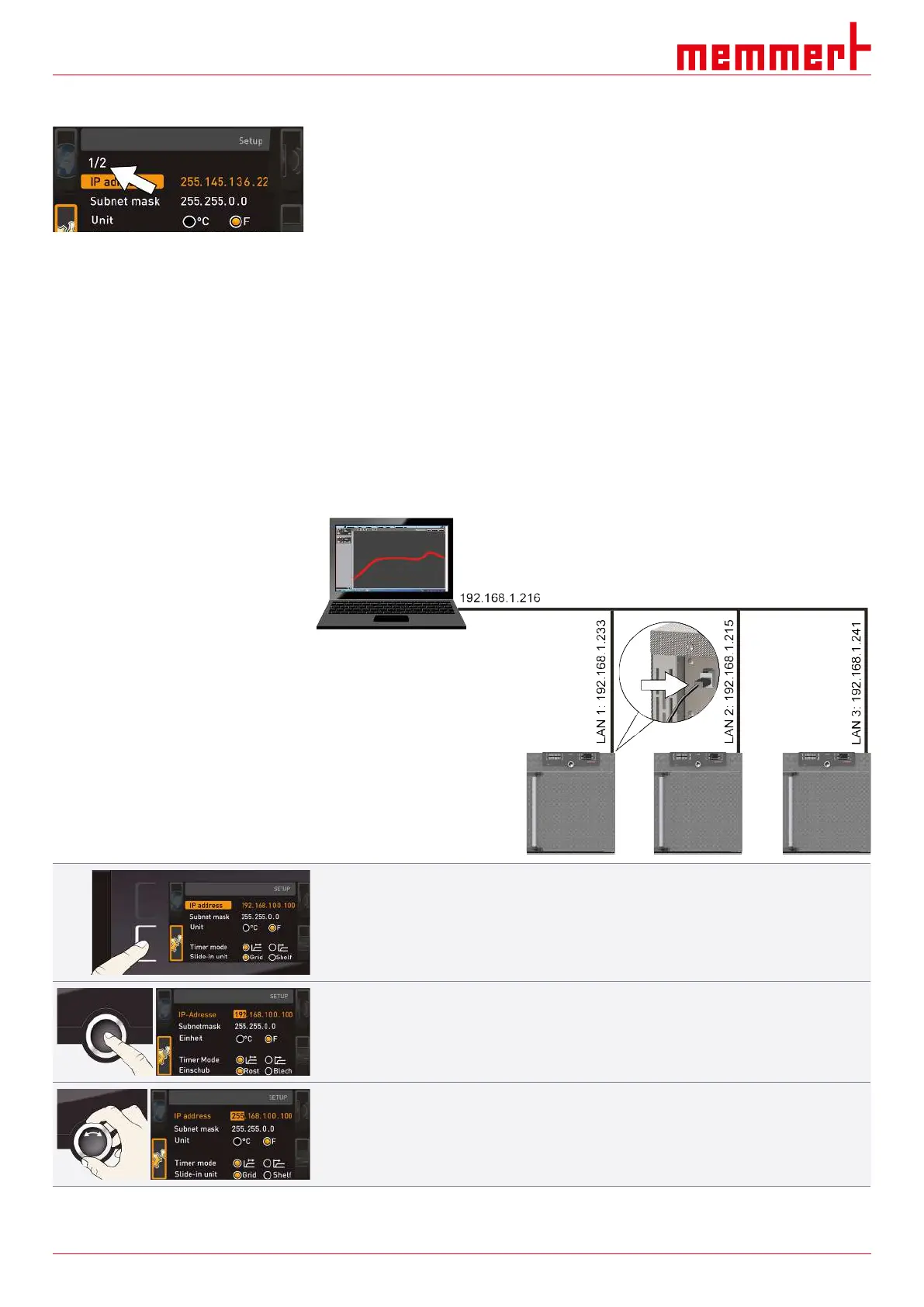
If the Setup menu contains more entries than can be displayed, this is indicated by the
display “1/2”. This means that there is a second “page” of entries.
To display the hidden entries, use the turn control to scroll beyond the lowest entry. The
page display then changes to “2/2”.
See also
2 Unit [}41]
2 Digital Backwards Counter [}28]
2 Shelf Type (Grid or metal plate) [}41]
2 Remote Control [}42]
2 Gateway [}42]
2 Automatic Defrosting System (Defrost) [}42]
8.3.2 IP Address and Subnet Mask
If you want to operate one or more appliances in a network, each appliance must have its
own unique IP address for identification. By default, each appliance is delivered with the IP
address 192.168.100.100.
1. Activate the SETUP display.
ð The IP address entry is automatically highlighted.
2. Confirm the selection by pressing the confirmation key.
ð The first three digits of the IP address are automatically highlighted.
3. With the turn control, set the new number, e.g. 255.



 To Next Page