Menu Mode
48 D30374 11/2023
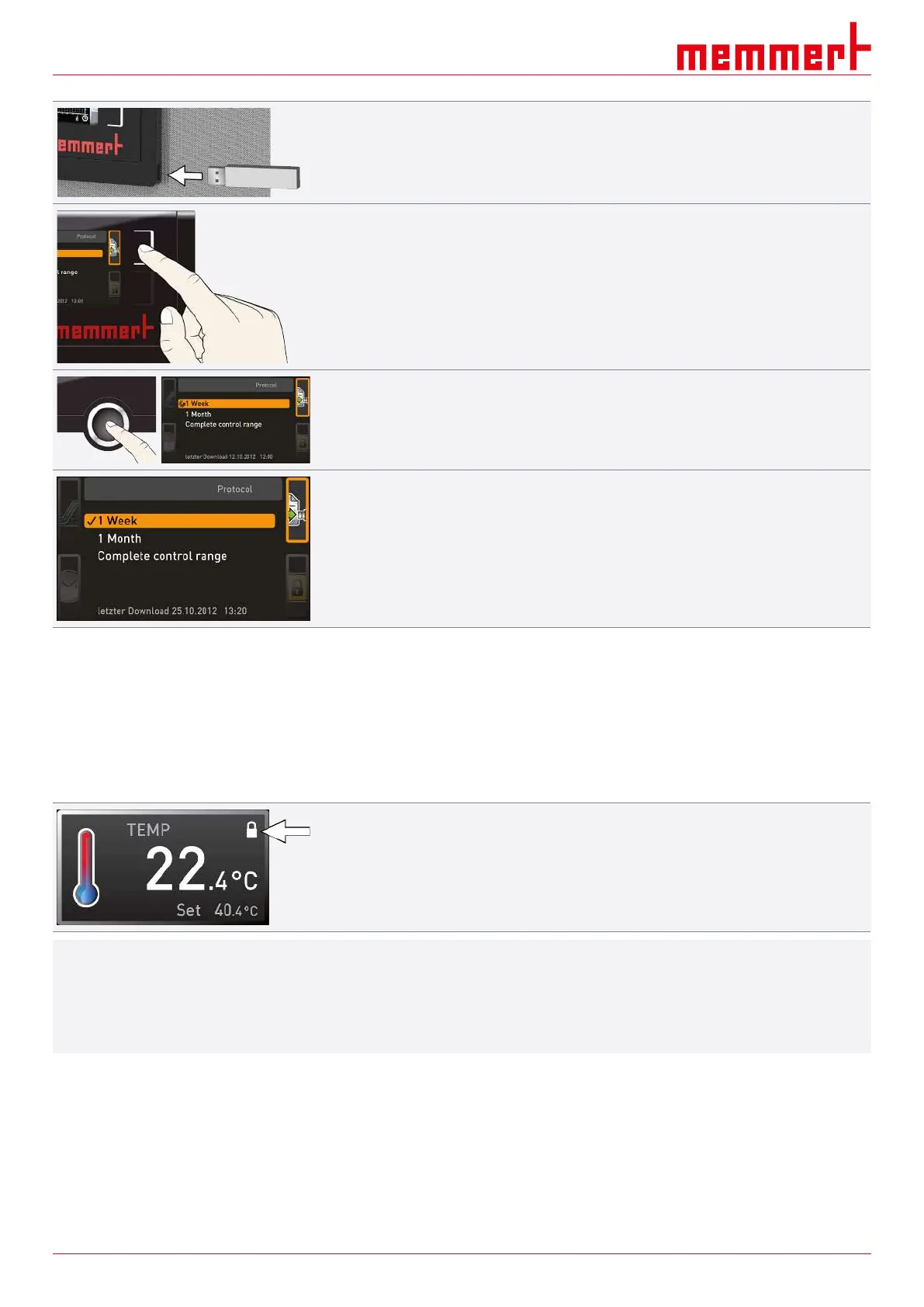
1. Connect the USB storage medium to the port on the right of the ControlCOCKPIT.
2. Press the activation key on the right side of the Log display.
ð The display is enlarged and the period This Month automatically highlighted.
3. To select another log period, use the turn control.
4. Apply the selection by pressing the confirmation key.
ð The transfer starts
ð and the status bar indicates the progress.
As soon as the transfer is complete, a check mark appears in front of the period selected.
■ The USB storage medium can now be removed.
8.9 USER ID
8.9.1 Description
With the USER ID function, you can lock the settings of individual (e.g. temperature) or all
parameters, so that they cannot be changed at the appliance by accident or by
unauthorised persons.
You can also lock adjustment options in Menu mode (e.g. adjustment of date and time
settings).
■ If adjustment options are locked, this is indicated by the lock symbol in the respective
display.
i
USER ID data is entered in the AtmoCONTROL software and saved on the USB storage
medium. The USB storage medium is thus acting as a key: Parameters can only be locked
or unlocked if it is inserted.
A description of how to create a USER ID in AtmoCONTROL is provided in the separate
AtmoCONTROL manual.



 To Next Page