Operation Manual Menzi Muck A91 Page 61
Control and Display elements
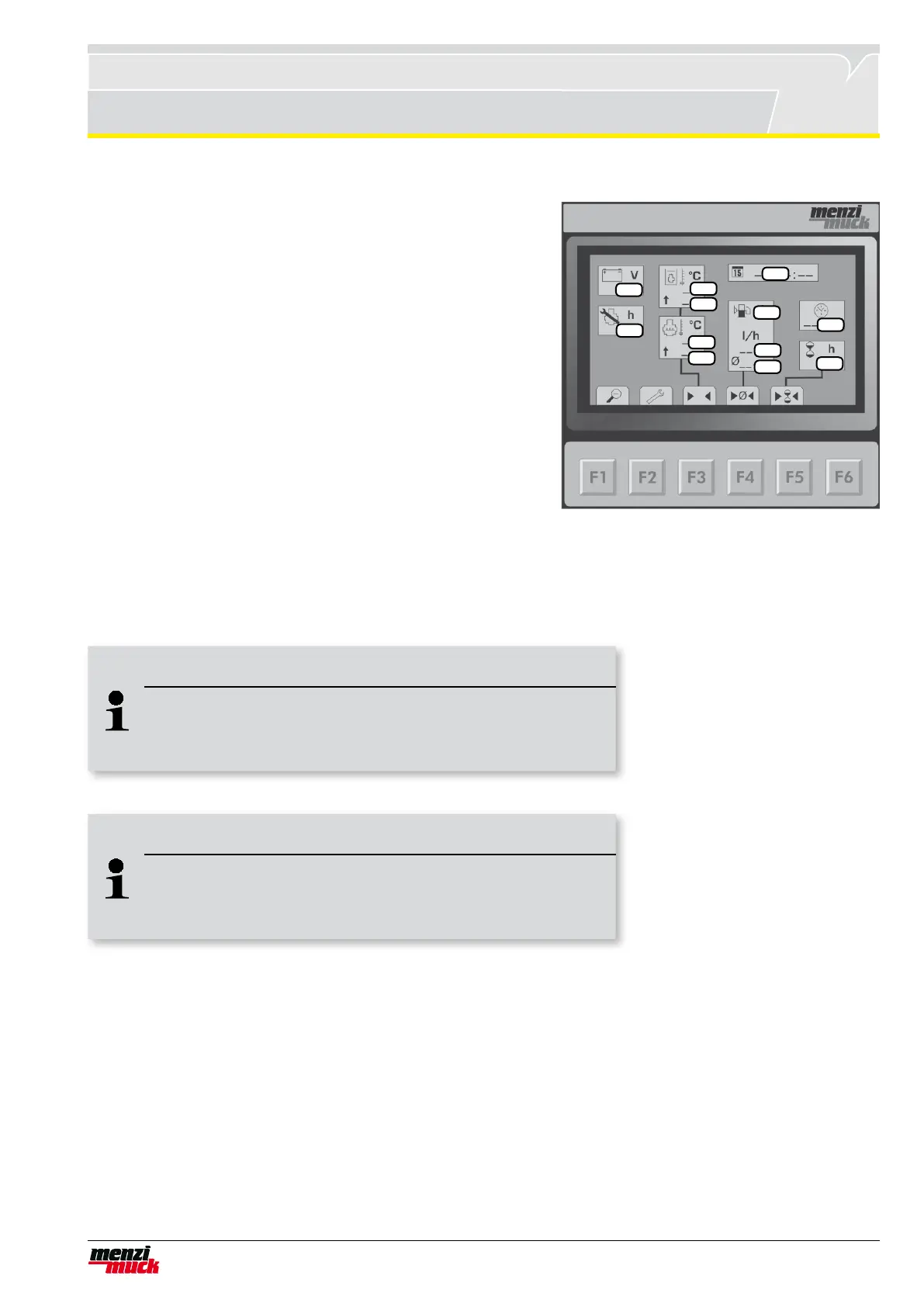
Detail menu
The detail menu can be reached from the main menu by pressing
the F1 key. Find in this menu detailed information about value of
the machine. There are also saved information about condition of
the machine.
1 Date
2 Time
3 Hours meter per day (reset by F5)
4 Current battery load
5 Maintenance is overdue in X hours
6 Tank capacity in litre
7 Current consumption per hour
8 Consumption on the average per hour (reset by F4)
9 Current hydraulic oil temperature
10 Maximum measured hydraulic oil temperature (reset by F3)
11 Curren temperature of cooling water
12 Maximum measured temperature of cooling water
(reset by F3)
Return to the main menu by F1
1
4
10
12
8
2
3
5
9
11
7
6
Adjust brightness, contrast, date and time
The description of how to adjust the brightness, contrast, date and time is contained in Chapter "Adjusting the
controls".
Note !
Tank capacity
Tank capacity is correct when the chassis is horizontal. If it isn't,
there may be a difference to the display.
Note !
Reset values
By F4 the maximum of cooling water and hydraulic oil temperatu-
re can be reseted together. So you will loose both values.



 To Next Page