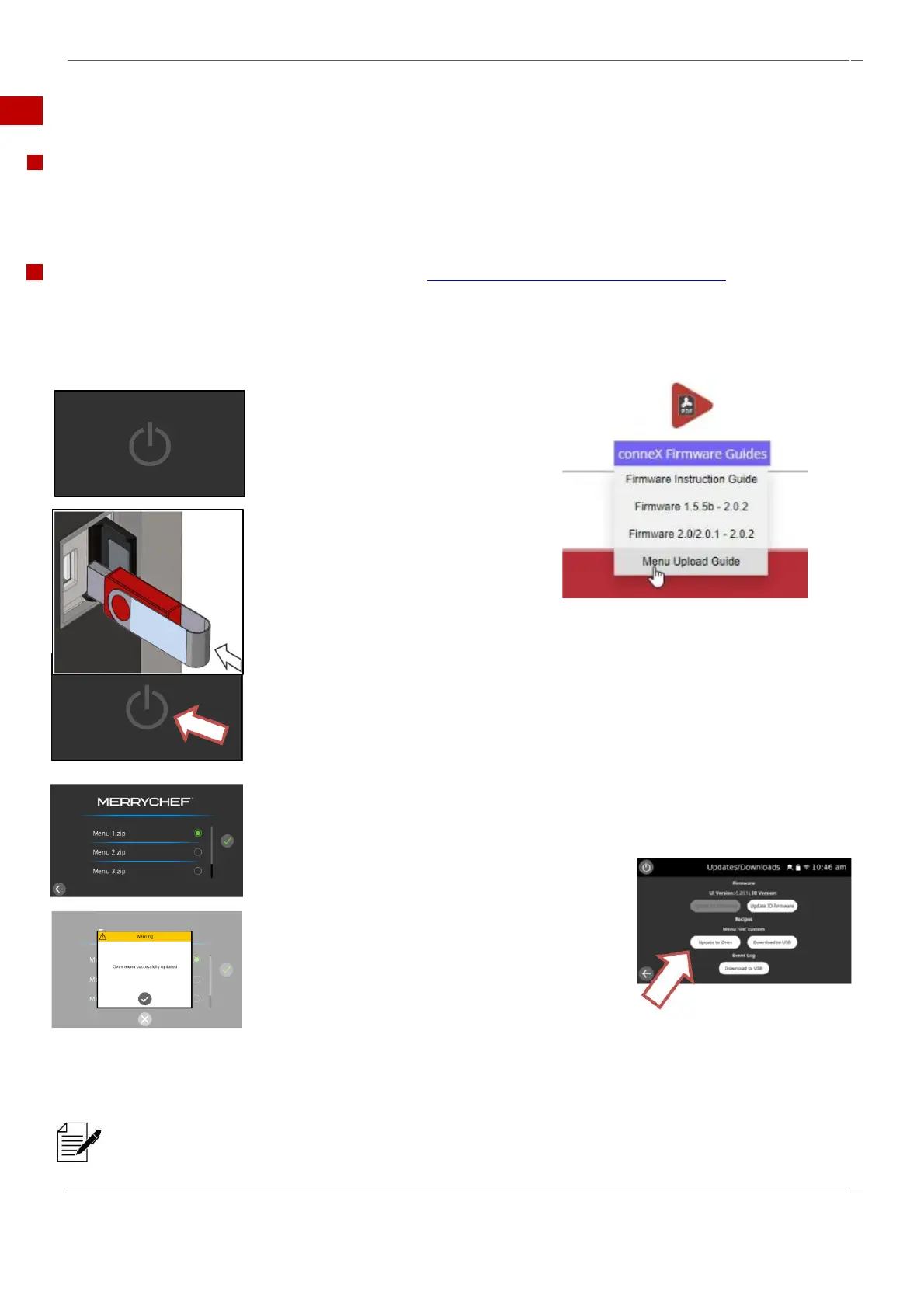
4.4 Using a USB stick.
Port location.
The USB port is located behind a cover to the right of user interface. (UI)
The USB cover protects the USB port so that no water vapour can get into the control electronics during cooking or cleaning.
During cooking and cleaning, there must not be a USB stick inserted and the USB port must be closed.
USB menu downloads & instructions go to Merrychef - Merrychef conneX®12
Uploading a new recipe file from a USB will overwrite all the existing programs in the memory.
1. With the appliance
switched OFF.
2. Open the cover to
access the USB port.
3. Plug in the USB.
4. Switch the appliance ON.
5. After the Welbilt start-up screens, the
oven will display the menu, or choices of
menus that can be selected of the USB.
6. Select menu file and then
the green tick.
7. Select the tick on completion
to end.
8. Unplug the USB memory
stick.
5A. After the Welbilt start-
up screens, the oven will
display the menu, or
choices of menus that can
be selected of the USB.
Menus can also be
downloaded onto the
oven through settings /
updates, without the need
to turn off the oven first.
Load only the correct complete menu file onto the USB memory stick and not a single cook menu.



 To Next Page