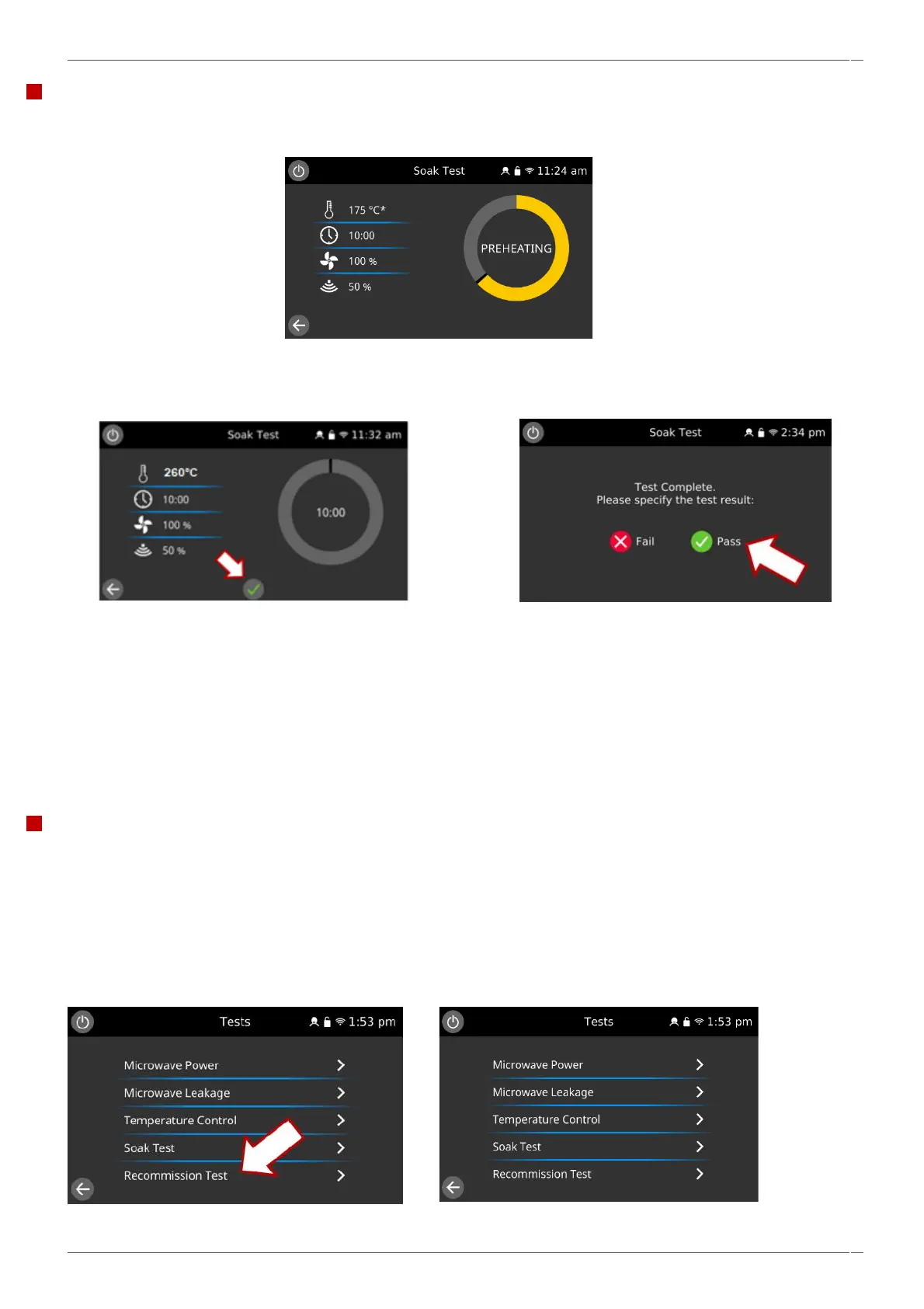
Soak test: checking the cavity integrity.
1. When selected, the oven heats up to 260
o
C.
2. Once the oven reaches temperature (>255
o
C), add 1 litre of water in an appropriate covered glass container.
3. Select the green tick to start. The oven will run for 10 minutes cycling around a cavity temperature of 260
o
C, 50%
microwave power and 100% convection fan.
4. During the test carefully check the appliance casing, joints, and door seal for signs of steam or water escaping from
the cavity. If necessary, rectify any leaks and repeat the test.
5. On completion of the test, specify the result by selecting ‘Pass’ or ‘Fail’.
6. Safely remove the container of water from the cavity.
Note: Opening the door during the test will stop the test. Reselect the test to run again.
This test is only generally recommended for workshop activities.
Recommissioning test: checking the appliance operation.
The recommission tests are performed following the completion of a planned maintenance visit, or repair to ensure that the
appliance is working correctly before handing back to the customer.
Some of the tests have a countdown timer, where failing to carry out a test within the time limit will cause a test failure and
the recommission test will have to be restarted.
If the ‘recommission test’ tab is greyed out, the oven is above 100°C and will not allow to the test to commence until the oven
is cooled down.



 To Next Page