4. Preparation
a. Unboxing the S618 node
i. Open the node box and the smaller accessory box inside of
it, verifying that all items in the prior section were included.
ii. Slide the S618 out of the box and remove the 2 cardboard
endcaps on either side of the node; keep them with the box
in case the node needs to be repackaged.
iii. With the silver clamp knob on the mount facing up, use your
fingers or the 4 mm hex key to unscrew the knob until the
node can be removed from the mount - it can be slid out
from the side if necessary.
iv. Note the node’s MAC address printed on the label affixed to
the outer case - verify that it contains the same MAC address
as the one printed on the side of the node box.
b. Unboxing the solar panel
i. Open the solar panel box, slide the panel(s) out from the
side, and remove the 2 cardboard endcaps.
ii. Remove any other cardboard corners from the panel(s) if any
are present. Obstructions to the panels’ solar cells will affect
its ability to charge .
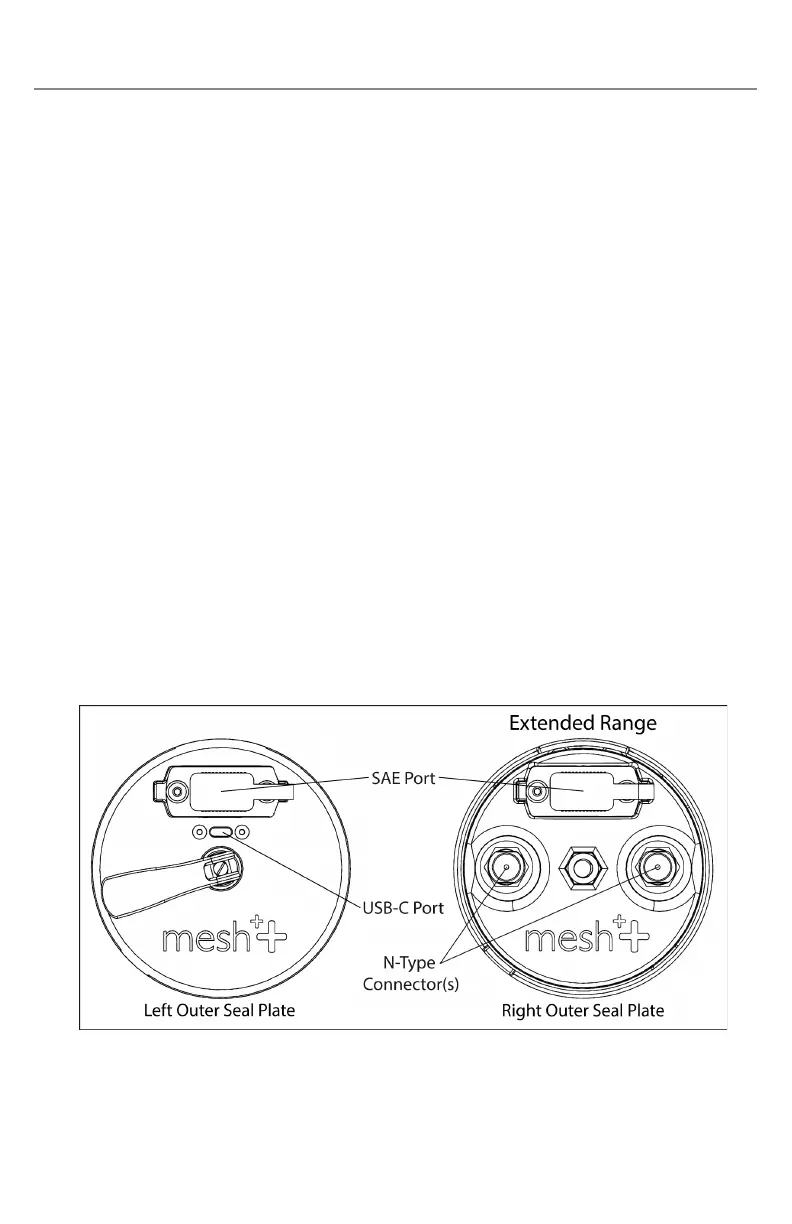
c. Overview of node ports
i. USB-C port
1. The S618 has a USB-C port near the cam handle that
connects the node to the USB Hub for data transfer, but



 To Next Page