may also be used to charge the node directly via USB-C
Power Delivery.
2. If you plan to power or charge your node via USB-C Power
Delivery, the USB-C PD adapter must be rated for 60W or
more of output power (20V, 3A minimum) to function.
ii. SAE ports
1. The S618 has 2 SAE ports located on each end of the
device. Using the SAE to SAE cable, you may connect a
solar panel to the node to power it. A single solar panel
can be connected to either port, or 2 panels can be
connected concurrently. Please note that SAE cables
provided by Mesh++ have a specific polarity that may not
be the same as 3rd-party cables. Using other cables may
cause damage to the node.
2. SAE cables may be used together if a second solar panel is
installed further away. Chaining more than 5 SAE cables
between the node and panel may impact efficiency.
3. You may also power the node via power adapter through
the SAE port by using an SAE to barrel jack connector.
This requires a DC power supply (12V, >6A).
iii. N-type connectors
1. The S618 may have 4 N-type connectors for external
antennas, which can be used with a WiFi 6E radio, or to
replace the integrated 2x2 WiFi 6 antennas.
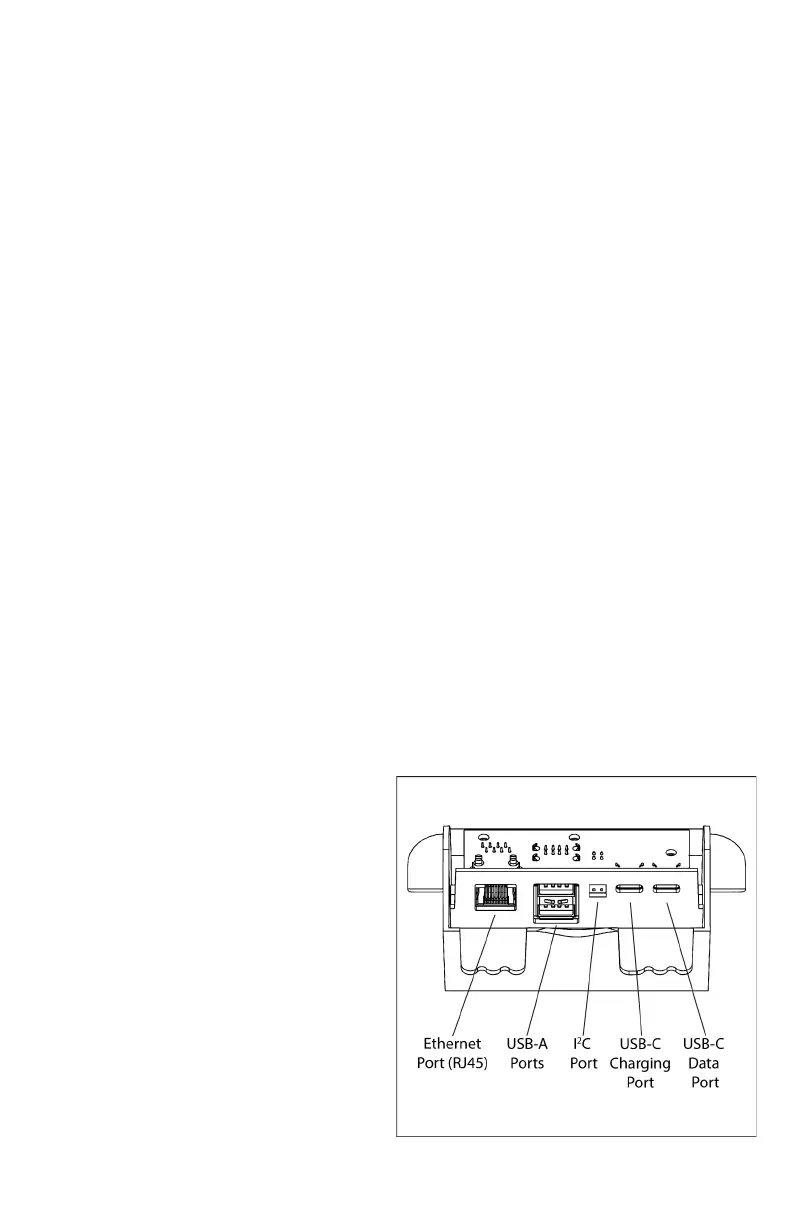
d. Overview of USB Hub ports
i. The USB Hub has 5
different types of ports:
1. USB-C for data transfer
to the node
2. USB-C for charging
3. I ²C port for peripheral
sensors
4. 2 USB-A ports
5. Ethernet port (RJ45)
for network
connectivity



 To Next Page