9. Servicing the Node
a. Outer case removal
The outer case may be
removed to reach the node’s
internal components. This is
useful for adding a SIM card,
storage, or servicing the node if
necessary. Do not operate
your node without its case
installed. Do not service it
while installed on a pole or wall;
we recommend a flat
supported surface, like a table.
i. When removing or
reinstalling the outer
case of the node, tools
that you may need:
1. A rubber mallet or
non-marring hammer.
If a regular hammer or
blunt object is to be
used, put a towel or
piece of wood
between it and the
node to prevent
external damage
2. Disposable rubber
gloves to protect from lubrication in the node
ii. Ensure the node is off via the mobile app.
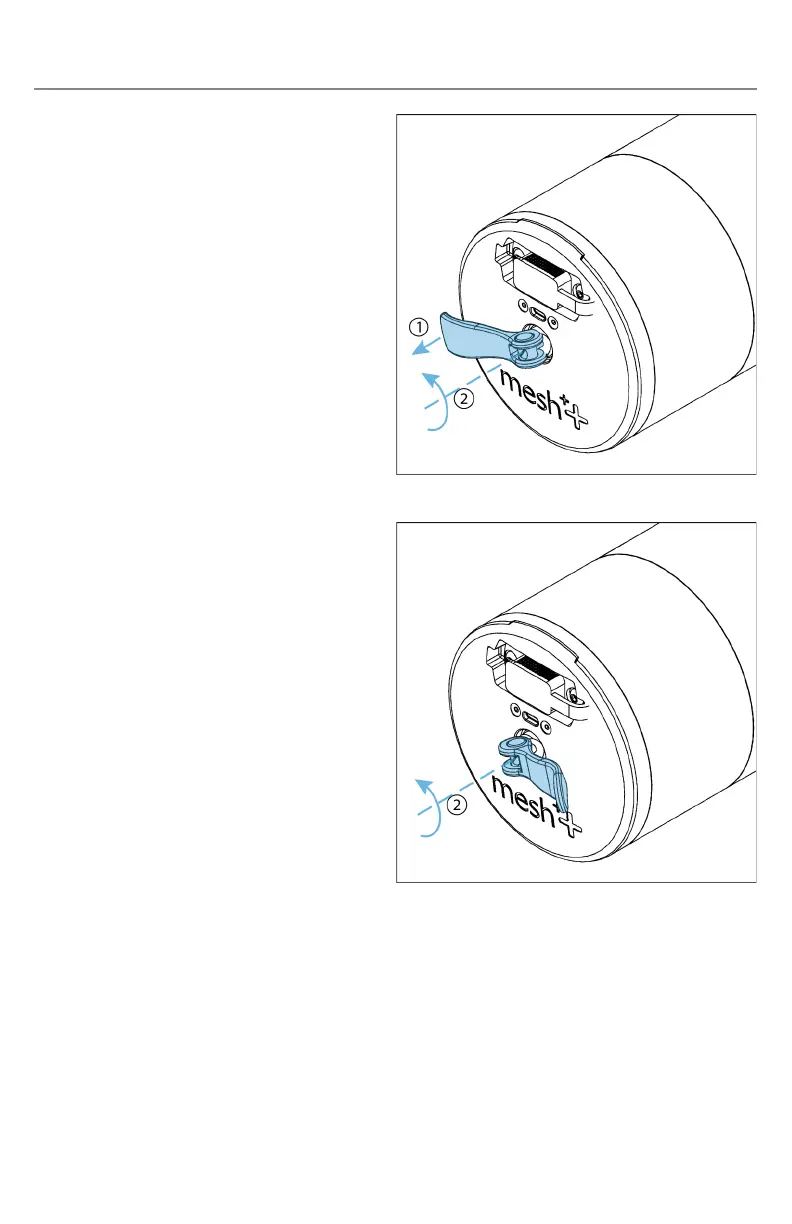
iii. The node’s internal components may be accessed by pulling
its core out from the cam handle side. Lift the node’s cam
handle up and turn it counter- clockwise to loosen its seal.
Make sure that the cam handle does not unthread
completely when being loosened.



 To Next Page