5. Creating Your Network
a. Setting up the mobile app
i. Search for “Mesh++” on the iOS App Store or Google Play
Store and install the Mesh++ mobile app. Please ensure that
the app is kept up to date as we continue to add new
features and enhancements.
ii. Register for a free account by entering your company name
and email. You should then receive an email from
info@meshplusplus.com to activate your account. If you
have not received one, it may be in the Spam folder.
From your web or phone browser, create your username
with your registered email and a selected password. Use this
information to log back into the mobile app to begin.
b. Getting started
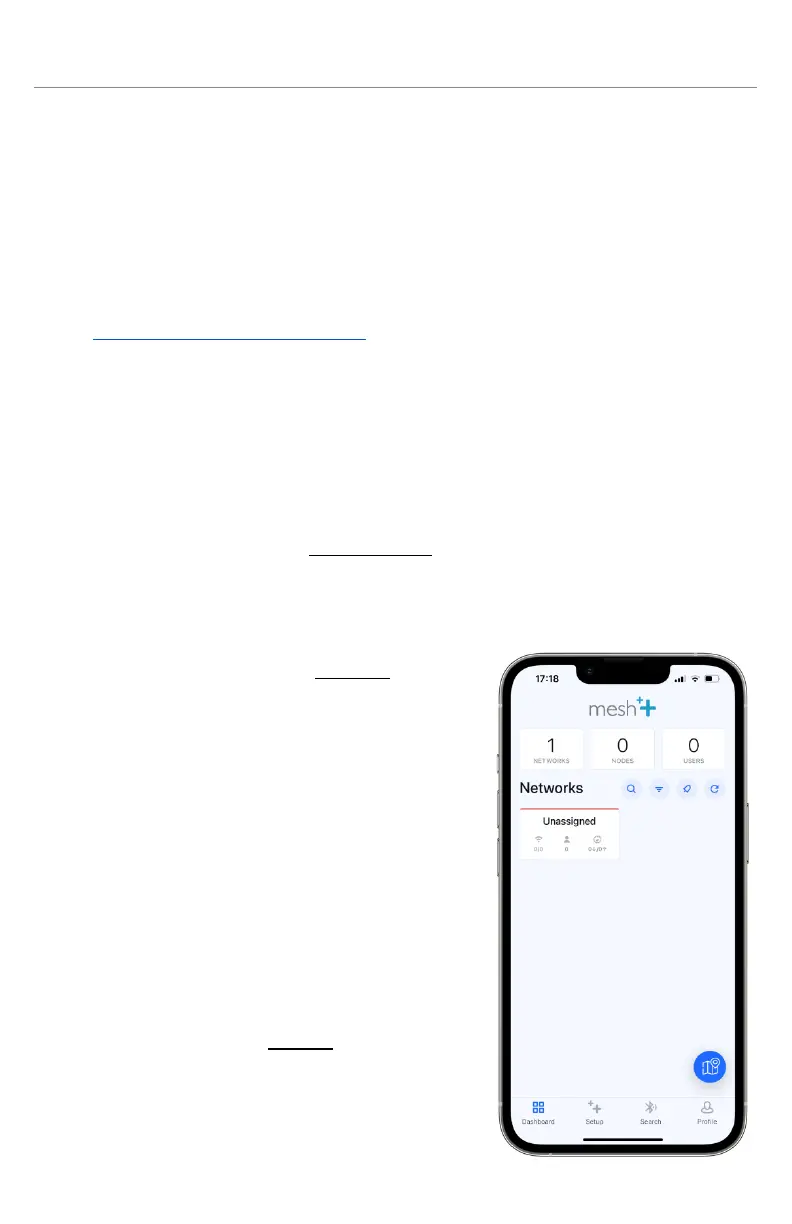
i. Once you have successfully logged into the mobile app, you
will be taken to the Dashboard tab, which shows a list of
networks created on this account along with their statuses.
Once completely loaded, all nodes in every network created
by this account can be searched for
via Bluetooth in the Search tab, or
can be accessed within its network.
ii. The Networks navigation bar
contains 4 useful buttons:
1. Search for networks by name
2. Sort the network list
3. Enable mobile notifications for
each network when certain
connectivity statuses change
4. Refresh all networks, which
directly affects each node's
displayed status
iii. Navigate to the Setup tab at the
bottom of the screen. Here, you are
able to set up a new network or
node to use.



 To Next Page