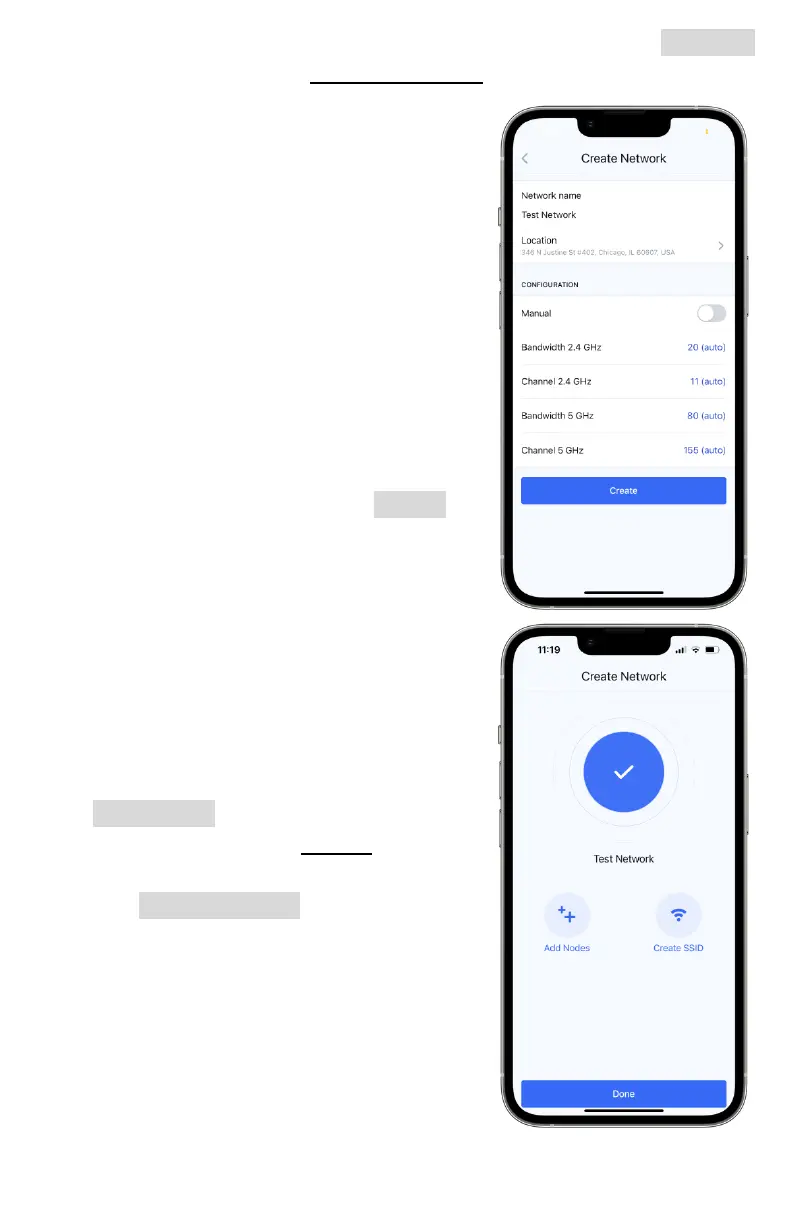
iv. If you do not have a network set up already, tap the Network
button to enter the Create Network page.
1. Network name: what your
network will be called in the app.
Name it something you will
remember. This differs from any
SSID name that will be
broadcasted.
2. Location: choose the general
location of your network.
3. Configuration: you may choose
certain channel and bandwidth
settings here manually, but we
recommend leaving it set to its
default autoconfigure setting.
v. Once completed, tap the Create
button to make your network.
c. Adding to your network
i. You may now either add nodes to
the network or create an SSID for
users to connect to the network.
Both must be done (in any order)
to create a working mesh network.
ii. If your network does not already
have nodes added to it, tap the
Add Nodes button. The app will
redirect you to the Nodes tab in
your newly created network.
iii. Tap Add new node to begin
registering a new node to your
network - we recommend using
Bluetooth initially to search for
local nodes.
1. Move from existing network: if a
node is already on a network,
you may move it to your newly
created one



 To Next Page