■■■■■■■■■■■■■■■■■■■■■■
5 Setting up the user administration
900 Touch Control
■■■■■■■■
43
2
Creating a new user
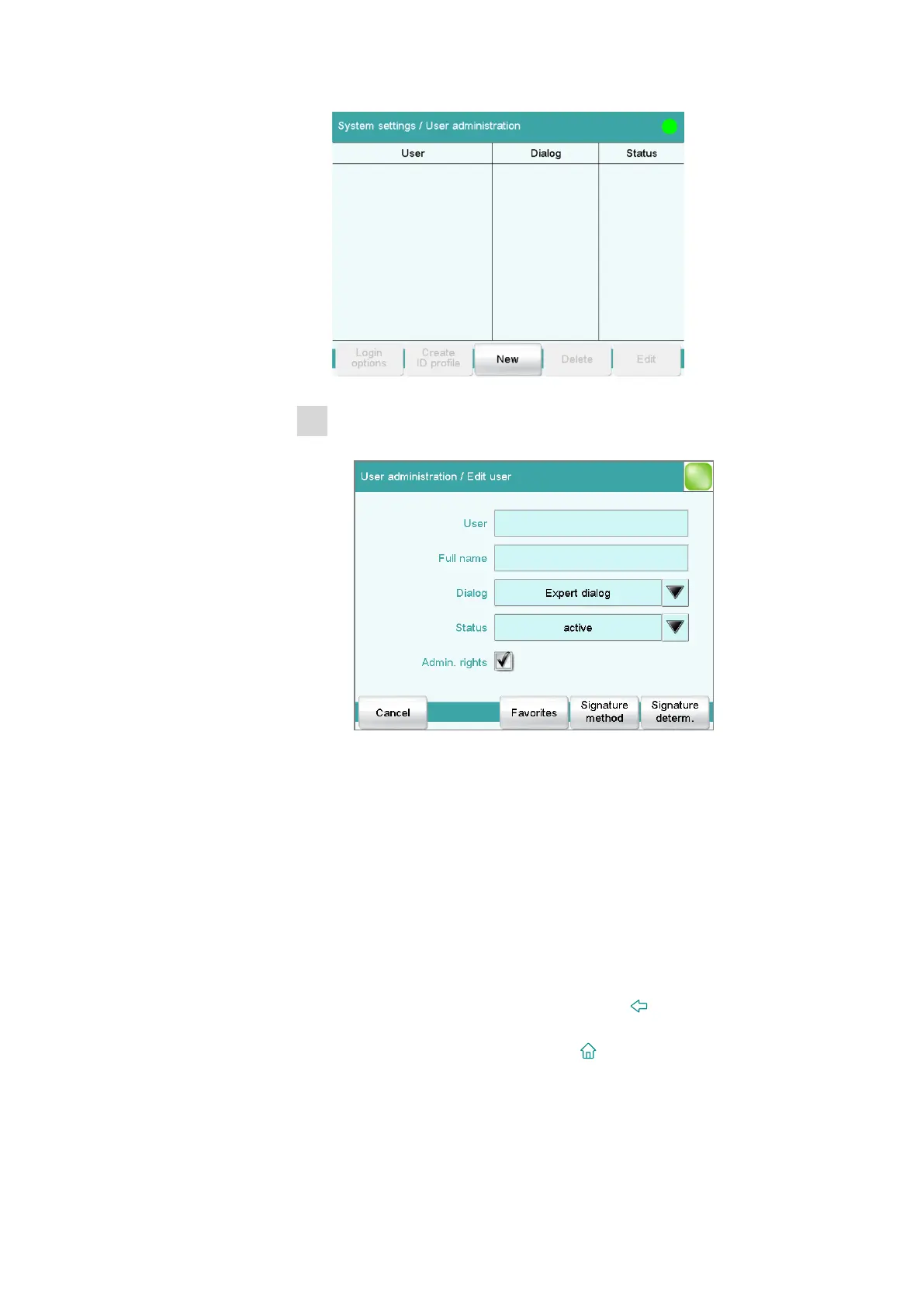
■ Tap on [New].
■ Tap on the input field User and enter an unambiguous user iden-
tification (e.g.,abbreviation). Close the input dialog with [OK].
■ Tap on the input field Full name and enter the name of the user.
Close the input dialog with [OK].
■ Tap on the selection list Dialog and select either Expert dialog
or Routine dialog. Remember that the system settings cannot
be changed except in the expert dialog.
The setting is effective only when working with login.
■ Activate or deactivate the administrator rights.
The user administration can be used only with administrator
rights. At least one person must be in possession of administrator
rights.
■ Return to the user administration with [ ].
■ Define additional users.
■ Return to the main dialog with [ ].















 To Next Page