Operating Instructions Synchroprint 5000
Operating instructions SP5000 V1-0.docx Page 33 of 52
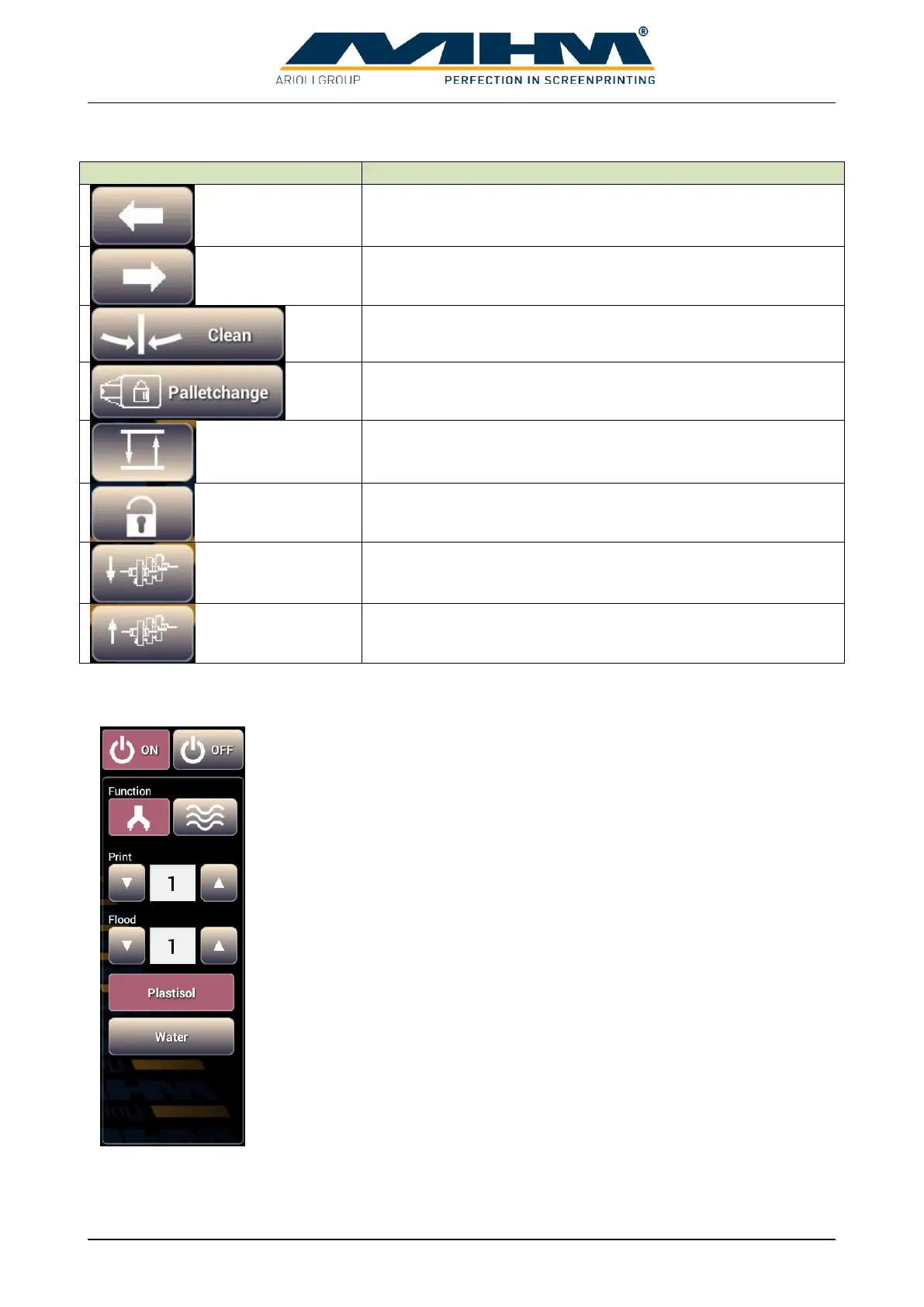
The following control panels are available:
Indexes/moves the tables to the next print station on the left.
Indexes/moves the tables to the next print station on the right.
Moves the tables to the clean/half index position.
Allows the operator to lock or release the pallets.
Raises or lowers the screens to off-contact position.
Lock and Unlock the screens pneumatically.
Moves all squeegees to the outer position.
Moves all squeegees to the inner position.
If a print station is selected the following control panels is displayed.
“On” activates a station, appending parameters are displayed.
“Off” deactivates a station.
Determines if the station is used as a print or a dryer station. Appending
parameters are displayed when print station is selected.
Determines the number of print strokes at a print cycle.
Determines the number of flood strokes at a print cycle.
Select this when Plastisol-ink is used. Print cycle starts with a flood stroke
followed by the print stroke.
Select this when Waterbased-ink is used. Print cycle starts with a print
stroke followed by the flood stroke to prevent screen from drying up.


 To Next Page