Operating Instructions Synchroprint 5000
Operating instructions SP5000 V1-0.docx Page 45 of 52
9.8.3. Automatic
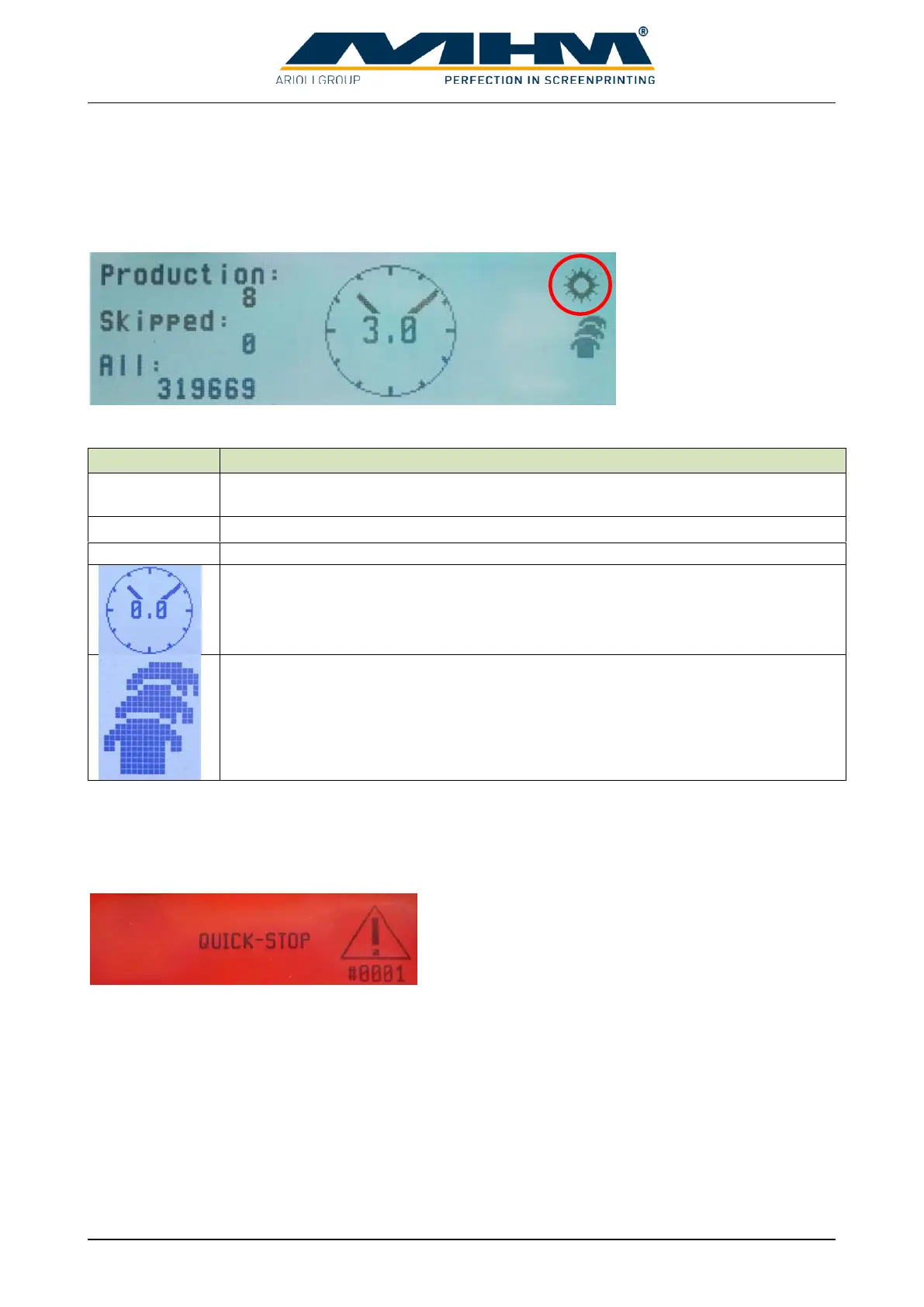
In Automatic-mode index and working cycles start continuously. Press START button to start the
automatic production. When a working cycle is finished the next index move starts automatically.
An optional foot switch can be used to pause before next index move.
The following values will be displayed:
Displays the number of items which have been produced since the last “RESET”.
Press START button in Adjust-mode for resetting the counter.
Displays the amount of skipped tables since the last reset.
Shows the overall number of produced items.
Delay time for working cycle to give the operators more time to do their work.
Use turning knob “SET” to change the time.
Is displayed when production is running.
9.9. Error display
9.9.1. Error messages terminal
Error messages will be displayed in red with error
number and error text.
After the error reason is eliminated the message must be cleared. An emergency shutdown must be
confirmed first with the “error-reset-button” on the backside of the control panel and afterwards
with “F1” on the terminal. Other messages must be confirmed two times on the terminal.


 To Next Page