Microair Avionics M760 Transceiver Installation & User Manual
M760Q Install & User Manual 01R12.doc Page 12 of 36 30
th
March 2010
3.7 INTERNAL VOX INTERCOM
The M760 is fitted with a VOX intercom feature which utilises the sidetone facility of the radio. The
VOX threshold level is controlled in software by use of the VOX Adjust Mode. See section 5.4 to adjust
the internal VOX intercom.
3.8 HEADSET ADJUSTMENT
It is important to ensure that the sidetone and mic gain are set to the correct levels, for best headset
performance. The sidetone level will set the intercom’s headset volume. The mic gain will set the level of
microphone sensitivity for each headset.
3.8.1 SIDETONE
Adjust the sidetone if necessary for good volume level in the headset using the intercom. Ensure that the
headset volume adjust (typically a knob located on the headset earcup) is set to mid range, so the volume
came be adjusted up/down by the user.
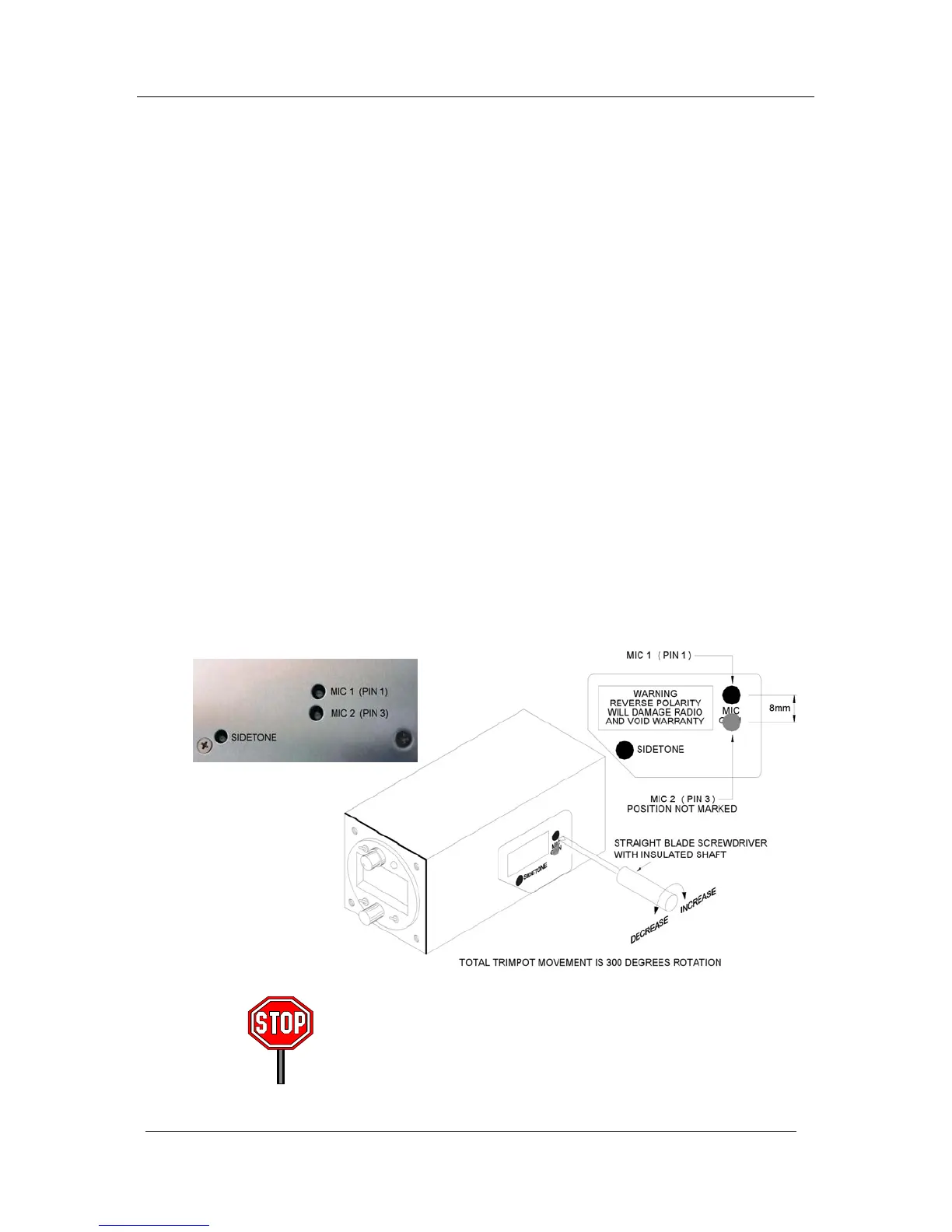
3.8.2 MIC GAIN
Adjust the microphone gain if necessary for best audio “quality” not volume level, when transmitting.
The M760Q is fitted with separate mic gain trimpots to allow for adjustment of individual headsets.
Punch the black dot carefully with a screwdriver blade, to expose the slotted plastic head of the trimpot,
located appox 3mm (1/8”) below the surface of the casing. The second mic gain position is not marked,
refer to the drawing below for location.
Note the position of the slot before making adjustments. Use a small flat bladed screwdriver to make
adjustments before testing with a headset again. The total movement of all trimpots is only 300 degrees
(4/5
th
turn). The factory setting positions the slot of the trimpots at 10 O’clock.
Do not attempt to adjust the modulation or power output. These
adjustments can only be set correctly by a qualified technician.
Adjustment of the power output or modulation by anyone other than
Microair or their approved agent will void the warranty.



 To Next Page