Microair Avionics M760 Transceiver Installation & User Manual
M760Q Install & User Manual 01R12.doc Page 20 of 36 30
th
March 2010
Press Mode Switch
Press Mode Switch
Press
Mode
Switch
4.4 MODE SWITCH
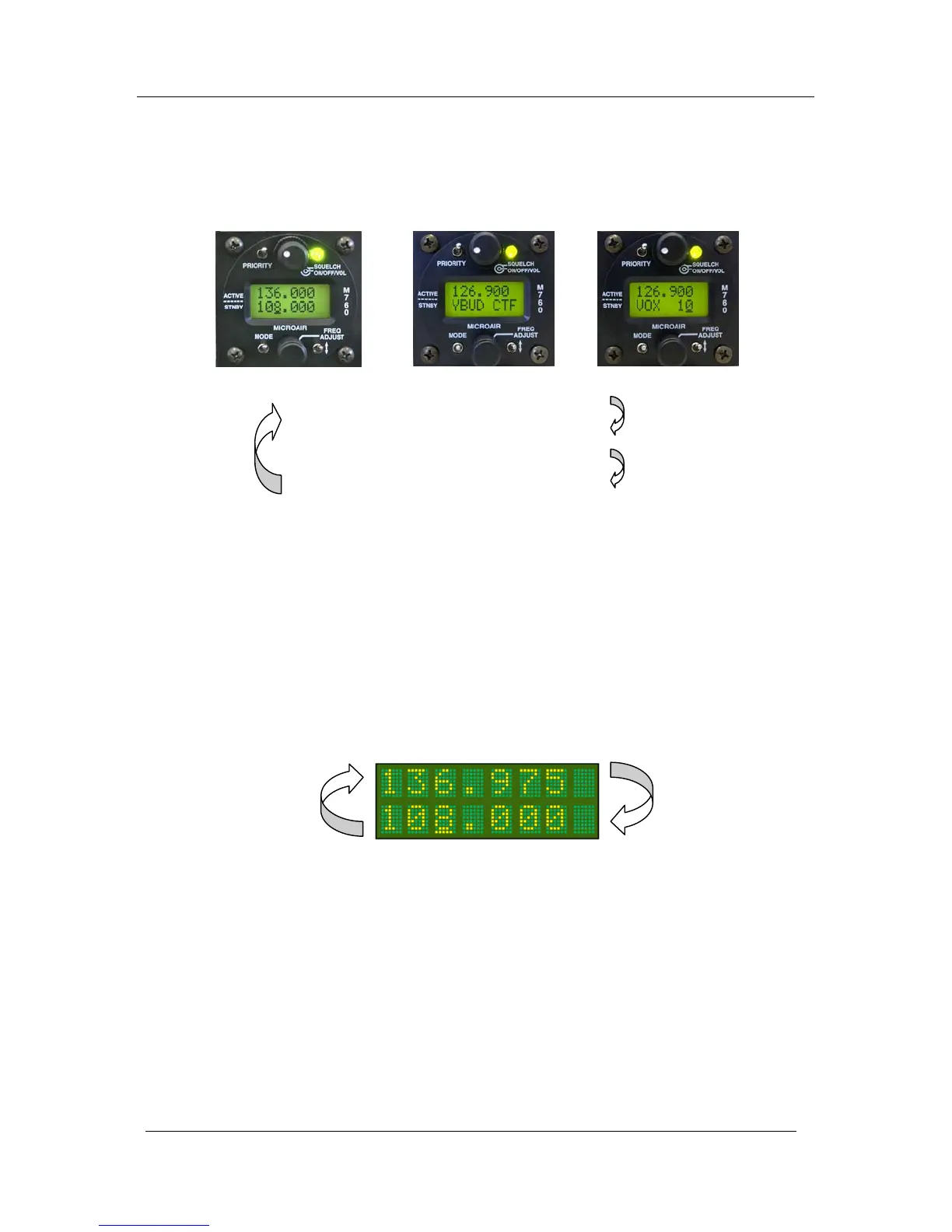
The mode switch is a push down switch, which will cycle through the operational modes of the M760.
When pushed down briefly the radio will step to the next operating mode.
ACTIVE / STANDBY MODE (Refer section 5.1)
CHANNEL MODE (Refer section 5.3)
VOX ADJUST (Refer section 5.4)
If the internal VOX intercom has been disabled in the program mode menu the intercom adjust mode
will be skipped. See section 6.2 to enable / disable the internal VOX intercom.
By holding the mode switch down and turning on, the M760 will start in PROGRAM MENU (refer
section 6.0)
4.5 TOGGLE SWITCH
When the toggle switch is pressed briefly in Active/Standby mode, the active and standby frequencies
exchange places. Hold the toggle switch down for 3 seconds to activate the monitor function.
When the M760 is in monitor mode, press the toggle switch briefly to disengage the monitor
function.
When the M760 is in channel mode the toggle switch is used to quick save the frequency.
The toggle switch is also used in the PROGRAM MODE for programming functions.



 To Next Page