OM-230693 Page 28
F
Complete Parts List is available at www.MillerWelds.com
SECTION 6 – OPERATION
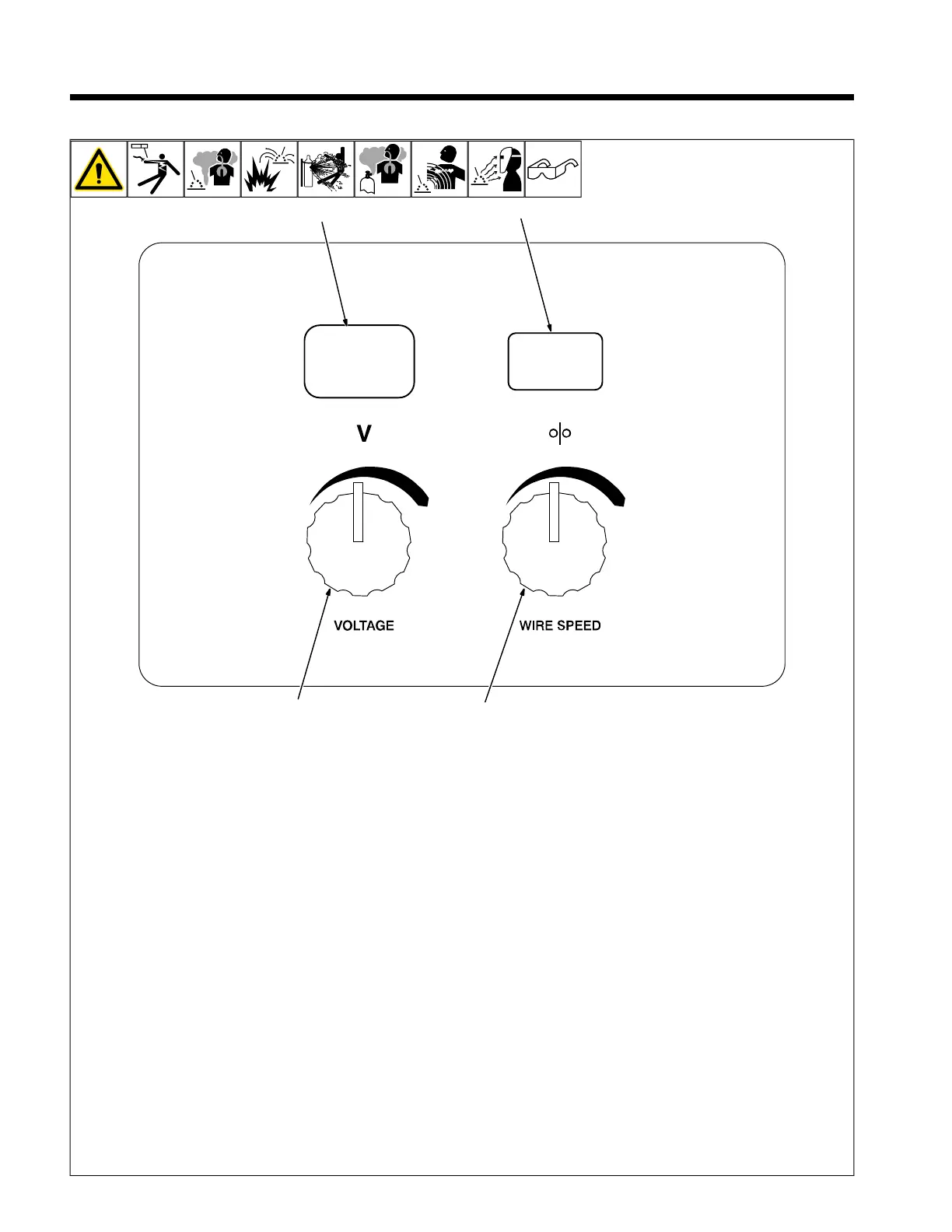
6-1. Controls
1 Voltage Control
Turn control clockwise to increase voltage.
2 Wire Speed Control
Turn control clockwise to increase wire feed
speed.
3 Voltmeter
4 Wire Feed Speed Meter
F
This unit has three automatic timers in-
cluded in its operation to help save
contact tips, gas, and wire:
Tip Saver – Weld output shuts off if tip is
shortened to work surface.
Safety shut-off – Weld output will shut off if
no arc is detected within 3 seconds after
gun trigger is depressed.
Jog mode – When loading a new roll of wire
or if the gun trigger is accidentally pressed,
gas will shut off after 1 minute and wire will
shut off after 2 minutes, saving wire and
gas.
JOG Mode
If the trigger on either gun is held for more
than 3 seconds without striking an arc, the
unit will automatically shut off weld power
(and shielding gas output on MIG gun only),
but will feed wire continuously at the preset
wire feed speed (which may be faster or
slower than Run −in Speed) until trigger is
released.
Run−in Wire Feed Speed Settings
Run−in settings for the MIG and Spool Guns
are independently set and stored in unit
memory. The settings are in percent of the
welding wire feed speed preset. Both set-
tings are adjustable from 25 to 150 percent.
MIG Gun Run −in is factory set at 100%
which is recommended for most wire sizes
and types.
Spool Gun Run −in is factory set at 50%
which is recommended for .030 & .035 wire.
A Run −in setting of 25% is recommended
for .047 wire.
To check Run −in settings, start with the
power switch OFF. Press and hold the MIG
or Spool Gun Trigger while turning the
power switch ON. The unit will power up with
both the displays reading 888 , then the volt-
age display will read run and the wire feed
display will read the preset Run−in percent-
age from memory for the gun selected. To
return to the weld mode without making a
change, simply release trigger and pull the
trigger again momentarily (one second).
To change Run −in settings, start with the
power switch OFF. Press and hold the MIG
or Spool Gun Trigger while turning the
power switch ON. The unit will power up with
both the displays reading 888 , then the volt-
age display will read run and the wire feed
display will read the preset Run−in percent-
age from memory for the gun selected. To
change the Run−in value, release the trigger
and turn the wire feed control knob (or the
wire feed adjustment knob located on the
bottom handle of the spool gun) to the de-
sired setting for the selected gun. To return
to weld mode after the Run −in speed
change, pull the trigger momentarily (one
second).





 To Next Page