System
22 Elix® Essential 3, 5, 10, 15 (UV) / RiOs™ Essential 5, 8, 16, 24
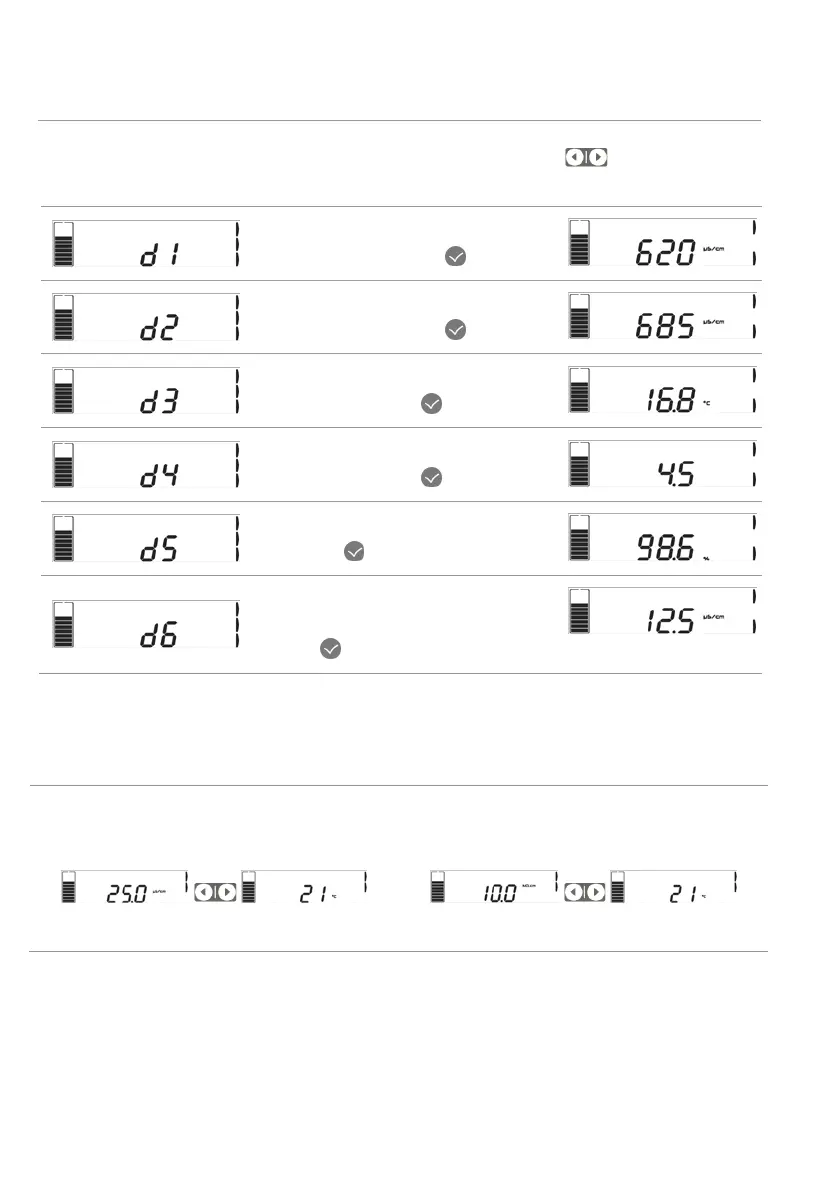
View operation parameters
In Ready or Tank filling, press and hold 2 sec on left or right arrow to access
operation parameters.
Tap water feed conductivity value can
be displayed by pressing
.
RO feed water conductivity value can
be displayed by pressing
.
RO water temperature value can be
displayed by pressing
.
RO pump pressure value can be
displayed by pressing
.
RO % rejection value can be displayed
by pressing
.
On Elix® Essential: RO permeate water
conductivity value can be displayed by
pressing
.
Note:
the product water quality and temperature are displayed on the main display view.
On RiOs™ Essential, the RO permeate water
conductivity is shown on the main display:
On Elix® Essential, the resistivity or
conductivity is shown on the main display:
Press arrow to view temperature.
Press arrow to view temperature.






 To Next Page