Sanitization and cleaning
Elix® Essential 3, 5, 10, 15 (UV) / RiOs™ Essential 5, 8, 16, 24 31
Cleaning RO membranes with acid/base (pH)
• It may become necessary to remove any built up layer of mineral scale or organic
material. This is done with a pH Cleaner. Contact your service representative for more
information about their use.
• To start the cleaning, make sure the system is in Standby or put the system in Standby by
pressing
.
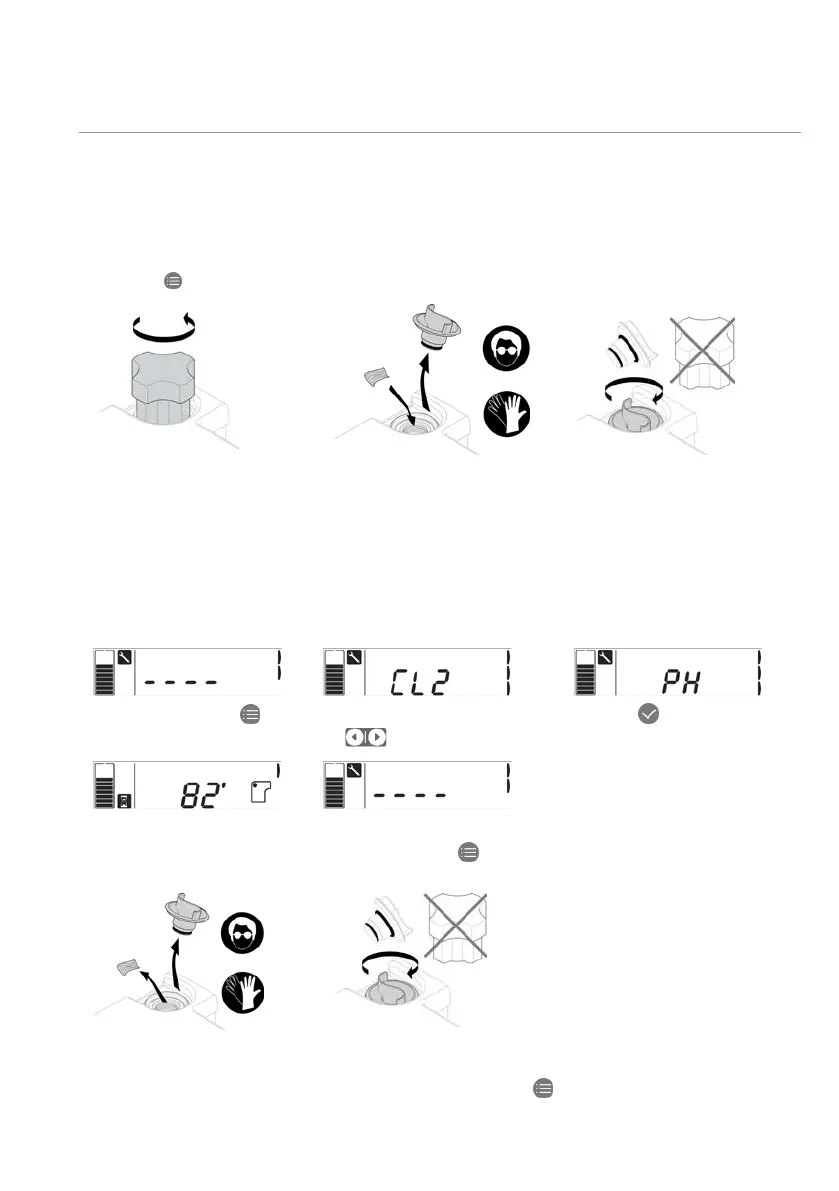
1- Using the tool, unscrew
the sanitation port cap.
2- Remove the plug and insert
the tablet in the port.
- Screw the plug back: make
sure the o-ring is in place.
do not use the tool to screw
the plug
– the plug may be
Starting pH cleaning
1- In Standby, press
.
2- Press on right arrow
to reach PH.
3- Press
for 1 second to
start pH cleaning.
4- The cleaning lasts
82 minutes.
5- Once the cleaning is
finished, press
system in Standby.
6- Unscrew the plug and
remove the empty pouch
from the cleaning port.
7- Screw the plug back and
put the system in Tank
filling by pressing twice
.






 To Next Page