Consumables replacement
Elix® Essential 3, 5, 10, 15 (UV) / RiOs™ Essential 5, 8, 16, 24 27
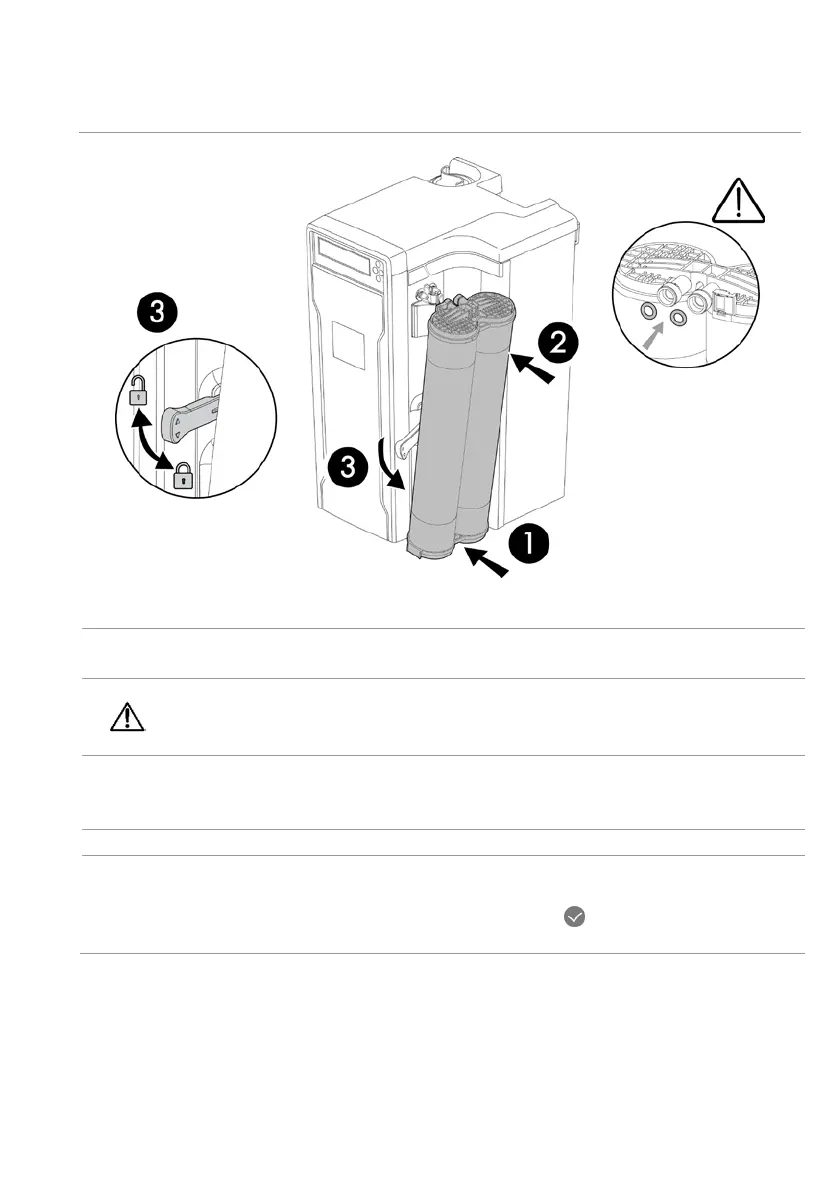
Placing new pack
Remove the new pack from its shipping box. Remove the 2 p
rotective caps from the
ports at the top of the pack.
Locate the o-ring inside each port. Make sure the o-rings are push inside
against the inner edge of the ports.
1 Mount the bottom of the Pack onto the small hole in the cabinet.
Swing the rest of the Pack so that the top of the Pack aligns with pack locking handle
and the cabinet ports.
2 Push the top of the Pack in-place.
3 Push the Pack locking handle down to secure the Pack.
•
The new pack is detected.
•
The display prompts you to start a Progard® flush: press for 1 second.
•
Wait 15 minutes for the Progard® flush to finish.






 To Next Page