EasyManua.ls Logo

Millipore RIOS 3 - Tank Level Calibration Procedure

Millipore RIOS 3
43 pages
Print Icon
To Next Page IconTo Next Page
To Previous Page IconTo Previous Page
Loading...
MAINTENANCE
6-4 HOW TO CALIBRATE THE TANK LEVEL (C01)
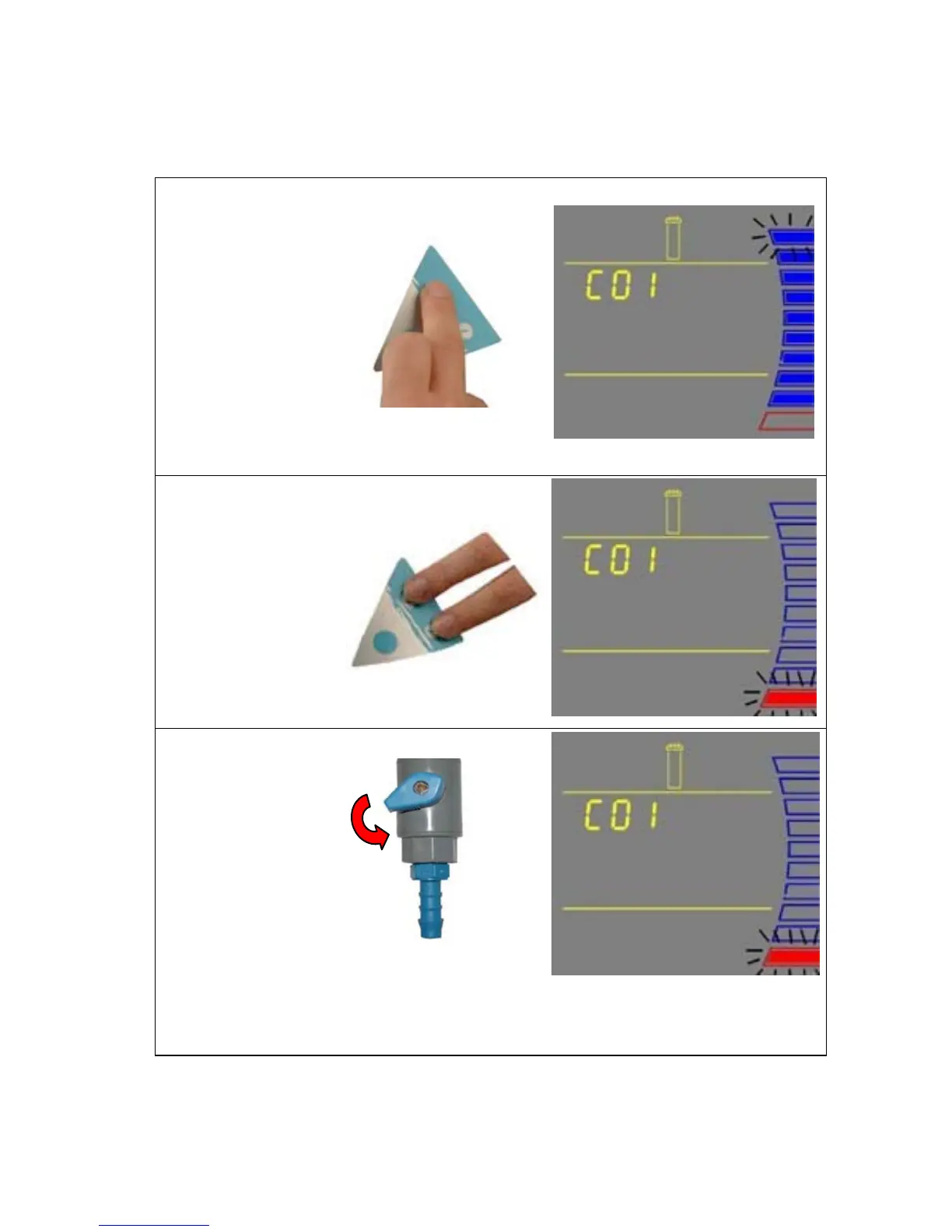
Before calibrating the tank level, the tank needs to be filled to the 100% level or TANK FULL.
1. Press the Main
and “+“ Buttons
together to enter
the menu. The
Display will show
C01. The highest
Tank Level
display will be
blinking. This
means that the
highest water
level is ready to
be calibrated.
2. Press the “+” and
“-“ Buttons
together to enter
the highest water
level. The Display
will show the
lowest Tank Level
(red level) display
blinking.
3. Open the Tank
Outlet Valve.
Allow the tank to
be emptied to its
lowest water
level.
NOTE: The highest and lowest tank level must be calibrated together or else the
tank level is not calibrated.
CONTINUED ON NEXT PAGE
- 28 -

Table of Contents

Related product manuals