Chapter 5 Test and Material List
65
5.5.2 AG CALIBRATE
(Agent>1.5%, CO2>1.5%, N2O>40%, O2>40% )
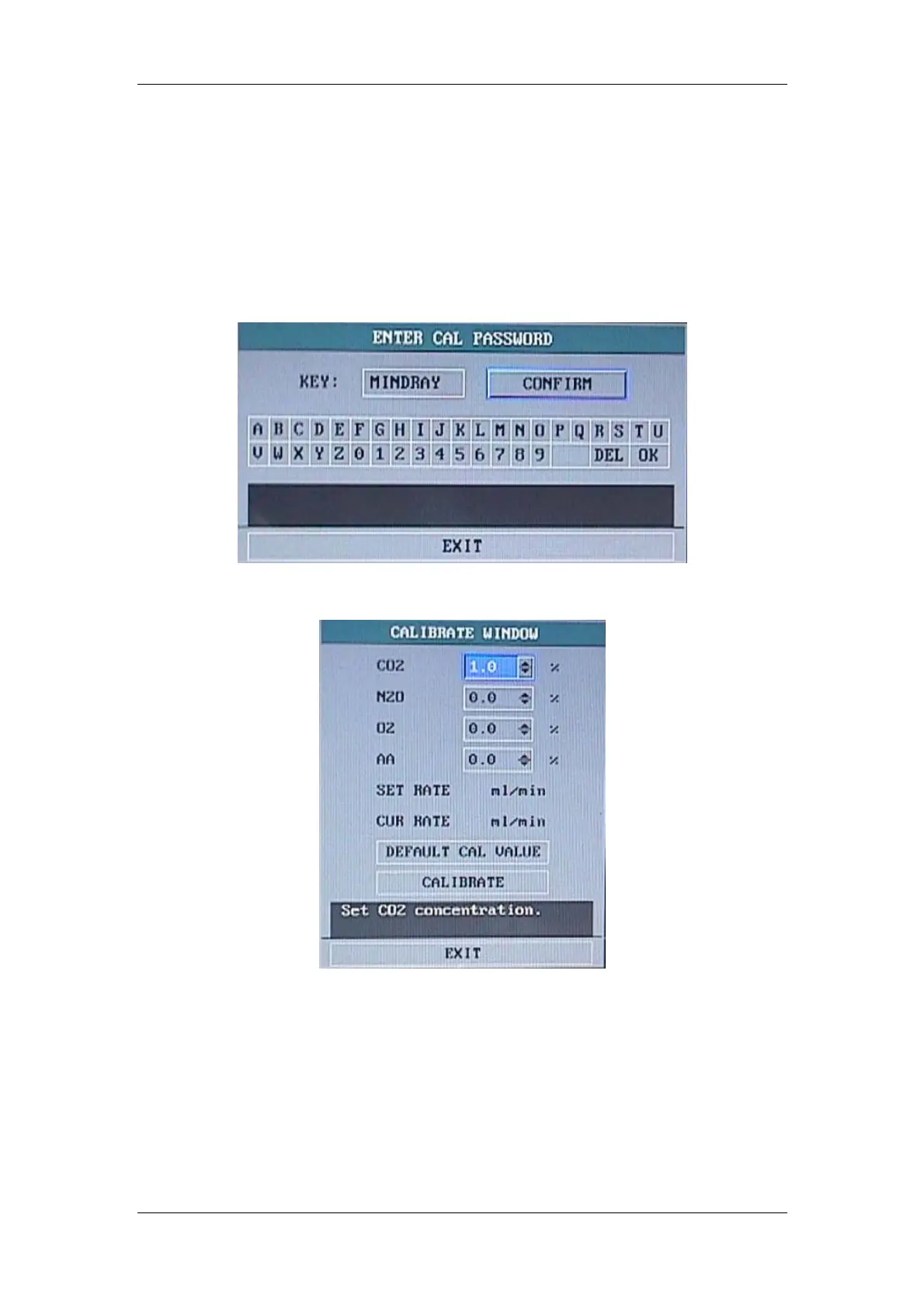
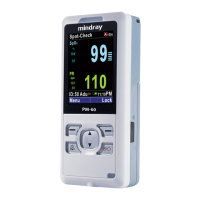
1、Press ‘START CAL’, then input password ‘MINDRAY’ entering ‘CALIBRATE’ menu.
Note: Make sure the AG in ‘Measure’ mode not ‘Standby’ mode before you do calibrate.
Figure 5-10
Figure 5-11
2、Input each gas concentration value according to the label on the AG bottle label.
Note: If your monitor do not have O2 module, input ‘0.0’ in O2 item.
3、Open AG cover, wait for the display value stabilization.
4、If the display value does not accord with the input value, please press ‘CALIBRATE’ item
and exit.
AG concentration must fit the following requirements:
Agent>1.5%, CO2>1.5%, N2O>40%, O2>40%


 To Next Page