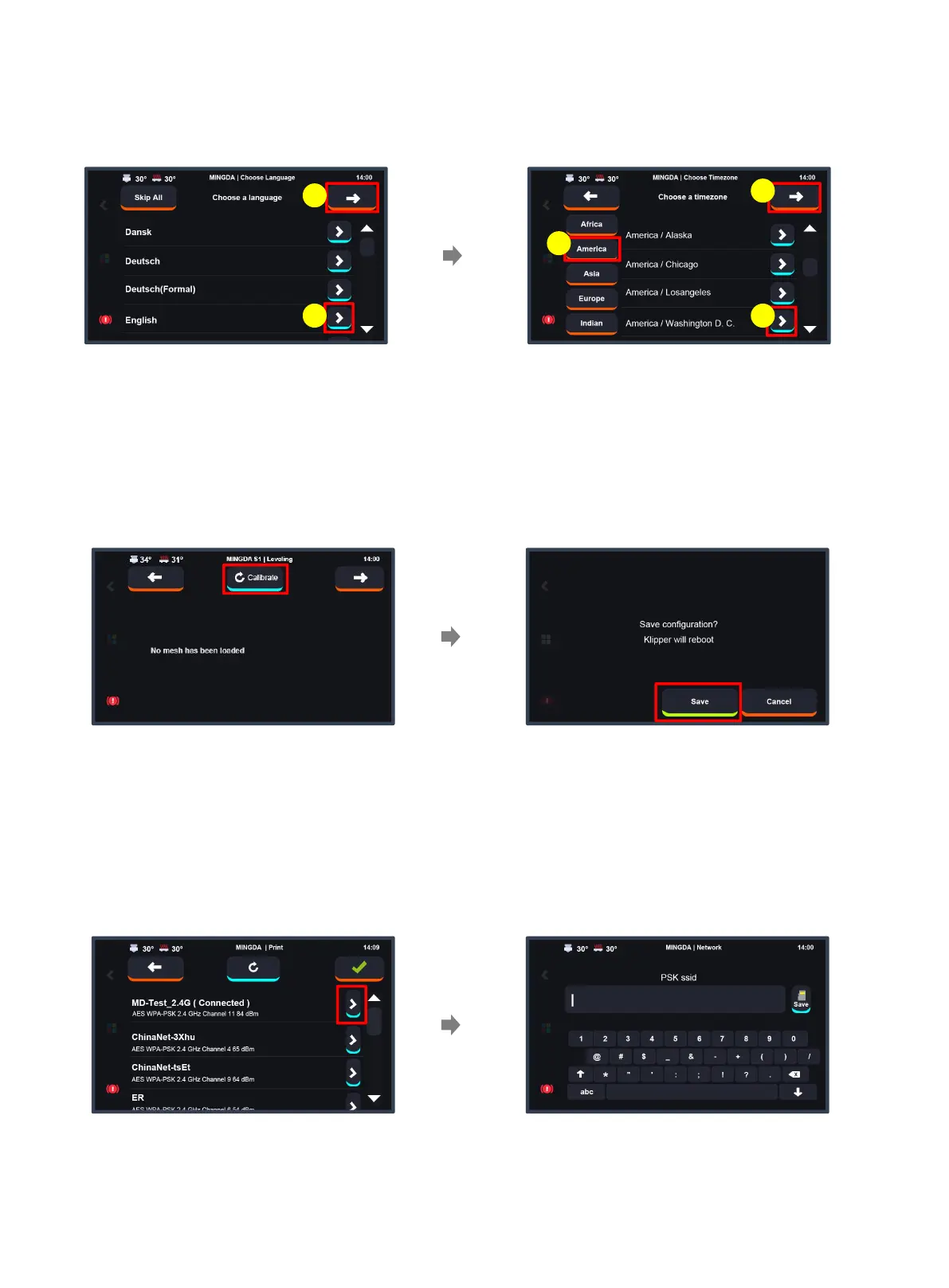
Startup Configuration
1. Select Language and Time Zone
Start by selecting your continent on the left,
then click the right arrow to choose your
specific region. [Time zone settings will take
effect after connecting to Wi-Fi and restarting
the system.]
Click the right arrow to choose
the language, and click the upper
right arrow to proceed to the next
step.
3
1
21
2
(For the first startup, it will enter the configuration wizard.)
2. Auto Bed Leveling
Click the "Save" button to store the bed
leveling data and automatically restart the
printer.
Click the "Calibrate" button to initiate the
quick auto bed leveling process, which will
take approximately 3 minutes. Please be
patient.
3. Wi-Fi
Enter the network password and then click
Save.
Click the right arrow button, select the network
you want to connect to. The first connection
may take some time, please be patient. If the
network is not displayed for an extended period,
click the refresh button at the top.
7



 To Next Page