Instructions for Use SonaStar Ultrasonic Surgical Aspiration System
IFU-601 Rev T March 2023 Page 32 of 73
1. IV Pole Insertion Block – Holding block for IV pole (on which the IV solution bag is suspended).
2. Audio Feedback Volume Control - knob for controlling the volume (down to zero level) of the
audible alert tone heard when the vibration footswitch is depressed during Preset or Linear
mode.
3. Fault Volume Control - knob for controlling the volume of the audio indicator heard when a
fault condition occurs.
4. Fault Override - button to override a non-critical fault (error code E4) and allow continued use
of the Ultrasonic Aspirator.
Tip: If an E4 fault has been overridden, the FAULT status indicator continues to flash during
subsequent operation.
5. Power Cord Brackets (2) - for wrapping the power cord when the unit is not in use.
6. External Aspiration Filter
Tip: If the footswitch is not connected, error code E5 is displayed on the front panel digital display.
This error code is monitored before running Setup only.
7. Storage Compartment - for storage of accessories.
8. Fuse - F3 (see Section 10.3 for replacement).
9. Power Cord Receptacle.
Fuses - F1 and F2 (see Section 10.3 for replacement).
10. Fans
11. Electrosurgery Umbilical Connector – provides for connection to a Misonix-approved
electrosurgical unit. See Chapter 7.
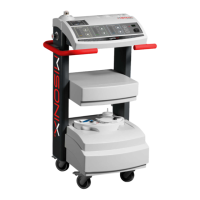
12. Footswitch Storage Shelf
13. Rating Plate - with Serial Number
14. Electrosurgical Unit Shelf – Provides a platform to position and store an electrosurgical unit.
Refer to Chapter 7.
15. Equipotential Grounding Lug
16. Receptacle for Remote IR Receiver.


 To Next Page