214
ED+, ED+P, ED-, ED-P
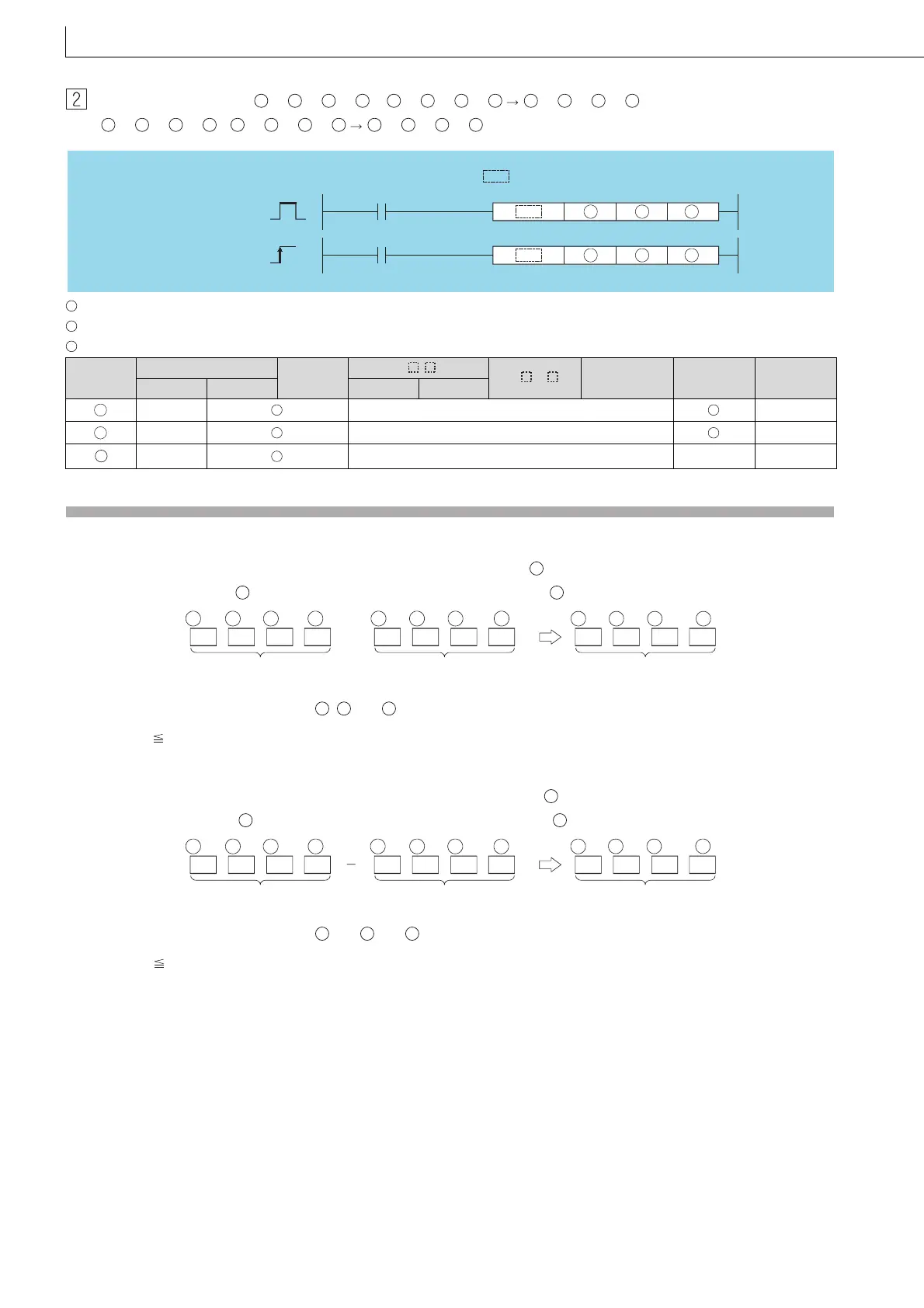
When three data are set (( +3, +2, +1, )+( +3, +2, +1, ) ( +3, +2, +1, ),
( +3, +2, +1, )-( +3, +2, +1, ) ( +3, +2, +1, ))
: Data to be added to/subtracted from or head number of the devices where the data to be added to/subtracted from is stored (real number)
: Data for adding/subtracting or head number of the devices where the data for adding/subtracting is stored (real number)
: Head number of the devices where the addition/subtraction operation result is stored (real number)
Function
ED+
(1) Adds the 64-bit floating decimal point type real number designated at and the 64-bit floating decimal point type real
number designated at , and stores the sum in the device designated at .
(2) Values which can be designated at , and and which can be stored, are as follows:
0, 2
-1022
| Designated value (stored value) | < 2
1024
ED-
(1) Subtracts a 64-bit floating decimal point type real number designated by and a 64-bit floating decimal point type real
number designated by , and stores the result at a device designated by .
(2) Values which can be designated at and and which can be stored, are as follows:
0, 2
-1022
| Designated value (stored value) | < 2
1024
Setting
Data
Internal Devices
R, ZR
J\
U\G
Zn
Constants
E
Other
Bit Word Bit Word
–– –– ––
–– –– ––
–– –– –– ––
S1 S1 S1 S1
S2 S2 S2 S2
D D D D
S1 S1 S1 S1
S2 S2 S2 S2
D D D D
Command
Command
P
S1 S2 D
S1 S2 D
ED+, ED-
ED+P, ED-P
indicates an instruction symbol of ED+/ED-.
S1
S2
D
S1
S2
D
S1
S2
D
+3
64-bit floating-point
real number
+
+2 +1 +3
64-bit floating-point
real number
+2 +1 +3
64-bit floating-point
real number
D
+2
D D
+1
D
S1 S1 S1 S1 S2 S2 S2 S2
S1
S2
D
S1
S2
D
+3
64-bit floating-point
real number
+2 +1 +3
64-bit floating-point
real number
+2 +1 +3
64-bit floating-point
real number
+2 +1
S1 S1 S1 S1 S2 S2 S2 S2
D
D
D
D
S1
S2
D


 To Next Page
 Loading...