© MOBATIME 51 / 120 800652.11
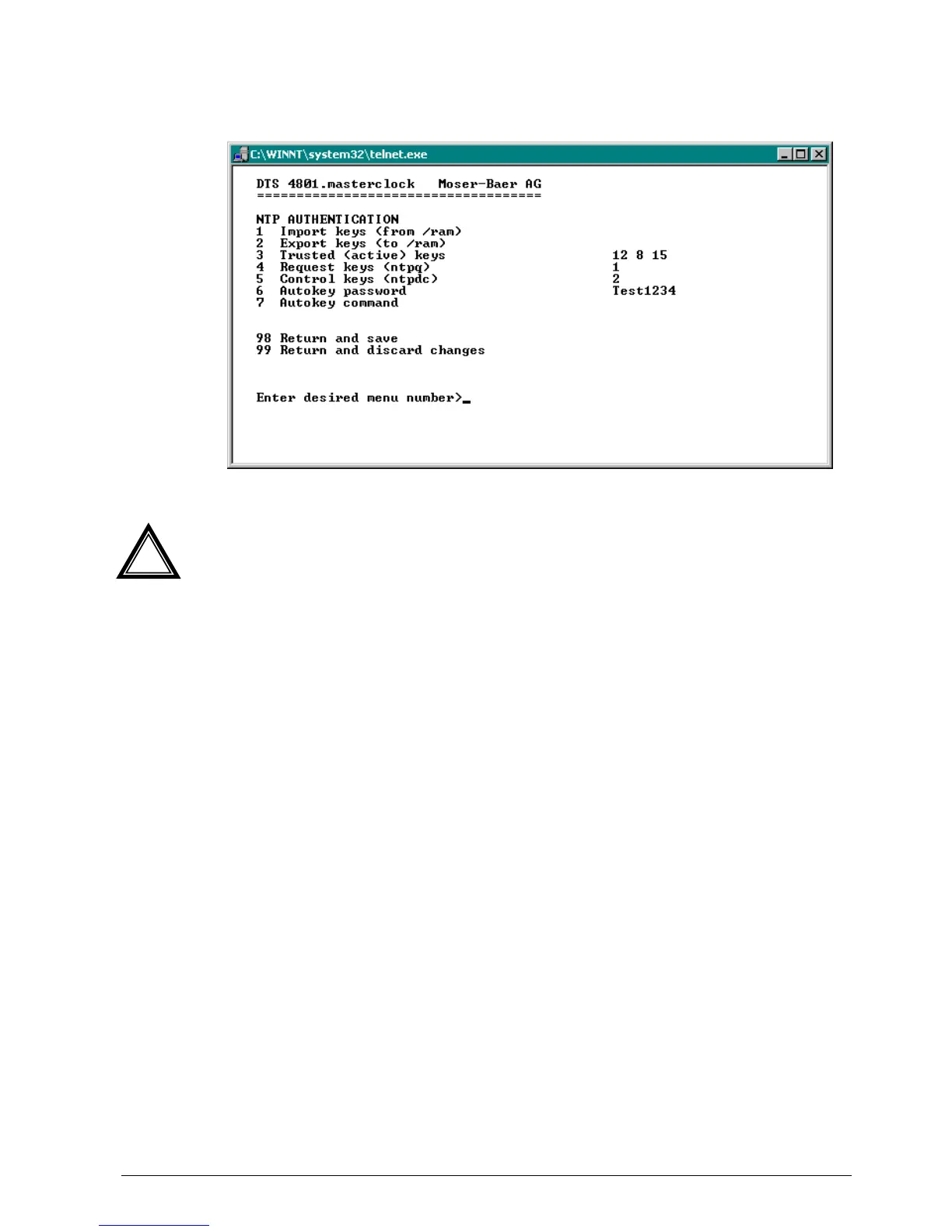
Configuration of the NTP authentication:
The NTP authentication is described in chapter “8.7 NTP authentication“.
1. Import keys (from/ram directory)
The file ntp.keys must first be copied into the directory /ram.
Attention:
The file must be named exactly in this way and written entirely in small
letters.
2. Export keys (to /ram directory)
The current ntp.keys file is written in the directory /ram.
3. Select the trusted keys separated by spaces
4. Select the request key
5. Select the control key
6. Set the auto key password
7. Execute for auto key commands:
gen_iff generate the IFF certificate
gen_gq generate the GQ certificate
gen_mv generate the MV certificate
gen_all generate all (IFF,GQ,MV) certificates
gen_client generate the client certificate
update_server update the server certificate
update_client update the client certificate
export_iff export the IFF server certificate to /ram. Parameter password
of the client
export_gq export the GQ server certificate to /ram.
export_mv export the MV server certificate to /ram.
import_iff import the IFF server certificate from /ram.
import_gq import the GQ server certificate from /ram.
import_mv import the MV server certificate from /ram.
clear_ram delete the certificates in /ram
clear_keys delete the certificates in the NTP key directory
Example: export_iff myPassword exports the IFF client certificate to /ram.
!



 To Next Page