EMC INDUSTRIAL GROUP LTD Display
MW93A_IM_ALL_SV6.09f_en 56/59
Address Data description
1000 to 4999 Macro strings (contains printouts and programs)
8000 to 8029 Interface registers (PLC access)
8030 to 8699 Configuration settings (full instrument calibration)
8700 to 8899 Data outputs (values produced by the instrument)
8900 to 8999 Activations (when set, a process is activated e.g. a zero or span)
Control and status bits can be read over modbus. Refer to the IO Function table page 52 and the Inter-
face Registers page 43 for further information.
Bits may be set in one of two ways. Either by writing to the control registers (contol1C, control1G, con-
trol2, control3) or by setting and resetting individual bits using the “IO Control” register.
OPERATION
The display normally shows the detailed operating status of the system. There are 5 soft keys with la-
belled functions. Dedicated keys give access to the operator menu, alarm menu, system select menu,
setup menu and change the displayed data.
Display
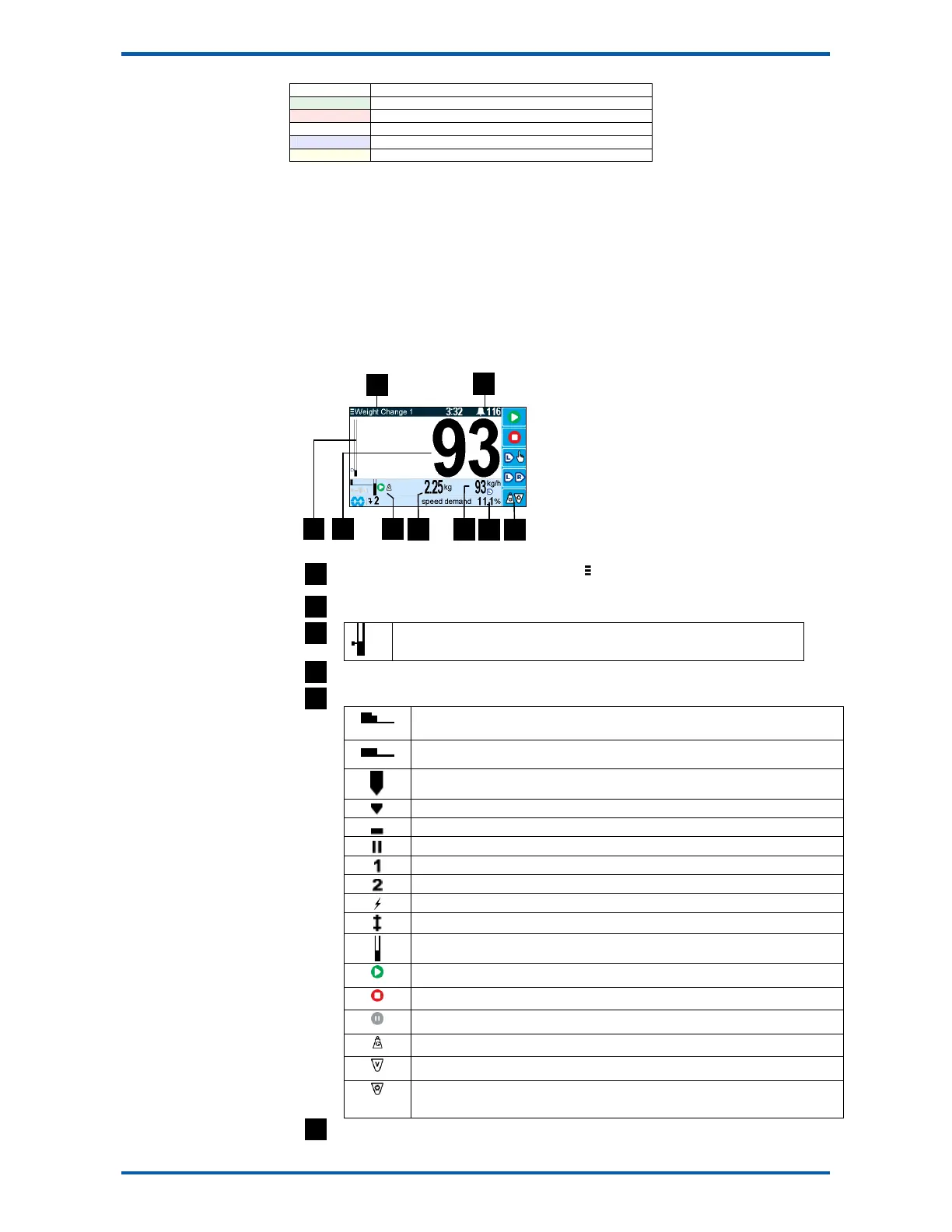
Following is a description of the various elements of the display.
Identification of selected unit. Press SELECT ( ) to view and select another unit from list of
units connected.
Alarm Symbol flashes when an alarm is present.
Main display bar graph. Shows the flowrate. The indicator shows the posi-
tion of the setpoint.
Main display of measured value. Normally flowrate.
A group of annunciators described below.
Speed demand bar graph 0 to 100%. The top smaller graph shows the feed
forward contribution to the speed demand.
tune
An auto-tune is in progress. The bar graph shows the progress.
Hopper disturbance
Refilling
Flowrate and control being HELD
Paused.
Limit 1 active.
Limit 2 active.
Setpoint change detected.
Tuning feed forward active.
Hopper level indicator.
The system is running.
The system is stopped.
The system is paused.
The system is in gravimetric mode, and is controlling the flowrate.
The system is in volumetric mode, and the speed demand is being estimated.
The system is in volumetric mode, and the speed demand has been manually
controlled.
Displays the totaliser. If the Batch Weight is not zero, then it is displayed below the totaliser.



 To Next Page