EMC INDUSTRIAL GROUP LTD Setup
MW94A_IM_ALL_SV6.09f_en 20/53
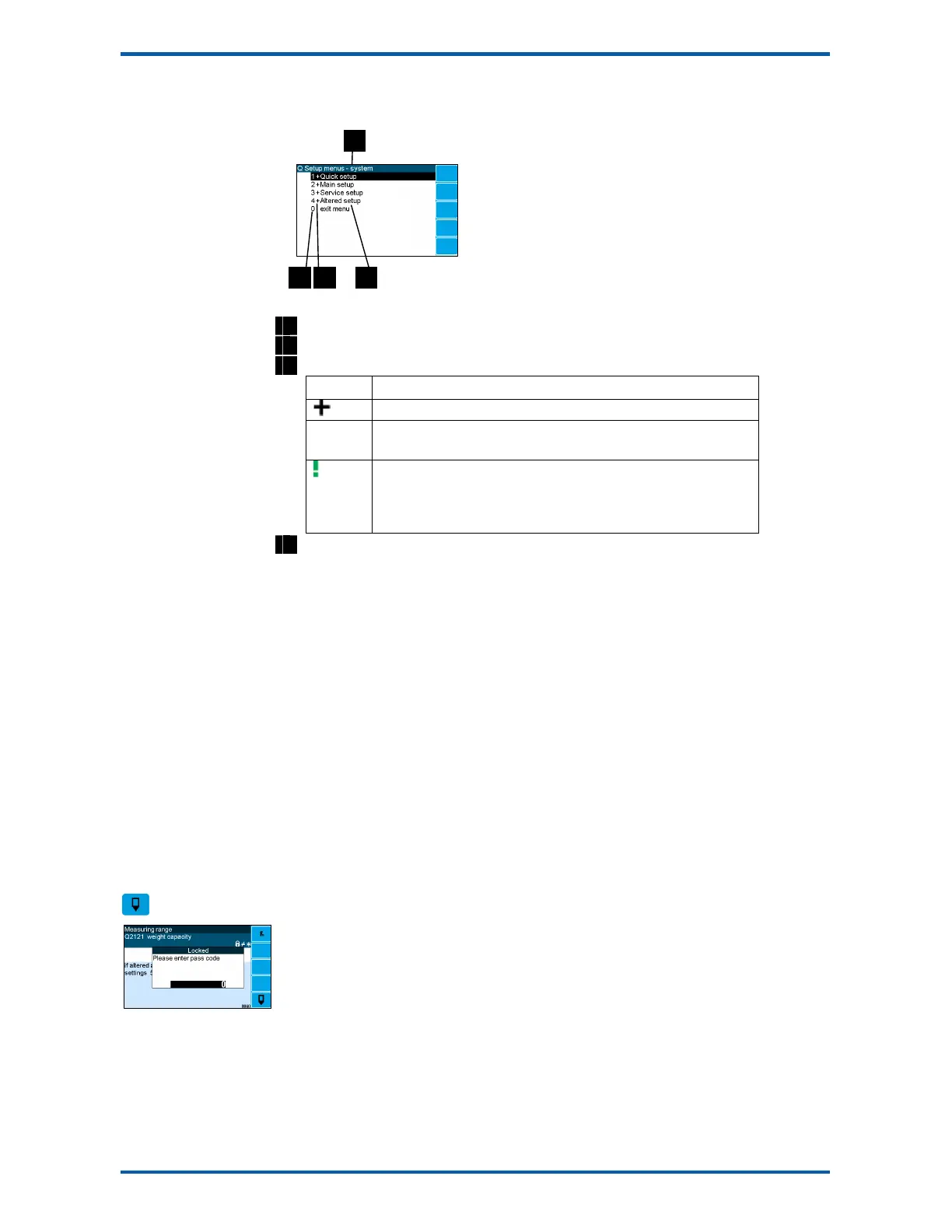
You can use the UP and DOWN keys to highlight a menu or sub-menu item, then press the ENTER key
to continue from there. When viewing a setting, the UP and DOWN keys will move between the set-
tings.
1
Menu name.
2
Quick Key number. Press key with same number to directly enter the named menu.
3
Menu item descriptor.
Element Description
Selecting this menu item will open a sub-menu.
(blank) Selecting this menu item will display the corresponding setting, or will
return from a sub-menu
The action described will be implemented directly either if the ENTER
key is pressed when item is highlighted or when the item’s Quick Key is
pressed. (Quick Key number is the left most number shown in the item
line)
4
Name of menu item.
Description of Menus
Quick setup
Quick setup menu contains the most important settings, and is a shortened version of the Main setup
menu. Use the Quick setup menu for initial setup of the unit. In many applications, no further setup will
be needed. The quick setup settings are marked with an asterix in the Setup Summary. (*)
Main setup
Main setup menu contains all standard information and settings. Use this menu to view the units infor-
mation (eg serial number), and adapt the unit for the application (eg change the speed demand output
to 0 to 20mA). The main setup settings are listed in the Setup Summary.
Service
Service menu contains all standard settings as well as settings for advanced configuration and diagnos-
tics. Use this menu if there are special application requirements, or if special diagnostics are required.
This menu includes the Factory settings, for which certified equipment is required. These settings are
not documented in this manual, contact the factory for further information.
Altered settings
Altered settings menu lists all settings that are different from the default. Use this menu to fill in the
field settings on the Setup Summary
To Adjust A Setting
Press the EDIT key to allow changes to the selected setting.
If editing is locked, a password will be requested. For Quick setup and Main setup, the password is
111. For Service setup the password is 9713. For Altered setup there is no password as settings are
display only.
Use the keypad and/or UP and DOWN arrow keys to increase or decrease the displayed setting. Some
settings allow only one method, and some are display only.
Holding either key down will automatically continually increase or decrease the value.



 To Next Page