EMC INDUSTRIAL GROUP LTD Macros
MW94A_IM_ALL_SV6.09f_en 21/53
1
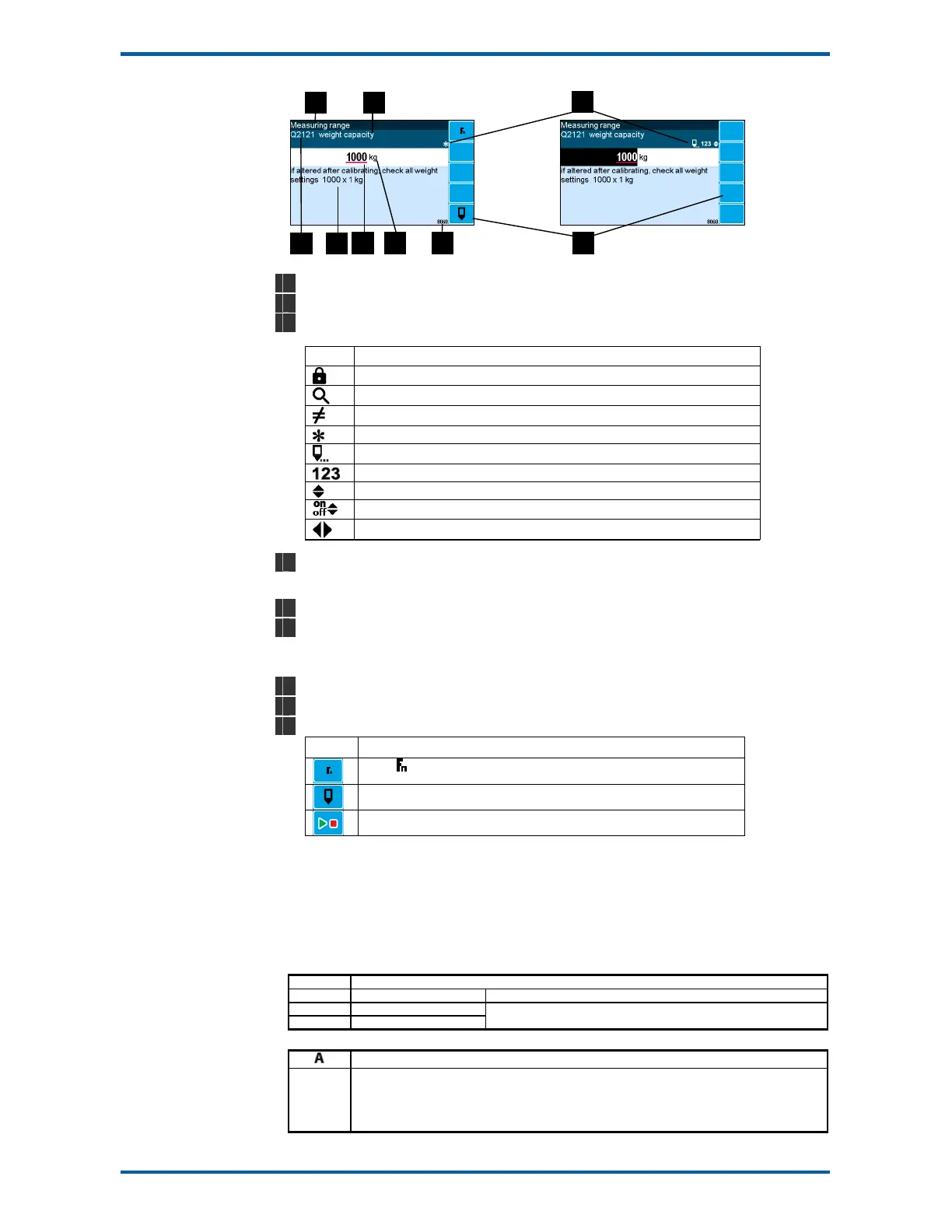
Menu item.
2
Setting name.
3
Gives information about the settings and indicates active keys or the preferred method of making a
value change while editing.
Icon Description
The setting is locked. Password must be entered to edit.
The setting can only be viewed.
The setting has been changed from the default.
An important setting.
The setting is being edited.
Use numbered keys to change setting value.
Use UP & DOWN keys to scroll through selection list.
Use UP & DOWN keys to turn setting on or off.
Use the arrow keys to move through the bits of a control or status register.
4
Sequence of quick-keys used to reach this setting. Not editable. The left-most digit identifies the
current menu as follows: 1 for Quick setup, 2 for Main setup, 3 for Service setup, and 4 for Altered
setup.
5
Hint line which reveals extra information about the setting.
6
Setting value. To change press EDIT key. If editing is locked, a password will be requested. Key in
the password and press the ENTER key. The setting will become highlighted by a black back-
ground. Key in changes then press ENTER key. For Quick setup and Main setup, the password is
111. For Service the password is 9713.
7
Engineering unit setting is displayed in.
8
Modbus address of this setting. Not editable.
9
Soft keys used with settings.
Icon Description
Press key for menu of special functions.
Press EDIT key to edit the macro.
Use the soft key to start and stop an operation.
Macros
A macro is a list of numbers representing text characters and instructions codes. Each number is edited
separately, and is entered either as a number using the numeric keys, or as an text character using the
letter keys much like a cell phone. There are three data entry modes, instruction, lower case text and
upper case text.
Macro Codes
Code Description
0 end of macro Terminates execution of macro or returns from subroutine.
1 - 127 standard ASCII characters
128 - 187 extended ASCII characters
Characters are sent out COM1 (RS232).
Alternate Instructions
Used to encode printable characters (Unicode values 0 to 65536) outside the ASCII range.Sends the
Unicode characters out COM1 with UTF8 encoding. Some characters can be used in the “system name
macro” to appear on a ModWeigh display.
arg0 and arg1 must be in the range 1 to 128.



 To Next Page