MONITOR
HEATING SYSTEM
Section
3:
Operation
3-9
PROGRAMMING
THE
WEEKLY
TIMER
FOR
AUTOMATIC
HEATER
OPERATION
The
Monitor GF3800 Heating
System
is
capable
of
providing
up to 4
different temperature setting
for 4
different times
of
each
day of the
week.
Not all 4
settings
have
to be
used;
2, 3 or 4
settings
can be
used.
A
clear understanding
of
programming tem-
peratures, time
and day of the
week
from
the
previ-
ous
pages
is
needed before programming
the
auto-
matic
settings. Also,
the
present time
and the day of
the
week must have been set.
This system
is
capable
of
programming Monday
to
Friday,
Saturday
and
Sunday
to
same
4
programs
as
shown
in the
table
or
each
day can
have
a
different
set
of 4
programs. Also, this system
is
capable
of
programming
all 7
days
to
have
the
same set.
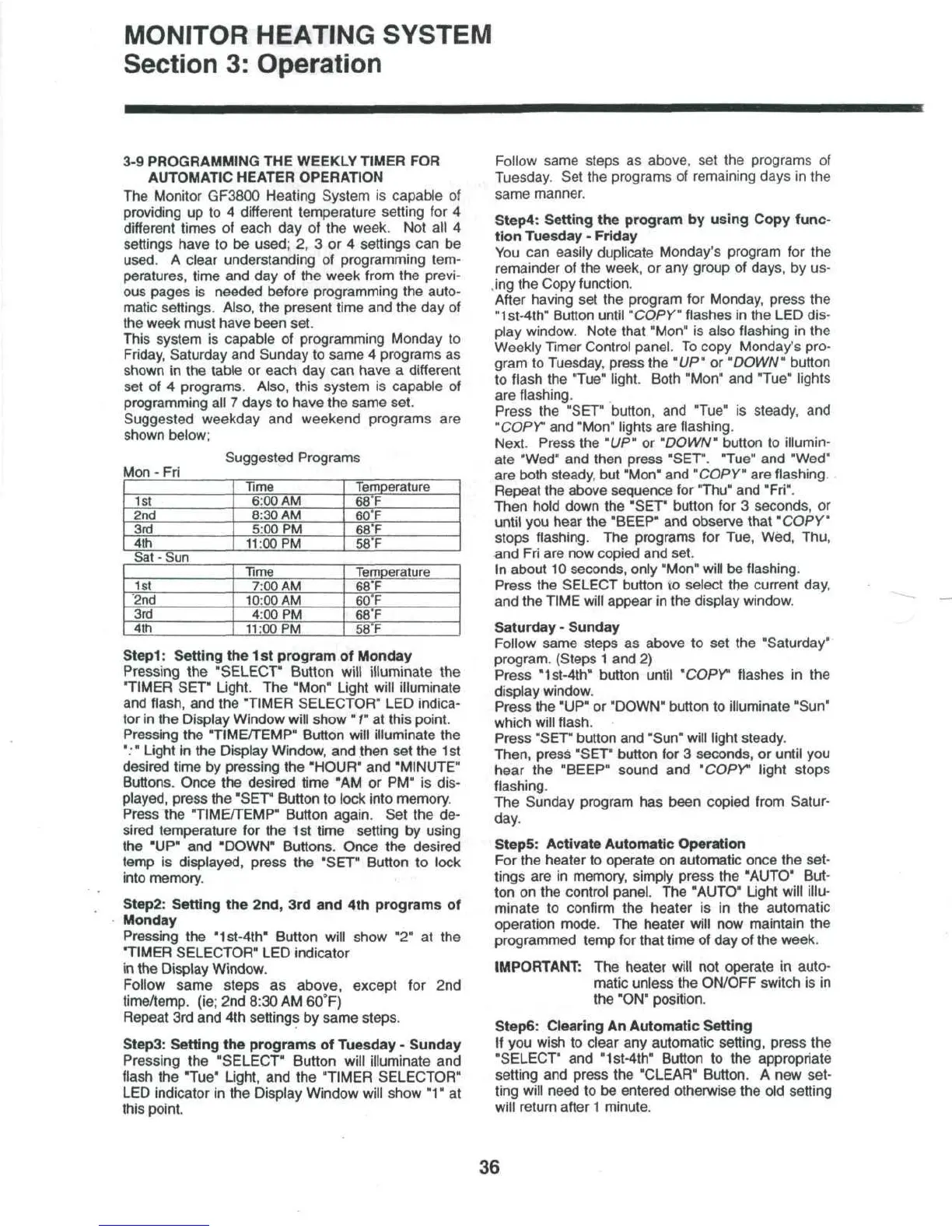
Suggested
weekday
and
weekend programs
are
shown
below;
Mon - Fri
Suggested
Programs
1st
2nd
3rd
4th
Time
6:00
AM
8:30
AM
5:00
PM
11:OOPM
Temperature
68°F
60°F
68'F
58T
Sat - Sun
1st
2nd
3rd
4th
Time
7:00
AM
10:00
AM
4:00
PM
11:OOPM
Temperature
68'F
60°F
68'F
58°F
Stepl:
Setting
the 1 st
program
of
Monday
Pressing
the
"SELECT"
Button
will
illuminate
the
"TIMER SET"
Light.
The
"Mon" Light will illuminate
and
flash,
and the
"TIMER SELECTOR"
LED
indica-
tor
in the
Display Window
will
show"
/"
at
this point.
Pressing
the
"TIME/TEMP"
Button will illuminate
the
":"
Light
in the
Display
Window,
and
then
set the
1st
desired time
by
pressing
the
"HOUR"
and
"MINUTE"
Buttons. Once
the
desired time
"AM or PM" is
dis-
played, press
the
"SET"
Button
to
lock into memory.
Press
the
"TIME/TEMP"
Button
again.
Set the de-
sired
temperature
for the 1st
time setting
by
using
the
'UP"
and
"DOWN"
Buttons.
Once
the
desired
temp
is
displayed, press
the
"SET" Button
to
lock
into memory.
Step2: Setting
the
2nd,
3rd and 4th
programs
of
Monday
Pressing
the
"1st-4th"
Button
will show
"2° at the
"TIMER
SELECTOR"
LED
indicator
in the
Display
Window.
Follow same steps
as
above, except
for 2nd
time/temp,
(ie;
2nd
8:30
AM
60°F)
Repeat
3rd and 4th
settings
by
same steps.
Step3: Setting
the
programs
of
Tuesday
-
Sunday
Pressing
the
"SELECT" Button will
illuminate
and
flash
the
"Tue"
Light,
and the
"TIMER SELECTOR"
LED
indicator
in the
Display Window
will
show
"1"
at
this
point.
Follow
same steps
as
above,
set the
programs
of
Tuesday.
Set the
programs
of
remaining
days
in the
same
manner.
Step4:
Setting
the
program
by
using Copy func-
tion Tuesday
-
Friday
You
can
easily duplicate Monday's program
for the
remainder
of the
week,
or any
group
of
days,
by us-
,ing
the
Copy function.
After
having
set the
program
for
Monday, press
the
"1st-4th"
Button until
"COPY"
flashes
in the LED
dis-
play window. Note
that
"Mon"
is
also flashing
in the
Weekly
Timer Control panel.
To
copy
Monday's pro-
gram
to
Tuesday, press
the
"UP"
or
"DOWN"
button
to
flash
the
"Tue"
light.
Both "Mon"
and
"Tue" lights
are
flashing.
Press
the
"SET" button,
and
"Tue"
is
steady,
and
"COPY
1
and
"Mon" lights
are
flashing.
Next.
Press
the
"UP"
or
"DOWN"
button
to
illumin-
ate
"Wed"
and
then press "SET". "Tue"
and
"Wed"
are
both steady,
but
"Mon"
and
"COPY"
are
flashing.
Repeat
the
above sequence
for
"Thu"
and
"Fri".
Then hold down
the
"SET" button
for 3
seconds,
or
until
you
hear
the
"BEEP"
and
observe that "COPY"
stops flashing.
The
programs
for
Tue, Wed, Thu,
and Fri are now
copied
and
set.
In
about
10
seconds, only "Mon"
will
be
flashing.
Press
the
SELECT button
vo
select
the
current day,
and
the
TIME will appear
in the
display window.
Saturday
-
Sunday
Follow same steps
as
above
to set the
"Saturday"
program. (Steps
1 and 2)
Press "1st-4th" button
until
"COPY"
flashes
in the
display window.
Press
the
"UP"
or
"DOWN" button
to
illuminate
"Sun"
which
will flash.
Press
"SET" button
and
"Sun"
will
light
steady.
Then, press "SET" button
for 3
seconds,
or
until
you
hear
the
"BEEP" sound
and
"COPY"
light
stops
flashing.
The
Sunday program
has
been copied from
Satur-
day.
StepS:
Activate Automatic Operation
For
the
heater
to
operate
on
automatic once
the
set-
tings
are in
memory, simply press
the
"AUTO" But-
ton
on the
control panel.
The
"AUTO" Light
will
illu-
minate
to
confirm
the
heater
is in the
automatic
operation mode.
The
heater
will
now
maintain
the
programmed temp
for
that time
of day of the
week.
IMPORTANT:
The
heater
will
not
operate
in
auto-
matic unless
the
ON/OFF switch
is in
the
"ON"
position.
StepS.
Clearing
An
Automatic Setting
If
you
wish
to
clear
any
automatic setting, press
the
"SELECT"
and
"1st-4th"
Button
to the
appropriate
setting
and
press
the
"CLEAR"
Button.
A new
set-
ting will need
to be
entered otherwise
the old
setting
will
return
after
1
minute.
36



 To Next Page