EasyManua.ls Logo

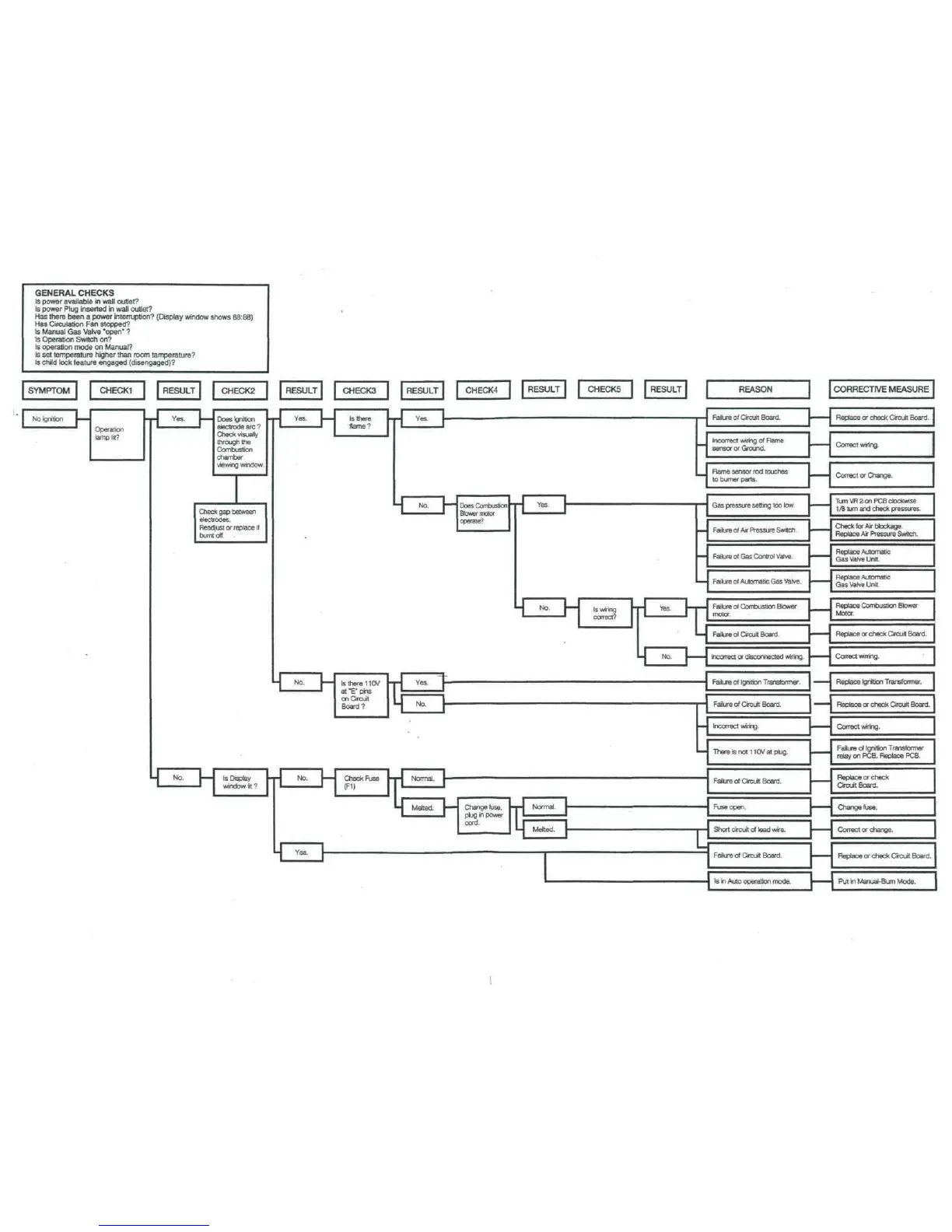
Monitor GF1800 - General Checks

Default Icon
74 pages
Print Icon
To Next Page IconTo Next Page
To Previous Page IconTo Previous Page
Loading...
GENERAL
CHECKS
Is
power
available
in
wall outlet?
Is
power Plug
inserted
in
wall
outlet?
Has
there
been
a
power
intemjpdon?
(Display
window shows
88:88)
Has
Circulation
Fan
stopped?
Is
Manual
Gas
Valve
'open*
?
Is
Operation
Switch
on?
Is
operation
mode
on
Manual?
Is
set
temperature
higher
than
room
tamperature?
Is
child
lock
feature
engaged
(disengaged)?
REASON
CORRECTIVE
MEASURE
P~
DoeiConilJuilluci
Blower
motor
operate?
M
No
1
ls
wiring
-pj
Yes
1-1
1
'
correct?
' '
'
'
-1
No.
1
-
mmm
r
L
-
.
ai
e
cu
Incorrect
wiring
of
Flame
sensor
or
Ground.
Flame
sensor
rod
touches
to
burner
parts.
Failure
of Gas
Control
Valve.
Failure
of
Automatic
Gas
Valve.
!
Failure
of
Combustion Blower
motor.
Failure
of
Circuit Board.
Incorrect
or
disconnected wiring.
VMV
-
-
~
-
Redac
C
'
Boar
Correct wiring.
Correct
or
Change.
Turn
VR
2-
on
PCB
clockwise
1/8
turn
and
check pressures.
1
Check
for Air
blockage.
Replace
Air
Pressure
Switch.
[
Replace
Automatic
Gas
Valve
Unit.
Replace
Automatic
Gas
Valve
Unit.
[
Replace
Combustion
Blower
Motor.
Replace
or
check Circuit Board.
Correct
wilting.
4
Failure
of
Ignition
Transformer.
I
'
Replace
Ignition
Transformer.
j
1
1
Failure
of
Circuit Board.
1
1
Replace
or
check Circuit Board.
4
Incorrect
wiring.
1
I
Correct wiring.
^
There
is not
1
1
0V
at
plug.
Failure
of
Circuit
Board.
Failure
of
Ignition
Transformer
relay
on
PCB. Replace PCB.
Replace
or
check
Circuit
Board.
i
Fuse
open.
Change
fuse.
J
-I
Short
circuit
of
lead wire.
I I
Correct
or
change.
I
-
Failure
of
Circuit
Board.
Replace
or
check
Circuit
Board.
Is
in
Auto operation mode.
I
1
Put
in
Manual-Bum
Mode.

Table of Contents

Related product manuals