EasyManua.ls Logo

Monitor GF1800 - Caution During Installation; Caution in Using the Back Guards

Default Icon
74 pages
Print Icon
To Next Page IconTo Next Page
To Previous Page IconTo Previous Page
Loading...
MONITOR
HEATING
SYSTEMS
Section
2:
Installation
IGFISOO!
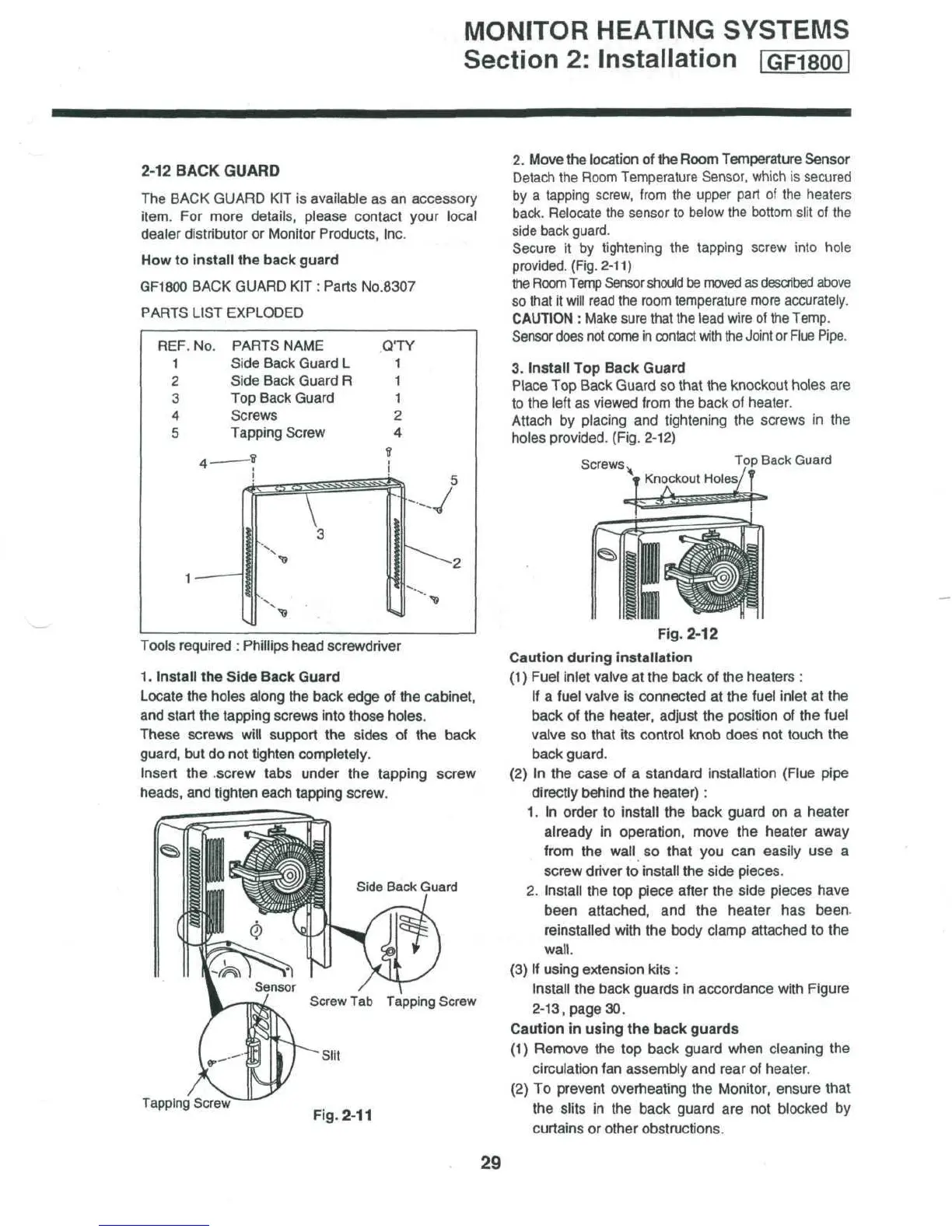
2-12 BACK GUARD
The
BACK
GUARD
KIT is
available
as an
accessory
item.
For
more details, please contact your local
dealer distributor
or
Monitor Products,
Inc.
How
to
install
the
back guard
GF1800
BACK
GUARD
KIT :
Parts No.8307
PARTS
LIST EXPLODED
REF.
No.
1
2
3
4
5
PARTS
NAME
Side Back Guard
L
Side
Back
Guard
R
Top
Back Guard
Screws
Tapping Screw
QTY
1
1
1
2
4
t
a
-V
Tools
required
:
Phillips
head screwdriver
1.
Install
the
Side Back Guard
Locate
the
holes along
the
back edge
of the
cabinet,
and
start
the
tapping screws
into
those holes.
These screws
will
support
the
sides
of the
back
guard,
but do not
tighten completely.
Insert
the
.screw
tabs under
the
tapping
screw
heads,
and
tighten each tapping screw.
Side
Back
Guard
Screw
Tab
Tapping
Screw
2.
Move
the
location
of the
Room Temperature Sensor
Detach
the
Room
Temperature
Sensor,
which
is
secured
by a
tapping
screw,
from
the
upper
part
of the
heaters
back.
Relocate
the
sensor
to
below
the
bottom
slit
of the
side
back
guard.
Secure
it by
tightening
the
tapping
screw
into hole
provided.
(Fig. 2-11)
the
Room
Temp
Sensor
should
be
moved
as
described
above
so
that
it
will
read
the
room
temperature
more
accurately.
CAUTION
:
Make
sure
that
the
lead
wire
of the
Temp.
Sensor
does
not
come
in
contact
with
the
Joint
or
Flue
Pipe.
3.
Install
Top
Back Guard
Place
Top
Back Guard
so
that
the
knockout holes
are
to
the
left
as
viewed
from
the
back
of
heater.
Attach
by
placing
and
tightening
the
screws
in the
holes
provided.
(Fig.
2-12)
Screws
Top
Back
Guard
Tapping
Screw
Fig.
2-11
Fig.
2-12
Caution
during installation
(1)
Fuel
inlet
valve
at the
back
of the
heaters
:
If
a
fuel valve
is
connected
at the
fuel inlet
at the
back
of the
heater, adjust
the
position
of the
fuel
valve
so
that
its
control
knob does
not
touch
the
back guard.
(2)
In the
case
of a
standard
installation
(Flue
pipe
directly behind
the
heater):
1.
In
order
to
install
the
back guard
on a
heater
already
in
operation, move
the
heater away
from
the
wall
so
that
you can
easily
use a
screw
driver
to
install
the
side pieces.
2.
Install
the top
piece after
the
side pieces have
been attached,
and the
heater
has
been
reinstalled
with
the
body clamp attached
to the
wall.
(3)
If
using
extension kits
:
Install
the
back guards
in
accordance with Figure
2-13,
page
30.
Caution
in
using
the
back
guards
(1)
Remove
the top
back guard when cleaning
the
circulation
fan
assembly
and
rear
of
heater.
(2) To
prevent
overheating
the
Monitor,
ensure that
the
slits
in the
back guard
are not
blocked
by
curtains
or
other obstructions.
29

Table of Contents

Related product manuals