EasyManua.ls Logo

Monitor GF1800 - Page 61

Default Icon
74 pages
Print Icon
To Next Page IconTo Next Page
To Previous Page IconTo Previous Page
Loading...
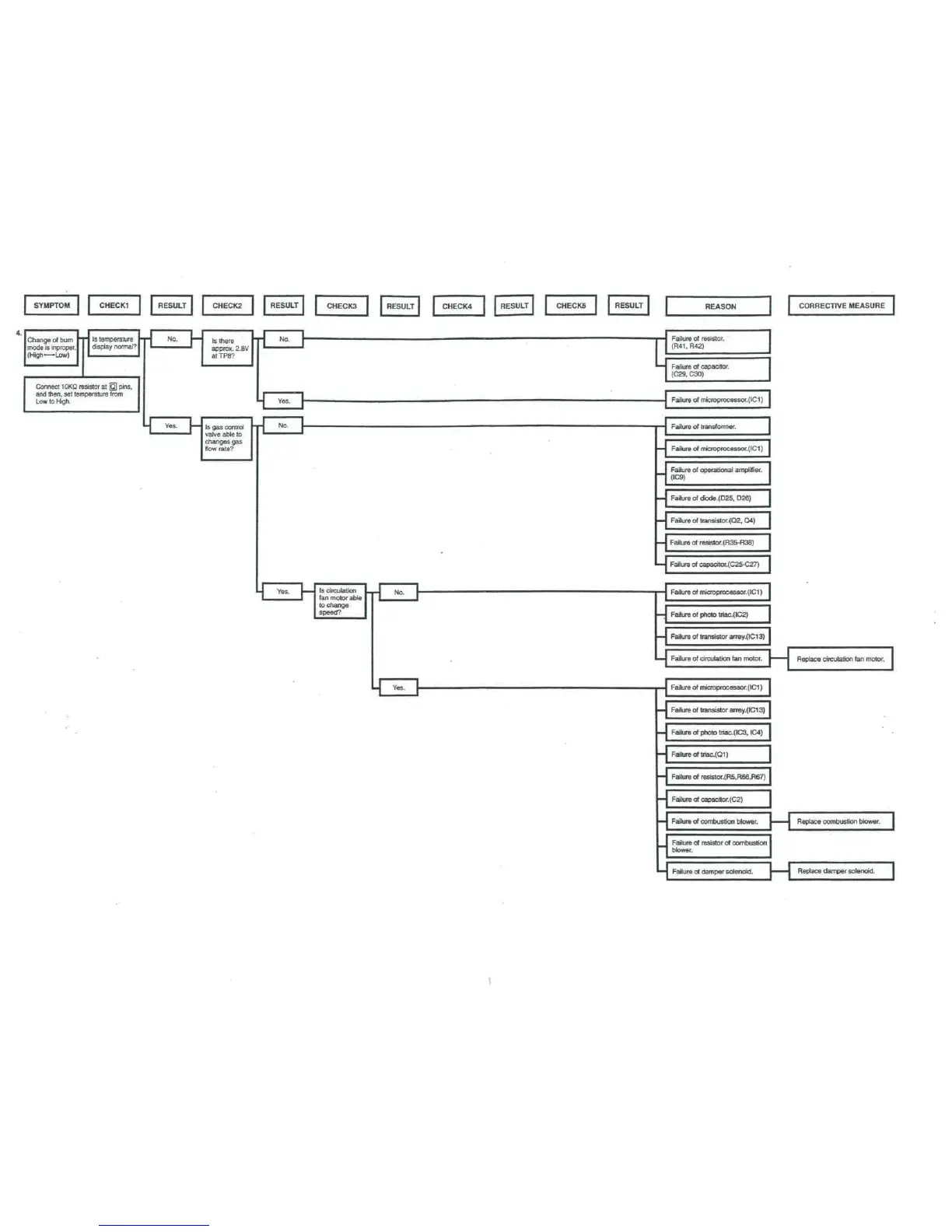
SYMPTOM CHECK1
I
RESULT
CHECK2
J
I
mode
is
inproper.
I
display
normal?
1
'
approx.
2.8V
I
Connect
10KD
resistor
at 0
pins,
and
ttien.
set
temperature
from
varve
30
ie
to
flow rate?
I
RESULT
I
j
~
i
i
i
J Y
r
1
"
"^
1
CHECKS
fan
motor
able
to
change
speed?
1
RESULT
i
i
"
i
1
CHECK4
RESULT
|
CHECKS
1 1
RESULT
1
-
-
-
-
-
-
L
L
-
-
-
-
-
-
-
L
REASON
1
i
(R41,R42)
(C29,
C30)
Failure
of
microprocessor.(ICI)
Failure
of
operational
amplifier.
(IC9)
Failure
of
dkxte.(025.
D26)
Failure
of
transistor.(Q2,
Q4)
Failure
of
resistor.(R35-R38)
Failure
of
oapacitor.(C25-C27)
Failure
of
photo
triac.(IC2)
Failure
of
transistor
arrey.(IC13)
Failure
of
circulation
fan
motor.
F
I
f
(IC1)
Failure
of
transistor
arrey.(IC13)
Failure
of
photo
tnac.(IC3,
IC4)
Failure
of
triac.(Q1)
Failure
of
resistor.(R5,R66,R67)
Failure
of
capatitor.(C2)
Failure
of
combustion
blower.
(
Failure
of
resistor
of
combustion
blower.
Failure
of
damper
solenoid.
j
CORRECTIVE
MEASURE
~~|
Replace
circulation
fan
motor.
1
Replace
combustion
blower.
1
Replace clamper
solenoid.

Table of Contents

Related product manuals