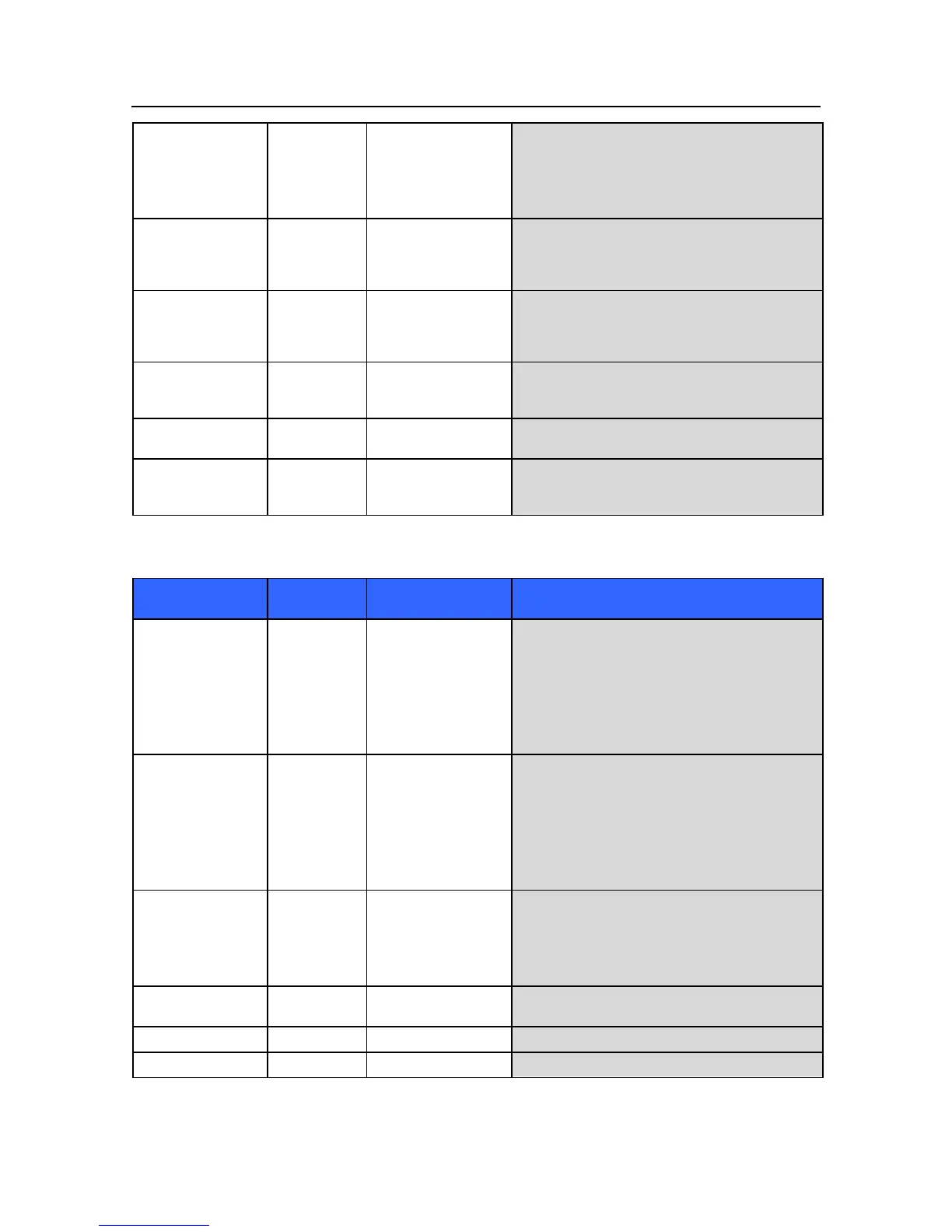
Note: Changing
patient mode will
clear IPI trend data,
even if other patient
data is saved.
The patient mode has
changed.
The patient age has
changed.
Verify that the correct patient mode (Adult/Pediatrics)
is being applied. Save or Purge patient monitoring
data as appropriate, or cancel selection.
Verify that the patient age is correctly entered. Clear
IPI trend data and continue, or cancel selection.
For pediatric patients,
the age range must be
set to correctly
determine IPI.
Set the age range in the CO2 setup screen.
CO2 sampling line
cannot be cleared due to
moisture or other
obstruction.
Replace the sampling line. If connected to scavenging
system, remove to see if the message disappears.
CO2 module is
preparing to acquire
data.
CO2 interface is not
connected.
Connect the CO2 sample line to the monitor and
patient.
CO2 interface has
encountered a problem
Check the CO2 subsystem including sampling line and
exhaust port. Verify that the exhaust port is not
blocked.
Invasive Pressure Messages
IBPs < [lower limit]
IBPm < [lower limit]
IBPd < [lower limit]
The patient's invasive
systolic/diastolic/mean
pressure has fallen
below the current lower
alarm limit.
Check the patient and provide any necessary clinical
care.
Verify that the values are not due to artifact by
checking the position of the patient, cables and
transducer. Zero set the pressure if necessary.
Change the alarm limit if it is no longer clinically
appropriate.
IBPs > [higher limit]
IBPm > [higher limit]
IBPd > [higher limit]
The patient's invasive
systolic/diastolic/mean
pressure has risen above
the current higher alarm
limit.
Check the patient and provide any necessary clinical
care.
Verify that the values are not due to artifact by
checking the position of the patient, cables and
transducer. Zero set the pressure if necessary.
Change the alarm limit if it is no longer clinically
appropriate.
IBP signal out of
range [low]
IBP signal out of
range [high]
The invasive signal is
out of range.
Verify the position of the patient, cables and
transducer. Zero set the pressure if necessary.
IBP cable or transducer
not plugged
Verify that the cable and transducer are properly
connected.
Open the stopcock and check tubing and cables.


 To Next Page