EasyManua.ls Logo

Mortara S12 - Cardiac Output Messages; Network Messages

Mortara S12
153 pages
Print Icon
To Next Page IconTo Next Page
To Previous Page IconTo Previous Page
Loading...
ALARM SPECIFICATIONS
136
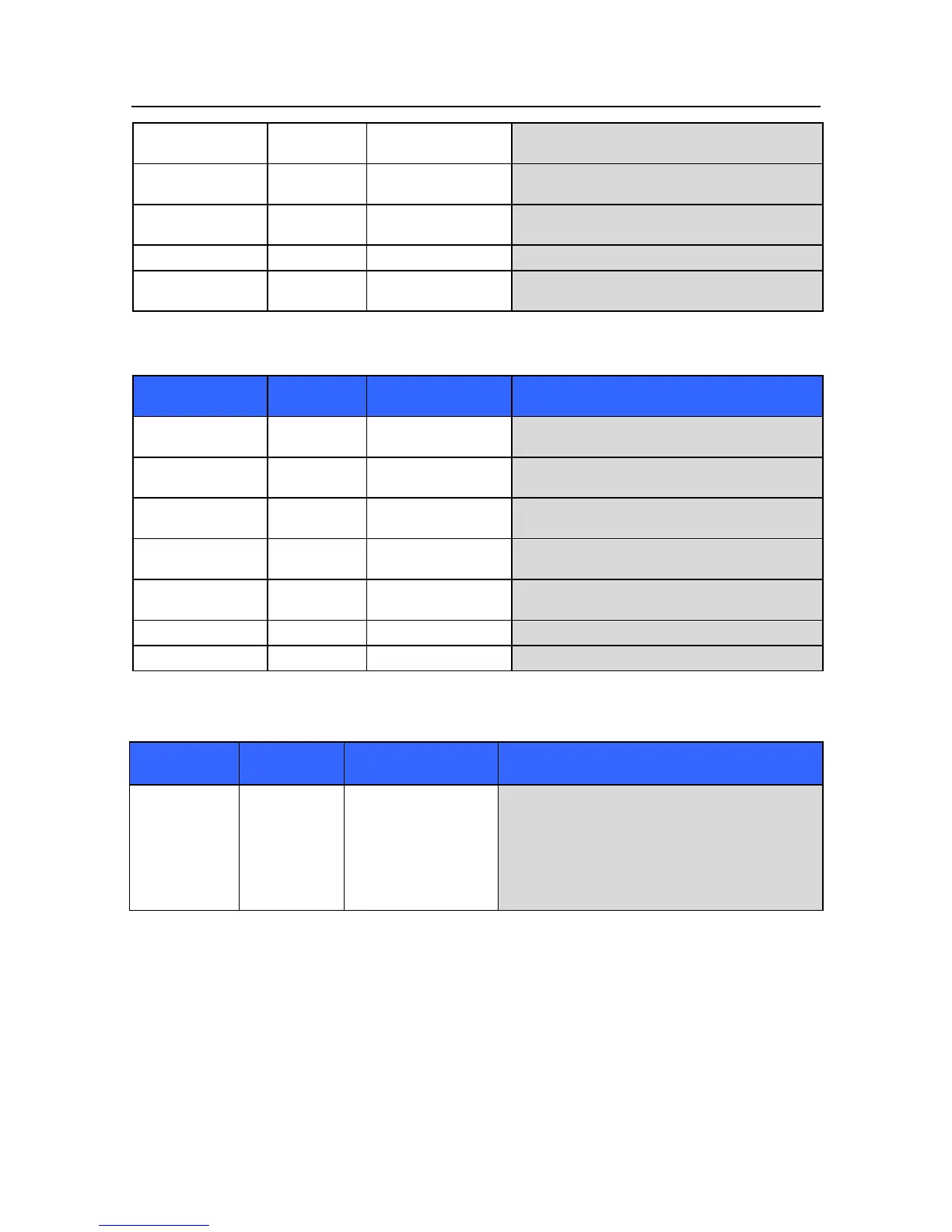
Needs zeroing after
60 seconds
--
IBP channel not zeroed
Zero the IBP channel
Needs calibration
--
IBP channel requires
calibration
Arrange for calibration service of the IBP channel
Calibrating
--
IBP channel calibration
is in progress
Wait until the calibration process is completed
Unable to calibrate
--
Calibration failed
Contact Mortara Technical Support
ART: Check
Transducer
--
ART IBP pressure
below 10mmHg
Check ART catheter to ensure that it is properly
positioned and connected.
Cardiac Output Messages
Message
Parameter
Value
Possible Causes
Suggested Actions
BT signal out of
range (high)
N/A
BT out of range (too
high)
Check the BT transducer
BT signal out of
range (low)
N/A
BT out of range (too
low)
Check BT transducer
IT signal out of range
(high)
N/A
IT out of range (too
high)
Check IT transducer
IT signal out of range
(low)
N/A
IT out of range (too
low)
Check IT transducer
CO measurement time
exceeded
N/A
CO measurement
timeout
Restart the CO
BT unplugged
N/A
BT unplugged
Plug in the BT transducer
IT unplugged
N/A
IT unplugged
Plug in the IT transducer
Network Messages
Message
Parameter
Value
Possible Causes
Suggested Actions
Network
Connection
Lost
N/A
LAN cable unplugged.
Network failure.
Monitor out of WIFI
coverage.
Check the LAN cable to ensure that it is properly
connected into the patient monitor.
Ensure that the monitor is under the WIFI coverage.

Table of Contents