42
To select the recording delay for the bedside recorder (optional):
1.
Select the Setup quick action key on the main screen to access the Setup dialogue.
2.
Select the Recorder button to access the Setup Recorder dialogue.
3.
Locate the Recording Delay label.
4.
Select the arrow to display the drop down list box (Choices are 0 seconds, 6 seconds, and 10 seconds).
5.
Select the recording delay desired.
6.
Select the OK button to enter that change OR select the Cancel button to cancel the changes.
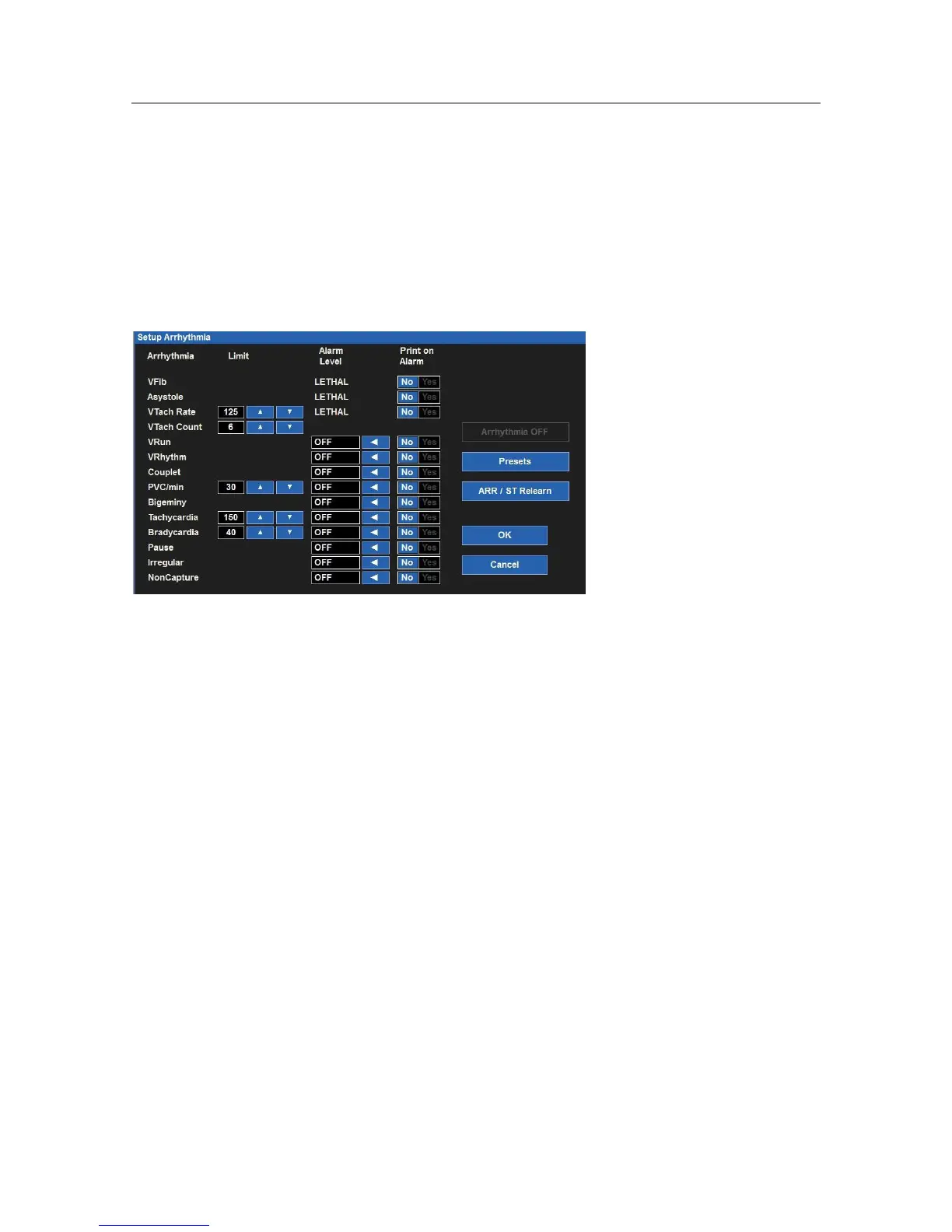
Arrhythmia
Setup Arrhythmia Dialogue
To adjust Arrhythmia alarm settings:
1.
Select the Setup quick action key on the main screen.
2.
Select the Arrhythmia button in the Setup menu.
3.
Adjust the Arrhythmia alarm settings as desired.
a.
To adjust the Alarm Level:
•
Locate the Alarm Level button.
•
Select the arrow to display the drop down list box with choices.
•
Select the appropriate choice.
b.
To adjust the Print on Alarm:
•
Locate the Print On Alarm button.
•
Select Yes to enable the Print On Alarm.
c.
Select No to disable the Print On Alarm.
4.
Select the OK button to enter that change OR select the Cancel button to cancel the changes.
VFib, Asystole and VTach may not be turned off in this dialogue, are only available as high level alarms, and are
labeled as LETHAL.


 To Next Page