39
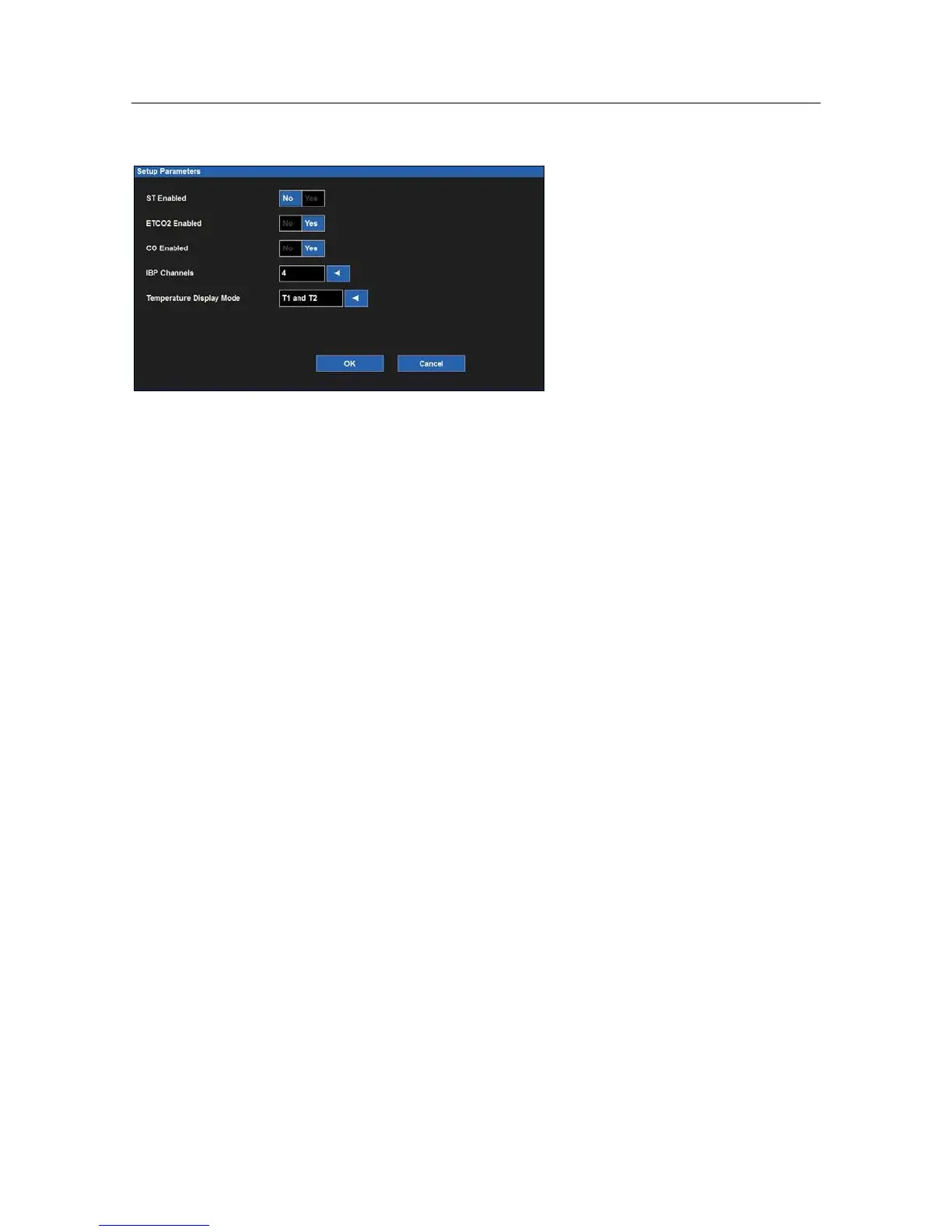
Example Setup Parameters Dialogue
To enable/disable a parameter:
1.
Select the Setup quick action key on the main screen to access the Setup dialogue.
2.
Select the Parameters button to access the Setup Parameters dialogue.
3.
Locate the parameter label.
4.
For ST Enabled, ETCO2 Enabled, and CO Enabled:
a.
Select Yes to enable the parameter.
b.
Select No to disable the parameter.
5.
For IBP Channels, select the arrow to display the drop down list box:
a.
Select 2 to enable P1 and P2.
b.
Select 4 to enable P1, P2, P3, and P4.
c.
Select None to disable all invasive pressure channels.
6.
For Temperature Display Mode, select the arrow to display the drop down list box:
a.
Select T1 only to display only T1 on the main screen.
b.
Select T1 and T2 to display both temperatures on the main screen.
c.
Select T1 and L'T to display T1 and L'T on the main screen.
7.
Select the OK button to enter that change OR select the Cancel button to cancel the changes.
Waveforms
The Setup Waveform Area dialogue is where the clinician can choose which waveforms are displayed on the main
screen, the size of those waveforms, and the sweep speed of those waveforms. This dialogue is also where the
clinician can choose to overlap the invasive pressures on the main screen.


 To Next Page