EDS-510A Series User’s Manual Featured Functions
3-21
Set Device IP will be set to the factory default
Mirror Port will be set to the factory default
You can setup these features again on your Trunking Port.
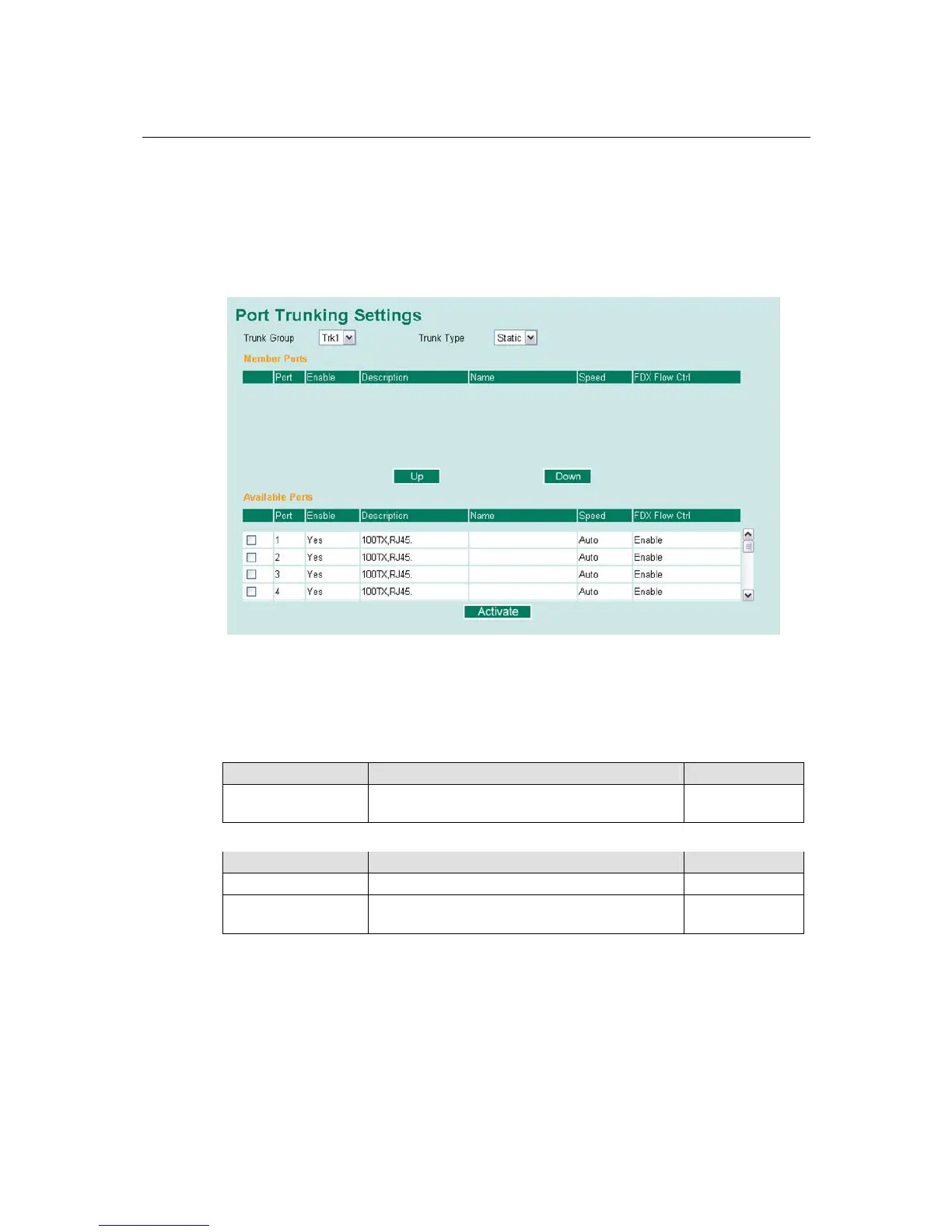
Configuring Port Trunking
The Port Trunking Settings page is used to assign ports to a Trunk Group.
Step 1: Select Trk1, Trk2, Trk3, or Trk4 from the Trunk Group drop-down box.
Step 2: Select Static, or LACP from the Trunk Type drop-down box.
Step 3: Under Member Ports and Available Ports, select the specific ports.
Step 4: Use the Up / Down buttons to add/remove designated ports to/from a trunk group.
Trunk Group (Maximum of 3 trunk groups)
Setting Description Factory Default
Trk1, Trk2, Trk3, Trk4 Display or designate the Trunk Type and Member
Ports for Trunk Group 1, 2, 3, 4.
Trk1
Trunk Type
Setting Description Factory Default
Static Designated Moxa proprietary trunking protocol Static
LACP
Designated LACP (IEEE 802.3ad, Link
Aggregation Control Protocol)
Static



 To Next Page
 Loading...











