MSADescription
ALTAIR 4X
14
GB
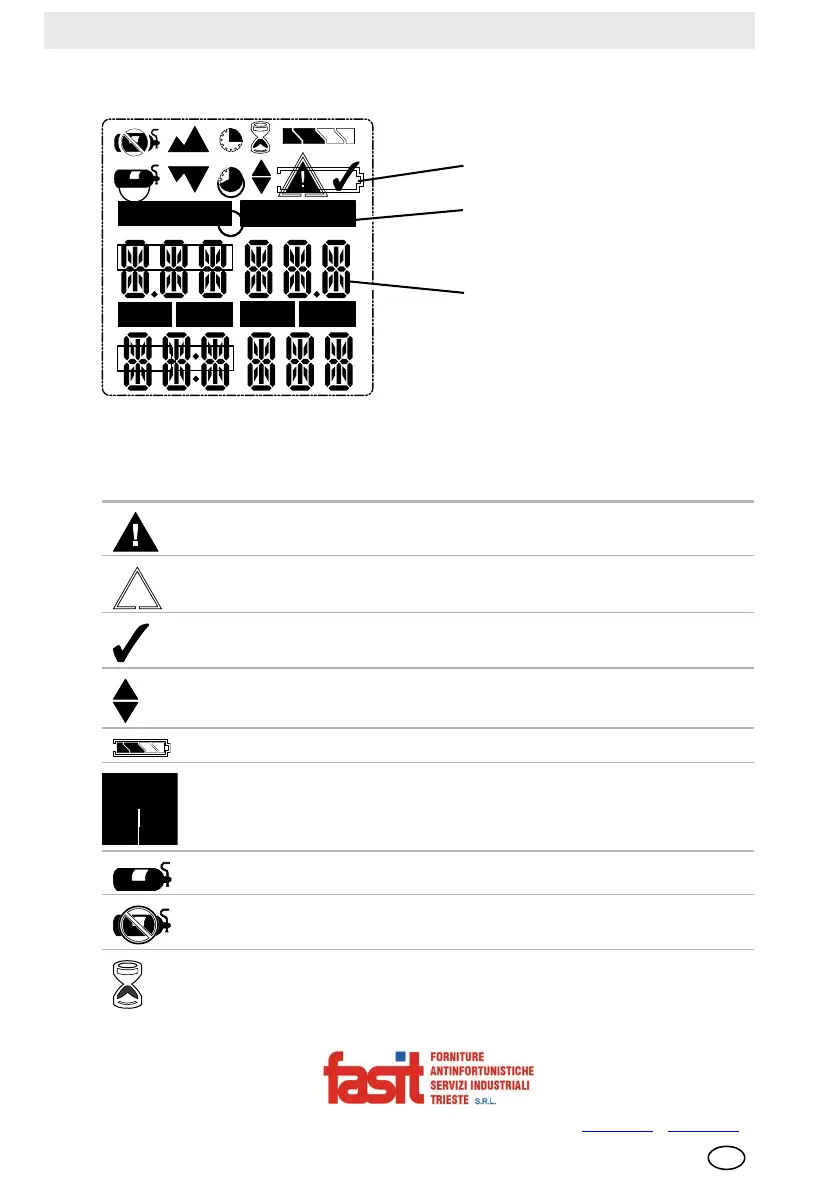
2.3 On-Screen Indicators
Fig. 2 Display
1 Graphic Symbols 3 Gas Concentration
2 Gas Type
Alarm Symbol – Indicates alarm state.
Motion Alert – Indicates Motion Alert is active.
Bump Check Symbol – Indicates successful bump or cal.
Indicates required interaction.
Battery Condition – Indicates the battery charge level.
Sensor Labels.
Cal Gas Cylinder – Indicates cal gas must be applied.
No Gas Cylinder – Indicates cal gas should not be applied and device
must be exposed to fresh air.
Hourglass – Indicates user should wait.
COMB/EX
O2
H2SCO
NO2
SO2
1
2
3
COMB/EX
O2
H2S
CO
NO2
SO2
FASIT Srl - Via Orsera 13/b - 34145 TRIESTE - ITALY - Tel +39 040 825604 - www.fasit.it
- info@fasit.it



 To Next Page