GB
MSA OPERATION
ALTAIR 5 - Operating Manual 27
3.2. Turning ON and Fresh Air Setup
Instrument operation is dialog driven from the display with the aid of the three
Function buttons (see chapter 2.2.1).
For more information, see the flow charts in chapter 7.
Turn the instrument ON with the
button.
The instrument performs a self test:
During the self test, the instrument checks alarm LEDs, audible alarm vibrating
alarm and for missing sensors.
In case of a missing sensor, the instrument displays the Sensor Missing
screen (see 2.5) and alarms until it is turned OFF.
Otherwise, the turn-ON sequence continues.
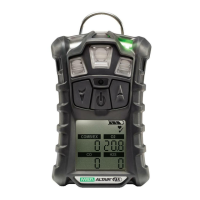
The instrument displays:
• Startup logo
• Software version, instrument name and serial number, company name,
department and user names
• Sampling safety test (if equipped with an integral pump)
• Combustible gas type and sensor units (monochrome display only)
• Alarm setpoints Low Alarm
• Alarm setpoints High Alarm
• Alarm setpoints STEL Alarm
• Alarm setpoints TWA Alarm
• Settings for calibration cylinder
• Current date
• Last calibration date (optional)
• CAL due date (optional). If the calibration due date is activated, the message
"CAL DUE; X DAYS" appears on the instrument display.
• X = the number of days until a calibration is due, user selectable for
1 to 180 days.
If the number of days until calibration is due reaches 0, an alert occurs and
"CAL DUE, NOW" displays.
• Press the
button to clear the alert and continue with the instrument
warm-up period.
• Sensor warm-up period
• Fresh Air Setup option (optional).
Refer to flowchart in Appendix, chapter 7.1


 To Next Page