GB
MSA MAINTENANCE
ALTAIR 5 - Operating Manual 49
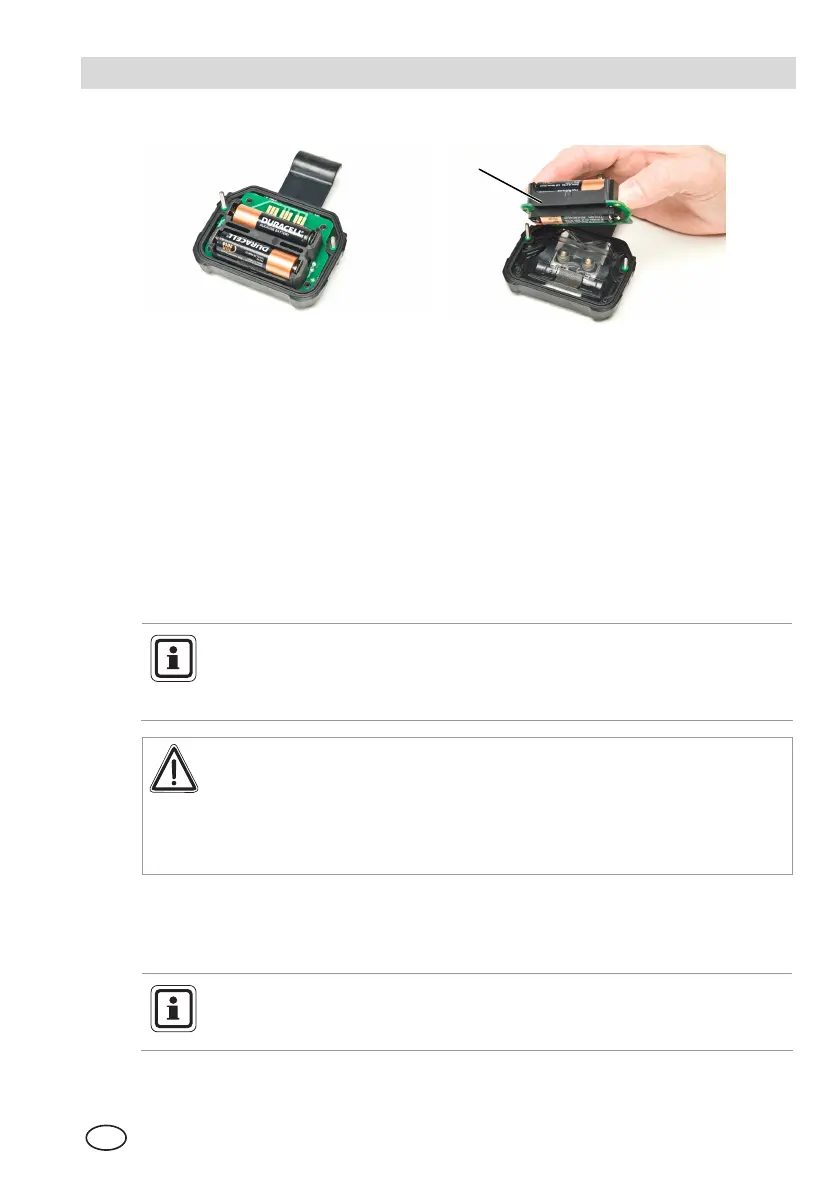
Figure 4-3 Battery Replacement
1 Battery holder
(3) For alkaline battery packs (ALTAIR 5 only):
• Remove the battery holder circuit board from the instrument
• Replace the 3 cells, using only those listed on the label.
Be sure to observe proper polarity on the cells.
• Place the battery holder circuit board back in the instrument and reinstall
the door.
• Tighten the 2 screws.
4.4. Live Maintenance Procedure - Replacing or Adding a Sensor
Before handling the PC board, the user must be properly grounded;
otherwise, static charges could damage the electronics. Such damage is
not covered by the warranty. Grounding straps and kits are available
from electronics suppliers.
Warning
Remove and reinstall sensors carefully, ensuring that the components
are not damaged; otherwise instrument, intrinsic safety may be
adversely affected, wrong readings could occur, and persons relying
on this product for their safety could sustain serious personal injury or
death.
To add a sensor to an instrument that is not already equipped with a full array of
sensors, remove the sensor plug from in front of the formerly unused sensor
housing.
While instrument case is open, do not touch any internal components
with metallic/conductive objects or tools. Damage to the instrument can
occur.
1



 To Next Page