GB
MAINTENANCE MSA
50 ALTAIR 5 - Operating Manual
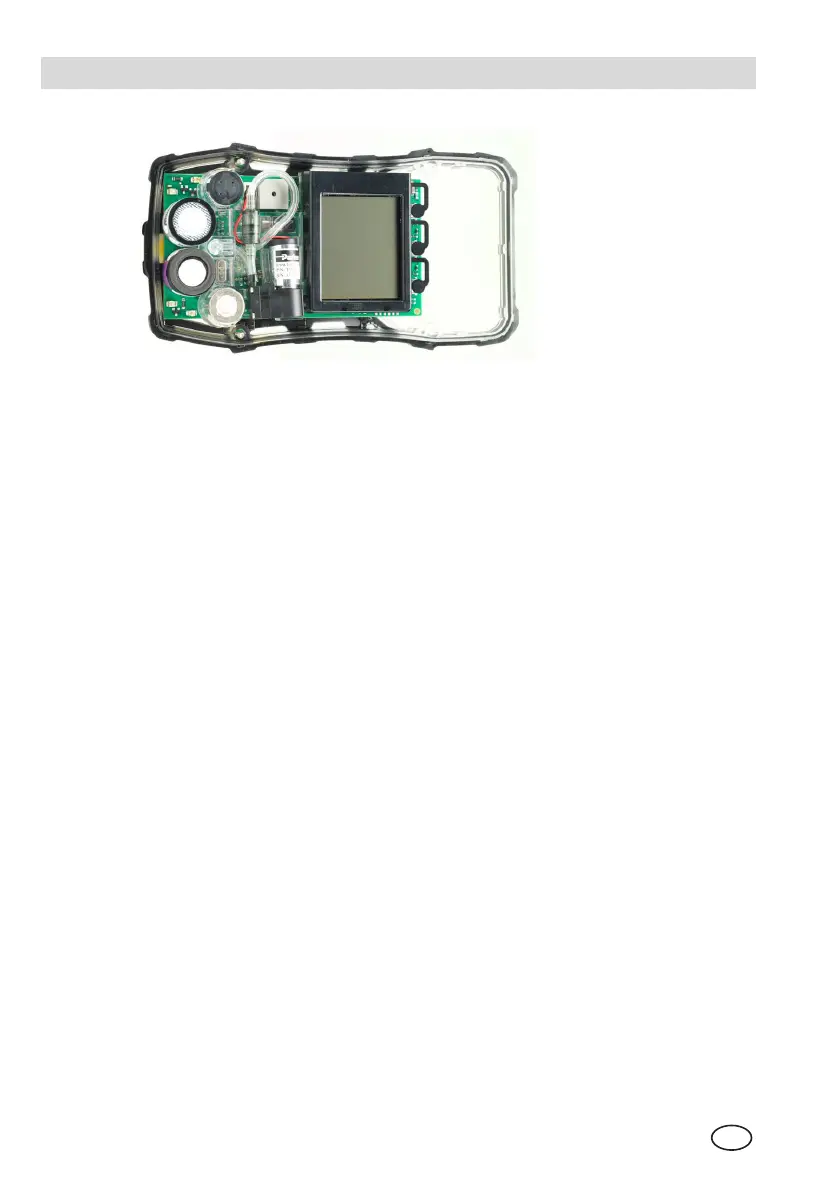
Figure 4-4 Sensor Replacement
(1) Verify that the instrument is turned OFF.
(2) Remove the battery pack.
(3) Remove the two remaining case screws, and remove the case front.
(4) Gently remove the sensor to be replaced.
• Using fingers only, gently remove the tox, combustible or oxygen sensor.
(5) Carefully align the new sensor contact pins with the sockets on the printed
circuit board.
(6) Press the new sensor into place.
• Ensure groove in combustible sensor is aligned with notch in sensor slot.
• If a sensor is not to be installed, ensure that a sensor plug is installed
properly in its place.
(6) If replacing sensor filter at this time:
• Carefully peel off old filter taking care not to damage the inside of the
case.
• On new filter peel off backing exposing adhesive. Note proper orientation
of filter and apply to inside of front case adhesive side against case.
• Press filter into place taking care not to damage filter surface.
(7) Reinstall the sensor gasket in the case front.
Ensure sensor gasket is properly installed.
(8) Re-install the screws.
(9) Go into the sensor setup and turn ON the sensor. If necessary calibrate
instrument before use.
Allow sensors to stabilise at least 30 minutes before calibration.


 To Next Page