GB
MSA OPERATION
ALTAIR 5 - Operating Manual 39
Setting Backlight
(1) Press the button to enter setup.
(2) Change option by pressing the
or
button.
(3) Press the
button to enter.
(4) Change timeout by pressing the
or
button.
(5) Press
button to confirm timeout.
Back To Main Menu
There are three options at this point:
the
button Sensor Options menu
the
button Previous Setup page in the Instrument Options menu
the
button Instrument Options menu
3.5. Data Logging
Connecting Instrument to PC
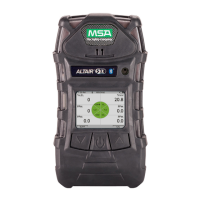
(1) Switch ON the ALTAIR 5 and align the Datalink Communication port on the
ALTAIR 5 to the IR interface of the PC.
(2) Start the MSA
Link software on the PC and start connection by clicking the
connect icon.
See MSA Link documentation for detailed instructions.
3.6. Function Tests on the Instrument
Alarm Test
(1) Turn ON the instrument. The user should verify that:
• alarm LEDs flash
• horn sounds briefly
• vibrating alarm triggers briefly.


 To Next Page