GB
MSA OPERATION
ALTAIR 5 - Operating Manual 29
3.2.2 Fresh Air Setup (FAS)
The Fresh Air Setup (FAS) is for automatic ZERO calibration of the instrument.
The FAS has limits. If a hazardous level of gas is present, the instrument ignores
the FAS command and the instrument alarm activates.
The Fresh Air Setup is not available for the CO
2
sensor.
Warning!
Do not activate the Fresh Air Setup unless you are certain you are in
fresh, uncontaminated air; otherwise, inaccurate readings can occur
which can falsely indicate that a hazardous atmosphere is safe. If you
have any doubts as to the quality of the surrounding air, do not use the
Fresh Air Setup feature. Do not use the Fresh Air Setup as a substitute
for daily calibration checks. The calibration check is required to verify
span accuracy. Failure to follow this warning can result in serious
personal injury or death.
COMB
CO
0
0
0.0
PPM
PPM
Vol%
0
PPM
SETUP
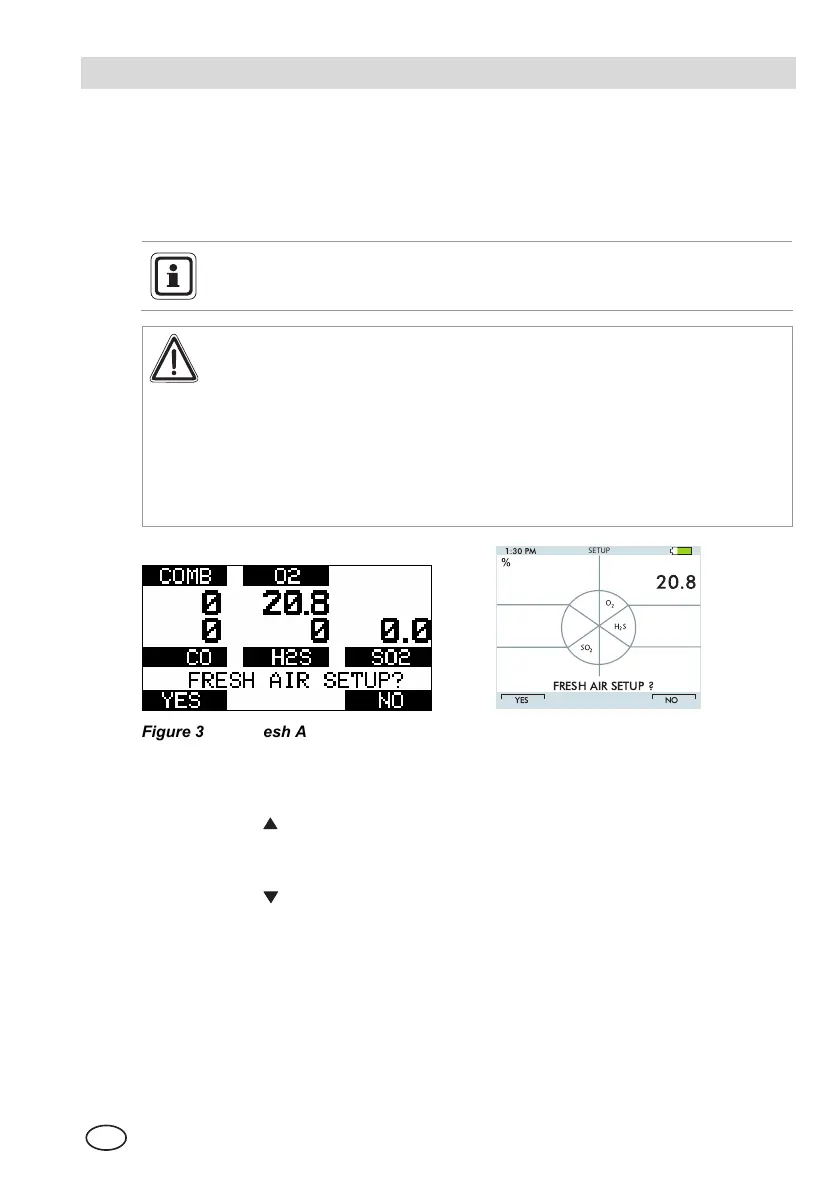
Figure 3-1 Fresh Air Setup
The instrument displays a blinking "FRESH
AIR
SETUP?", prompting the user
to perform a Fresh Air Setup:
(1) Press the
button to bypass the Fresh Air Setup.
• The Fresh Air Setup is skipped and the instrument goes to the Measuring
page (Main page).
(2) Press the
button to perform the Fresh Air Setup.
• The instrument starts the FAS sequence and the FAS screen displays.
• A progress bar shows the user how much of the FAS has been
completed.
• At the end of the FAS, the instrument displays either
"
FRESH
AIR
SETUP
PASS" or "FRESH
AIR
SETUP
FAIL".


 To Next Page