Checking unassigned connector
sockets
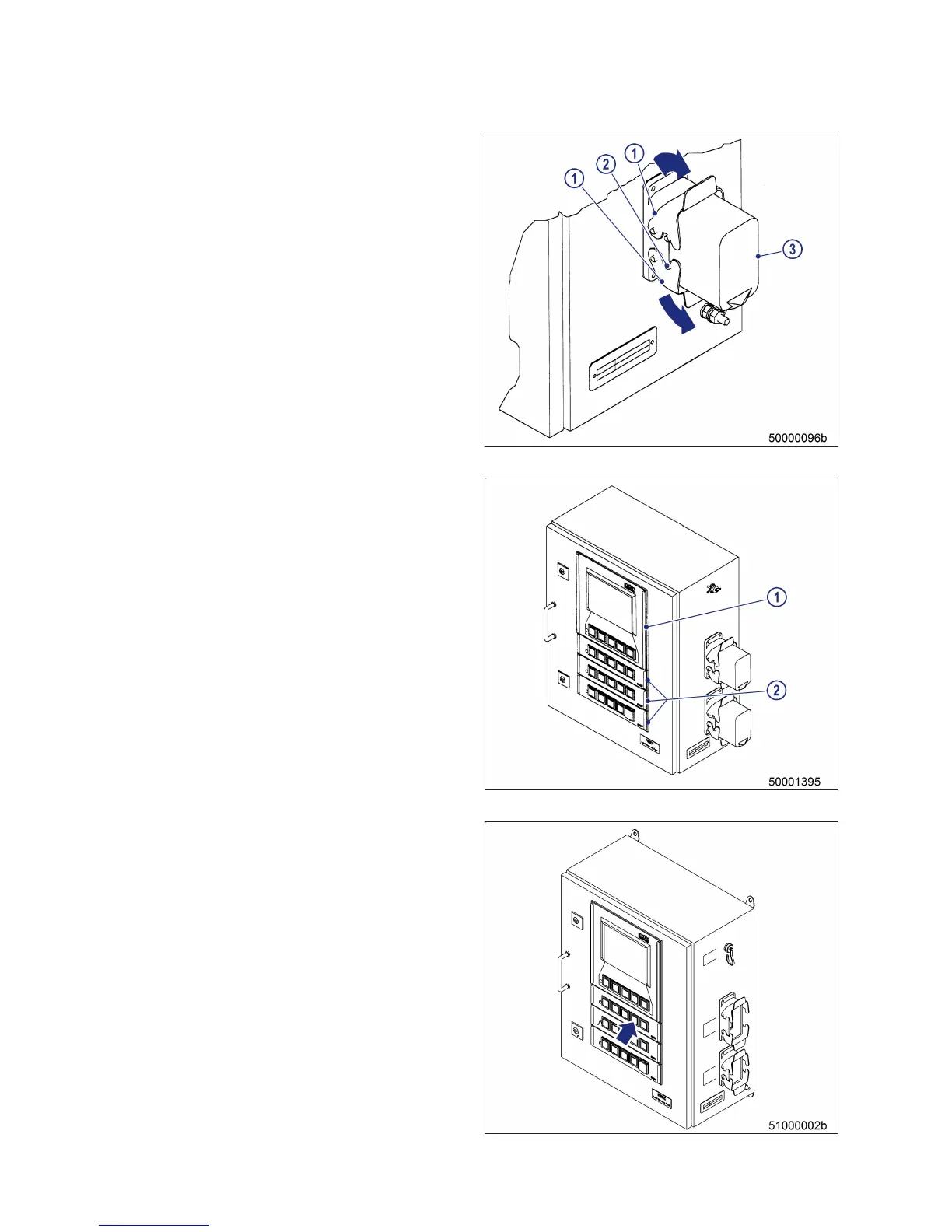
1. Ensure that non-assigned connector sockets
are protected with caps.
2. Make sure that the two securing elements (1)
are engaged in the lugs (2) so that the cap (3)
is held firmly in place in the socket.
3. If this is not the case, press the securing ele-
ments (1) concerned in the direction of the
arrow until they can be felt to engage.
Checking pushbuttons and dis-
play
1. Pushbuttons: Ensure that
• Pushbutton caps are not damaged (cracks
or similar damage)
• Pushbuttons move easily
• Pushbutton housing is seated securely
• Seals (2) between PAN operating panels
and LOP housing are not damaged.
2. Display: Ensure that
• Front glass is not damaged or pressed in
• Seal (1) between display housing and LOP
housing is not damaged.
3. Have damaged components replaced imme-
diately by Service.
Performing lamp test
1. Connect battery in accordance with battery
manufacturer's instructions.
2. Switch on master power switch.
3. Switch on engine control system.
4. Hold down LAMP TEST pushbutton:
Result: Indicators and controls light up.
5. Have damaged lamps immediately replaced
by Service.
152 | Task Description | MW15409/04E 2015-08
TIM-ID: 0000008868 - 007



 To Next Page